Table of Contents >> Show >> Hide
- Before You Cite It: Know What Version You Used (Yes, There Are Several)
- Easy Way #1: Cite the Declaration in MLA (Works Cited + In-Text)
- Easy Way #2: Cite the Declaration in APA (Reference List + Author-Date)
- Easy Way #3: Cite the Declaration in Chicago (Notes + Bibliography)
- Quick Troubleshooting: 6 Mistakes That Break an Otherwise Good Citation
- Mini Cheat Sheet: The “Grab This Before You Exit the Tab” Method
- Experiences With Citing the Declaration: Real-World Scenarios (and How People Fix Them)
The Declaration of Independence is the rare primary source that shows up everywhere: history papers,
debate briefs, civics projects, even the occasional overly dramatic group chat (“I, too, am declaring independence
from homework.”). But when it’s time to cite it, a lot of people freezebecause it’s old, famous, and doesn’t behave
like a normal book or article.
Good news: citing the Declaration is actually simple once you make one key decision:
Which citation style are you using? In the U.S., most assignments boil down to one of these:
MLA, APA, or Chicago. This guide gives you three easy “plug-and-play”
approachesplus examples you can adapt in seconds.
Before You Cite It: Know What Version You Used (Yes, There Are Several)
You’re not expected to cite the physical parchment in Washington, D.C. (unless you’re writing this from inside a
museum with a tiny flashlight and a dramatic soundtrack). Most people read the Declaration through a reliable
digital or printed versionlike the National Archives, the Library of Congress, or a classroom textbook reprint.
Your citation should match the version you actually consulted.
Why does that matter? Because you might be reading:
- A museum-grade scan or transcript hosted by a government archive
- A manuscript copy (a handwritten or “mixed material” item) from a library collection
- A modern printed reproduction inside a textbook, anthology, or facsimile edition
The solution is the same every time: collect the “core details” before you close your tabs.
Think of it like grabbing your fries before the car drives away.
Your 20-Second Citation Checklist
- Title: Declaration of Independence (or the exact title shown on the page/item record)
- Date: July 4, 1776 (the document date). Some records also list a specific version date.
- Creator/author: Often “United States” or “Continental Congress” (depends on your style + source record)
- Where you found it: National Archives, Library of Congress, or your book’s publication info
- URL (if online) and Access date (often required in MLA/Chicago for web collections)
- Locator for quotes: page number (if print) or paragraph/section (if online)
Easy Way #1: Cite the Declaration in MLA (Works Cited + In-Text)
MLA is common in English, humanities, and a lot of high school writing. The basic idea is:
full details in “Works Cited,” then short parenthetical citations in the text.
MLA Works Cited (Online Version from a Trusted Archive)
In MLA, government documents are often treated like works by an organization. Many teachers want you to include:
the government, the agency/site, the title, the publisher (if listed), the date (if listed), the website/container,
the URL, and your access date.
Example MLA Works Cited entry (National Archives online):
Why this works: It clearly identifies the hosting institution (a major U.S. archive),
the page title, and where you accessed it online.
MLA Works Cited (Library of Congress Item Record)
If you used a specific Library of Congress item page (with its own “Cite This Item” block), you can adapt the record’s
details. These citations are sometimes auto-generated, so treat them like a helpful starting pointnot a sacred tablet.
Example MLA Works Cited entry (Library of Congress item):
MLA In-Text Citations (The Part Teachers Actually Check First)
MLA in-text citations usually look like (Author Page). But the Declaration online won’t give you page numbers.
So you have two clean options:
- Option A: Use a short title in parentheses:
(Declaration of Independence) - Option B: Use paragraph numbers if you’re quoting a specific spot:
(Declaration of Independence, par. 2)
Example sentence (MLA):
Tip: If your version doesn’t show numbered paragraphs, you can still cite by title alone,
and make your quote short enough that it’s easy to locate.
Easy Way #2: Cite the Declaration in APA (Reference List + Author-Date)
APA is common in social sciences, psychology, education, and health-related writing.
The main move is: author-date in the text and a full reference at the end.
For something like the Declaration, APA usually treats it as a historical government document.
Your “author” is typically the government body, and your “date” is the document date (1776).
When the source is online, include the hosting site and URL.
APA Reference List (Online Version)
Example APA reference (National Archives online):
Example APA in-text citation:
APA When You Quote: Add a Locator (Paragraph or Section)
When there are no page numbers, APA commonly uses paragraph numbers (or a section/heading plus paragraph).
That way your reader can find the exact line without needing a time machine.
Example APA quote with paragraph locator:
Note: Keep quotes short. The Declaration is public domain, but your paper still needs to be your own writing.
APA Reference (Library of Congress Item Record)
If you used a Library of Congress item page, your reference can reflect that format and the LOC as the source.
Then your in-text citation becomes:
Quick judgment call: In APA, it’s acceptable to use the creator info shown in the official record you accessed.
If your instructor prefers “United States” or “Continental Congress” as the author, follow your course rules.
Easy Way #3: Cite the Declaration in Chicago (Notes + Bibliography)
Chicago style is a favorite in history classes. It often uses footnotes (or endnotes),
sometimes with a bibliography. If you’ve ever thought, “I want my citations to look fancy and mildly intimidating,”
Chicago is here for you.
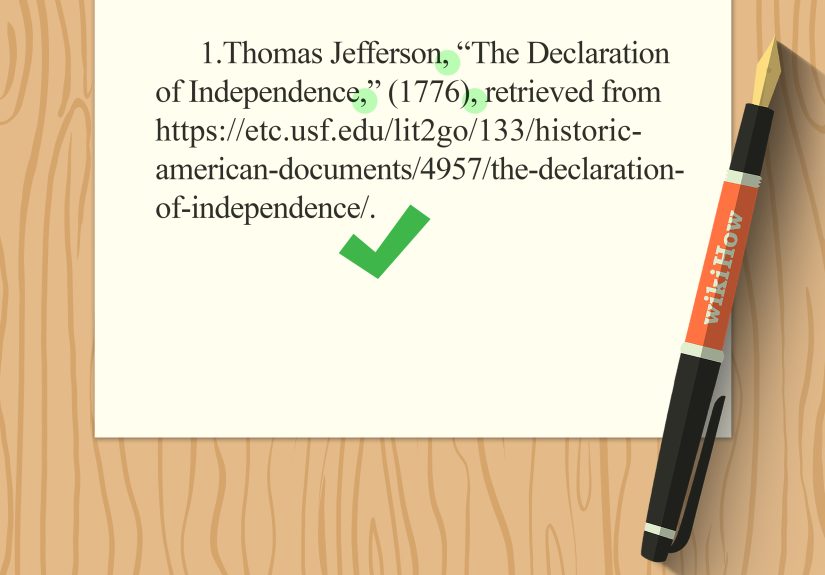
Chicago Footnote (Online Version)
Example full note (National Archives online):
After you cite it once, Chicago typically uses a shortened note:
Chicago Bibliography Entry (If Your Teacher Requires One)
Chicago Using a Library of Congress Record
Chicago can also cite a Library of Congress item directly, using the creator and item title shown on the record.
Again: if your instructor wants “Continental Congress” instead of the record’s creator field, follow the assignment rules.
Chicago is flexible as long as you provide enough information for a reader to find the source.
Quick Troubleshooting: 6 Mistakes That Break an Otherwise Good Citation
- Mixing styles: Don’t write MLA in your Works Cited and then drop a Chicago footnote in the middle like a surprise party.
- Forgetting the container: If you found it on the National Archives site or a Library of Congress record, say so.
- No access date (when required): MLA often expects it for online collections. Chicago commonly includes it too.
- Citing the wrong thing: If you read a textbook excerpt, cite the textbooknot the National Archives (unless you actually used that page).
- No locator for quotes: If there’s no page number, use a paragraph number or keep the quote short and clearly identifiable.
- Over-quoting: A citation does not give you permission to paste half the document. It just proves you didn’t invent it.
Mini Cheat Sheet: The “Grab This Before You Exit the Tab” Method
When you’re staring at an archive page, copy these elements into your notes:
- Title shown on the page
- Date shown in the record (or the document date: July 4, 1776)
- Creator/author field (if the record provides one)
- Institution/site name (National Archives, Library of Congress, Yale Avalon Project, etc.)
- URL
- Access date (especially for MLA/Chicago web-based citations)
- Page number (print) or paragraph/section (web)
Experiences With Citing the Declaration: Real-World Scenarios (and How People Fix Them)
The funniest thing about citing the Declaration of Independence is that the trouble rarely comes from the document itself.
The trouble comes from how people run into it in real lifescreenshots, textbooks, posters, PDFs, and “helpful” auto-citation buttons.
Here are a few common experiences students and writers have (and the simple fixes that keep your bibliography from turning into modern art).
1) The “Poster on the Classroom Wall” Problem
Someone writes a paper and proudly cites “The Declaration of Independence (1776)”but they actually copied a line from a decorative classroom poster.
That poster might be based on a later reproduction (like the famous Stone engraving facsimile) or a modern design that rearranges punctuation and capitalization.
The fix is easy: cite the version you used. If it’s from a textbook or a specific reproduction edition, cite that item.
If you looked it up afterward on a government archive to confirm the wording, cite the archive page for the quote you actually used.
Teachers love this because it shows you can trace a quote to a reliable source instead of trusting whatever font looks most patriotic.
2) The “Auto-Citation Button Said So” Experience
A lot of libraries provide a “Cite This Item” box. It’s helpfulbut it’s not magic.
Students often paste it in without checking anything and end up with a date formatted oddly, a missing access date, or a title that doesn’t match the assignment’s style rules.
The fix: treat auto-citations like a draft. Keep the core details (creator, title, format, URL), then adjust punctuation, italics,
and access date based on MLA/APA/Chicago expectations. It takes about 30 seconds and saves you from losing points for formattingaka the most annoying way to lose points.
3) The “No Page Numbers, So I Guess I’m Doomed” Moment
Online versions don’t have page numbers, and that makes people panic when they need to cite a specific quote.
The fix is to use a locator that makes sense:
paragraph numbers if your platform shows them, or a short quote + clear attribution if it doesn’t.
In Chicago, you can also use a footnote that names the document, repository, and access datereaders can find it quickly.
The real lesson: page numbers are convenient, but they’re not required for a citation to be correct.
What matters is that someone else can reliably locate what you used.
4) The “I Used Three Different Websites” Research Sprint
This happens all the time: someone starts with a school site, then checks Yale’s Avalon Project for a clean transcription,
then confirms details on the National Archives page. Which one do you cite?
Answer: cite the version you actually quoted or paraphrased. If you used multiple versions for comparison, cite each one where relevant.
That’s not overkillit’s good scholarship. It also makes your paper stronger because you’re showing you checked your primary source against reputable repositories.
5) The “My Teacher Wants Chicago Notes, Not a Bibliography” Surprise
Some instructors only want footnotes for well-known public documents, while others want a full bibliography too.
The fix is simple: follow the assignment directions first, then make your citations as complete as possible within that system.
In Chicago notes, include the title, date, repository, URL, and access datedone.
If a bibliography is required, add the bibliography entry and keep it consistent. Consistency is what makes citations look “right,” even when sources are unusual.
Bottom line: the Declaration isn’t hard to cite. The real skill is recognizing what you’re looking at, choosing the correct style,
and giving enough information that another person can find the exact version you used. That’s the whole job of a citationno more, no less.