Table of Contents >> Show >> Hide
- How Can an Amiga “Run” Anything Without the CPU?
- The Copper: A Tiny Program That Rides the Video Beam
- The Blitter: A Graphics Bulldozer (That Can Also Write Your Script)
- Paula: Audio That Streams Itself
- The No-CPU Demo Challenge: A Real-World Framework (Not Just a Thought Experiment)
- What Makes No-CPU Demos So Hard (And So Fun)?
- Practical No-CPU Techniques That Actually Work
- A Tiny (Illustrative) Example: Copper as Scheduler, Blitter as Worker
- Why the Demoscene Loves This Kind of Madness
- Experiences: What It Feels Like to Think in “No-CPU” (And Why Your Brain Might Thank You Later)
- Conclusion
Picture this: you boot an Amiga, but the CPU is basically told, “Thanks for your serviceplease take a seat.”
And then… a demo still runs. Graphics. Music. Timing-perfect effects. The kind of thing that normally makes a
Motorola 68000 sweat through its heatsink paste.
If that sounds impossible, welcome to the part of retrocomputing where “impossible” is just a scheduling problem.
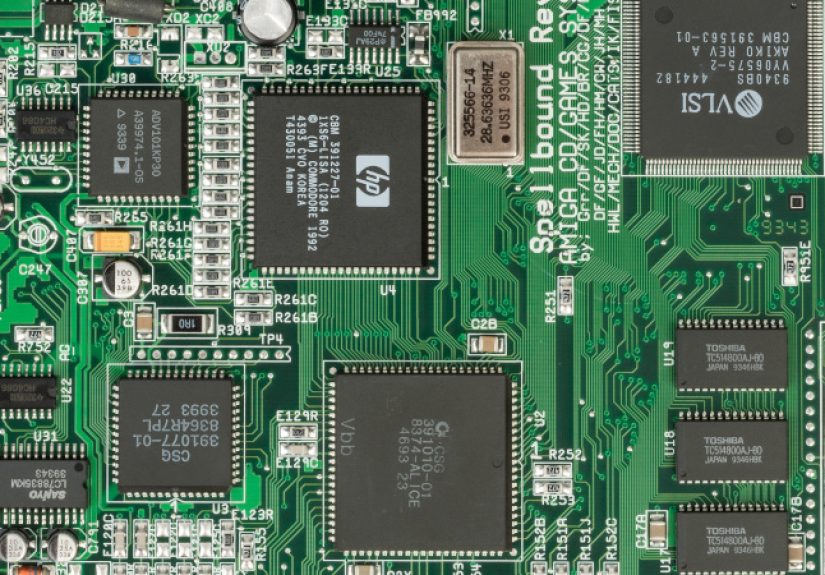
The Amiga’s custom chips weren’t shy little helpers; they were full-on co-processors built to move data, paint pixels,
and stream audio using DMAoften faster than the CPU could do it. A “no-CPU” demo doesn’t mean the CPU never existed.
It means the demo’s show is driven by the custom chipset alone, with the CPU reduced to a loader (and sometimes, a spectator).
Let’s break down how an Amiga can put on a one-machine circus without leaning on the CPU to juggle.
How Can an Amiga “Run” Anything Without the CPU?
The Amiga was designed around a powerful custom chipset that handled the heavy lifting for multimedia:
display fetches, sprites, blits, audio playback, and tight synchronization with the video beam. The CPU is important,
but the Amiga’s secret sauce is that several subsystems can autonomously fetch data from memory and act on it.
In modern terms: the Amiga shipped with multiple “hardware engines” decades before GPUs became a household acronym.
The key idea is DMA (Direct Memory Access). Instead of the CPU reading bytes and pushing them around,
the custom chips grab memory cycles and do work on their own schedule. On the Amiga, these DMA clients are prioritized
so the display and audio don’t glitchbecause nothing ruins a demo like your soundtrack turning into an angry fax machine.
The Three-Headed (Sometimes Three-Named) Beast
Depending on the chipset generation (OCS/ECS/AGA), you’ll hear different names, but the roles stay familiar:
- Video timing + DMA arbitration (Agnus in OCS/ECS; Alice in AGA): coordinates memory access and display timing.
- Display output logic (Denise in OCS/ECS; Lisa in AGA): helps turn bitplanes/sprites into what you see on screen.
- Audio + I/O glue (Paula): streams audio via DMA and handles several system interfaces.
In a typical demo, the CPU sets up registers and feeds these chips new instructions every frame.
In a no-CPU demo, you flip the script: you preconfigure memory and registers so the chipset can “play the demo”
by executing a data-driven plan.
The Copper: A Tiny Program That Rides the Video Beam
The Copper is the Amiga’s famously weird little coprocessor. It isn’t a general-purpose CPU. It doesn’t do math.
It doesn’t run C. It doesn’t even pretend to understand your feelings.
What it does do is run a list of simple instructionssynchronized to the raster beamso it can change hardware registers
at precisely the right time. That’s how you get “copper bars,” mid-screen palette swaps, split-screen effects,
and all those visual tricks that feel like sorcery but are really just impeccable timing.
The Copper Only Knows Three Tricks (And Somehow That’s Enough)
The Copper’s instruction set is famously tiny: MOVE (write a value to a hardware register),
WAIT (pause until the beam reaches a position), and SKIP (conditionally skip a MOVE based on beam position).
That’s it. Three instructions. And yet, demosceners have been dining out on them for decades.
Here’s the important part for “no CPU” work: a Copper list is just data in memory. If you can arrange for the Copper
to start reading from a known address, it can begin “executing” immediately, writing to registers that kick off other DMA engines.
Raster-Synced Control Flow: When WAIT Becomes a Metronome
WAIT is the Copper’s superpower. Because it’s locked to the beam position, it can time changes down to specific scanlines.
That means a Copper list can behave like a scheduler: “At scanline X, do Y,” every frame, forever.
And if you make the Copper wait on certain conditions (including Blitter state in specific modes),
you can chain complex sequences without the CPU orchestrating them.
The Blitter: A Graphics Bulldozer (That Can Also Write Your Script)
The Blitter is a block transfer engine: it copies memory, combines bit patterns, draws lines, and fills areas.
It’s built for bitplanes and masksperfect for classic Amiga graphics. Crucially, it also runs via DMA,
meaning it can crunch through work while the CPU does something else… or in this case, does nothing at all.
In a “no CPU” demo, the Blitter becomes more than a paint roller. It becomes the tool that updates state.
If you can’t run code, you can still transform memory. And if you can transform memory, you can do a surprising amount
of computation-like behavior: copy buffers, generate new patterns, update pointers, and even rewrite parts of the Copper list
so the “program” evolves over time.
Blitter Nasty: Politely Asking the CPU to Step Aside
One famous Amiga concept is the “blitter nasty” (also called “blitter hog”) behavior: the Blitter can be configured to get priority
over CPU access to memory cycles. In ordinary demos, you might use this carefully so the CPU doesn’t starve.
In a no-CPU demo, starving the CPU is practically a feature. It helps ensure the custom chips truly own the show.
Paula: Audio That Streams Itself
Paula gives the Amiga four hardware audio channels, each driven by DMA. That means you can store sample data in memory,
point Paula at it, and let it fetch and play sound without constant CPU involvement.
The classic Amiga soundespecially in tracker musiccomes from clever use of those channels:
mixing, panning (two channels to the left output, two to the right), and fast sample tricks that create the illusion
of more complexity than “four channels” suggests.
In a no-CPU demo environment, audio is both easier and harder:
easier because DMA playback is naturally autonomous, harder because many “normal” music engines rely on the CPU
to update notes, timing, and pattern data each tick. So the trick becomes: can you design audio playback where
the hardware keeps moving forward using preplanned data, register updates timed by the Copper, or memory changes driven by the Blitter?
The No-CPU Demo Challenge: A Real-World Framework (Not Just a Thought Experiment)
“No CPU” isn’t just a philosophical vibe; it’s been formalized as a challenge with a standard runner and rules.
The concept is simple: your demo is a raw chip-memory image. The runner loads it, sets a defined initial state,
and then the custom chipset takes over. If your memory image is correct, the show begins without any CPU-driven demo code.
What You Actually Get at Startup
In the published challenge spec, a few initial conditions are key:
- The Copper starts at address 0 in chip memory, meaning your Copper list can live right at the beginning.
- Copper “danger” mode is enabled, allowing access to a wider range of registers (including those you’d want for serious control).
- DMA is configured so bitplane DMA, Copper DMA, and Blitter DMA are enabled, while sprite DMA is disabled.
- PAL timing is set, background starts black, and many other registers are left undefinedso you must initialize what you depend on.
The framework also sets practical memory-size limits by chipset generation:
up to 512 KB for OCS, 1 MB for ECS (common configurations), and 2 MB for AGA.
In other words: the “program” is your chip RAM image, not a CPU executable.
How Does the Demo End?
Since the CPU isn’t running your logic, the runner needs a signal to know you’re done.
One defined method is to clear the Blitter priority (“blitter nasty”) flag. In practice, that can be done via a Copper MOVE
that writes to the DMA control register. And even then, the spec warns that on some hardware setups the runner might not fully return
to the OSso your demo should still keep a valid display if it “ends.”
What Makes No-CPU Demos So Hard (And So Fun)?
If you’ve written classic Amiga demo code, you’re used to a loop:
wait for vblank, update copper list, update pointers, run blits, push audio tick updates, repeat.
Remove the CPU and you remove that loop. So where does “time” live?
In a no-CPU demo, time lives in:
- The video beam position (Copper WAITs)
- DMA completion (Blitter finishing operations)
- Memory transformations (Blitter writing new data that changes what happens next)
- Precomputed sequences (tables, frames, audio blocks, and scripted register changes)
It’s less like writing a conventional program and more like building an elaborate set of dominoes:
once you tap the first tile, everything must proceed in the right orderbecause you won’t be there to nudge it back on track.
The Weirdly Beautiful Constraint: No Branches (Unless You Earn Them)
The Copper can conditionally SKIP based on beam position, but it isn’t branching on “game state” or “user input.”
That means most no-CPU demos are deterministic: they unfold the same way every time, like a mechanical music box.
To introduce evolving behavior, creators lean on memory changesespecially Blitter-driven rewritesto “encode” state changes.
Practical No-CPU Techniques That Actually Work
Here are a few approaches that show up again and again when you’re trying to make a demo feel alive without a CPU babysitter:
1) Copper-Driven Visuals: Palette Swaps, Bars, and Split Screens
Copper lists excel at effects that are fundamentally about timing:
per-scanline palette changes, color gradients, raster bars, and changing bitplane control registers mid-frame.
These tricks can create motion and depth even if the underlying bitplane data is static or only slowly changing.
2) Blitter-Driven Animation: Let Memory Be Your Timeline
The Blitter can copy buffers, draw lines, fill shapes, and combine sources using logic operations.
A common no-CPU pattern is to set up a sequence of blits that generate the next frame’s data,
then repeat. If you want more than a loop, you can:
- Have the Blitter write new parameters (pointers, masks, modulos) into a control block.
- Have the Copper read that control block and feed it into registers at specific times.
- Have the Blitter rewrite parts of the Copper list so next frame’s “script” differs from the last.
3) Audio as a Script: Preplanned Buffers + Timed Register Updates
With four DMA channels, you can build audio that advances by playing sequences of samples,
swapping pointers or lengths at scheduled times. The Copper can help with timing by updating audio registers at beam-synced points.
It’s not a full tracker replay routine, but it can be surprisingly musical if you precompose with the limitation in mind.
4) Use the Display Itself as Data
One sneaky demoscene trick is to treat the visible framebuffer as both output and input:
blit from screen to screen, apply masks, scroll regions, and let patterns “evolve.”
Cellular-automata-style visuals become very achievable when your “compute” is just repeated memory transforms.
A Tiny (Illustrative) Example: Copper as Scheduler, Blitter as Worker
This is intentionally simplified, but the pattern is real:
a Copper list sets a background color, triggers a blit setup via register writes, waits, then changes colors again.
In a real no-CPU demo, you’d do more careful synchronization and avoid relying on undefined startup registers.
The “magic” is that nothing here needs a CPU loop. Once the Copper is running and the Blitter is enabled,
the machine is executing a hardware-timed sequence.
Why the Demoscene Loves This Kind of Madness
Demos have always been about turning constraints into style. “No CPU” is a deliciously unfair constraint:
you’re handed a powerhouse chipset and then told you can’t use the obvious part of the computer.
It’s like being gifted a grand piano and informed you must perform by dropping marbles on the strings.
Ridiculous… until it starts sounding good.
The result is a different flavor of creativity:
less about raw computation and more about orchestration, timing, and exploiting what the hardware can do autonomously.
It’s also a reminder of why the Amiga earned its reputationthose chips were designed to move serious data
while the CPU handled higher-level logic.
Experiences: What It Feels Like to Think in “No-CPU” (And Why Your Brain Might Thank You Later)
If you’ve ever tried writing a normal Amiga effect, you know the comforting rhythm: initialize, then run a main loop
that updates per frame. You can debug it like a regular program. You can add a counter. You can print something.
You can curse a little, fix it, and move on.
No-CPU work politely removes that safety net and replaces it with a trampoline made of barbed wire.
The first “experience” most people have is realizing that your mental model must change:
you’re not writing code that executes over timeyou’re building a timed machine that becomes time.
Your “loop” isn’t a loop instruction; it’s the Copper list re-running each frame, the Blitter repeating a transform,
and the display hardware fetching bitplanes every scanline whether you’re emotionally prepared or not.
The next experience is learning to love data. Precomputed tables stop being an optimization and start being the plot.
Want a smooth motion curve? That’s a table. Want a palette that breathes? Table. Want pseudo-randomness?
Tableplus a Blitter operation that scrambles memory in a repeatable-but-interesting way.
You start designing your demo like you’re storyboarding an animation: “At this moment, the Copper changes these registers,
which triggers this blit, which overwrites this region, which becomes the next frame’s input.”
Then comes the delightful paranoia. In CPU-driven code, if something’s slightly off you can correct it next frame.
In no-CPU land, “next frame” might be controlled by the very thing that is currently wrong.
So you become obsessive about initialization and determinism. You build in “stable states”:
a valid display even when the runner wants to exit, a fallback palette, safe bitplane pointers.
You also learn to respect undefined startup conditions, because relying on “whatever happens to be in that register”
is a great way to create a demo that works on your emulator and explodes into abstract art on real hardware.
(Sometimes that’s a bug. Sometimes that’s the vibe.)
Finally, there’s the best experience: the moment it clicks that the chipset is not “helping” the CPUyour chipset is the performer.
The Copper is your conductor. The Blitter is your stage crew moving set pieces in the dark.
Paula is your band, playing from memory like it’s reading sheet music.
When you watch the result, it feels less like software and more like a mechanical performance:
timing, movement, repetition, and transformationan engineered ballet where the dancers are DMA channels.
And even if you never ship a no-CPU demo, the mindset is contagious.
You’ll come back to normal programming with a sharper sense of what can be offloaded, scheduled, and simplified.
In other words: you might start by trying to remove the CPU for fun, and end up writing better demos even when the CPU is invited back.
Conclusion
An Amiga demo with “no CPU involved” is a perfect reminder that the Amiga was never just a 68000 with a keyboard.
It was a coordinated system of autonomous engines designed to move data in real timeespecially for graphics and audio.
By turning the CPU into a loader and letting the custom chips drive the entire production, no-CPU demos highlight how far
clever scheduling and DMA-driven hardware can go.
If you’re into retrocomputing, this is one of the best rabbit holes around: part history lesson, part hardware deep-dive,
and part creative dare. The CPU can take a nap. The show can still go on.