Table of Contents >> Show >> Hide
- What Is FileHippo App Manager v2.0?
- Key Features at a Glance
- Pros: Where FileHippo App Manager v2.0 Shines
- Cons: Where FileHippo App Manager Falls Short
- How FileHippo App Manager Compares to Modern Software Updaters
- Who Is FileHippo App Manager v2.0 Best For?
- Final Verdict: Is FileHippo App Manager v2.0 Still Worth Using?
- Real-World Experiences with FileHippo App Manager v2.0
If you’ve been using Windows for more than five minutes, you already know one painful truth:
software never stops updating. Browsers, media players, PDF readers, even that one ZIP utility
you installed in 2013 all demand fresh patches. That’s where tools like
FileHippo App Manager v2.0 come in – lightweight software updaters that scan
your PC and help you keep everything current with a lot less clicking and Googling.
In this in-depth review, we’ll look at what FileHippo App Manager v2.0 (often just called
FileHippo App Manager) does well, where it struggles, and whether it still deserves a spot in
your Windows toolbox in 2025. We’ll also compare it with more modern software updaters, and
wrap up with some real-world experiences and lessons learned from using this classic utility.
What Is FileHippo App Manager v2.0?
FileHippo App Manager v2.0 is a free software updater for Windows created by
the team behind FileHippo.com, a long-running download portal. The app grew out of an older
tool called FileHippo Update Checker and keeps the same core idea: scan your PC for
installed programs, compare your versions with the latest builds in FileHippo’s database, and
offer quick download links to bring everything up to date.
The v2.0 line is best known in the form of FileHippo App Manager 2.0 Beta
(often referenced as “2.0 Beta 4” on download mirrors). While the underlying engine is mature,
the versioning is a bit confusing: sites that track installers report the latest “stable”
version around 1.47.x, with the 2.0 builds effectively acting as a revamped beta branch.
Either way, if you see “FileHippo App Manager v2.0,” you’re looking at the same category of
lightweight updater with a refreshed interface.
Key Features at a Glance
FileHippo App Manager v2.0 doesn’t try to be an enterprise patch management suite. Think of it
as a simple, friendly update checker for home users. Here are the core
features most people care about:
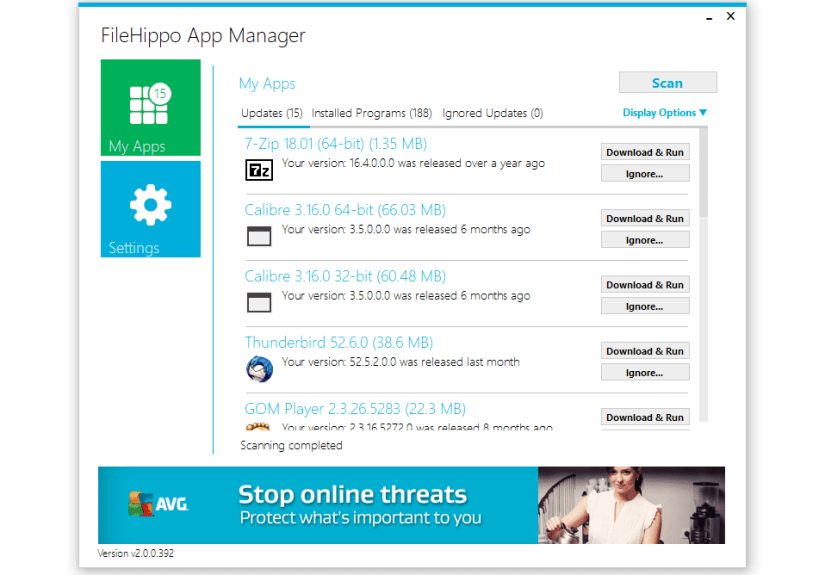
Fast scanning for outdated software
Once installed, App Manager scans your system’s default application locations and builds a list
of installed programs it recognizes. It then checks each version against FileHippo’s online
catalog and flags anything that’s out of date. The scan itself is quick – usually just a few
seconds on a typical home PC – and the results are presented in a clean, scrollable list.
Programs are grouped into categories such as “Up to date,” “Outdated,” and sometimes “Beta”
builds. You’ll see your installed version next to the latest version available, which makes it
easy to decide whether updating is worth it.
One-click downloads and in-app installs
In earlier generations, FileHippo’s tools would open the website and let you grab the installer
manually. With App Manager v2.0, the process is much more streamlined. You can:
- Click an outdated app and jump straight to its download.
- Download updates directly inside the program interface.
- Install updates with minimal extra prompts, depending on the specific software.
It’s not 100% “hands-free” automation, but it cuts down a lot of repetitive searching and
downloading compared with doing everything manually.
Simple, customizable interface
One of the reasons App Manager stayed popular for so long is its interface. Version 2.0
introduced a cleaner layout and small quality-of-life perks such as:
- A dashboard-like main window showing your update status at a glance.
- Optional color schemes so you can pick a theme that doesn’t burn your eyes.
- Support for multiple languages.
- Buttons and menus that are straightforward enough for non-technical users.
There’s nothing flashy here, but that’s kind of the point. It feels more like a utility than a
“productivity platform,” and that’s refreshing.
Custom scan locations and basic control
By default, FileHippo App Manager scans common locations where Windows applications usually live
(like C:Program Files). If you’ve installed software on other drives or folders,
you can add custom scan locations so the app can pick those up too. This is helpful if you:
- Keep games or large apps on a secondary drive.
- Use portable apps stored in non-standard directories.
- Share a machine with multiple users who install software in odd places.
You can also set basic preferences for how often the app checks for updates and how it reports
them, though the control isn’t as detailed as enterprise tools that manage hundreds of devices.
Compatibility and technical requirements
App Manager was originally built when Windows XP and Windows 7 were still common, and it remains
compatible with a wide range of systems. It’s designed for:
- Windows XP, Vista, 7, 8, 8.1, and 10 (32-bit and 64-bit).
- Relatively low hardware resources – it’s a small, lightweight installer.
- Microsoft .NET Framework 2.0 or later to run properly.
On modern Windows 10 and 11 machines, .NET is usually already present in some compatible form,
but very old systems may need an additional runtime install.
Pros: Where FileHippo App Manager v2.0 Shines
1. Free and lightweight
Let’s start with the obvious: FileHippo App Manager is free software. There’s
no paid tier, no subscription, and no trial countdown quietly ticking away. The program is also
tiny compared with many modern utilities, and it launches quickly even on older machines.
If you just want a no-cost, low-overhead way to check for updates, that’s a big plus. For many
home users, a tool like this is already a huge improvement over “never update anything until
something breaks.”
2. Easy for non-technical users
Not everyone wants a dashboard full of graphs and security scores. App Manager keeps things
simple:
- Green and red indicators clearly show what’s current and what’s outdated.
- Version numbers are displayed in plain text – no digging through menus.
- Actions are logical: scan, review, download, install.
If you’re the “family tech support” person, this can be an easy recommendation for relatives who
just want to keep their apps reasonably up to date without reading a manual the size of a
novella.
3. Safer downloads than random search results
Because App Manager pulls from FileHippo’s curated catalog, you’re less likely to wander onto
shady download sites full of bundled adware. FileHippo historically prided itself on avoiding
toolbars and extra junk in installers, and that mindset carries over to how its updater works.
Is it perfect? No – you should still pay attention during installs. But compared with typing
“download VLC” into a search engine and clicking the first sketchy ad, App Manager is a big step
up in safety.
4. Good for catching the “big stuff”
While it doesn’t detect every single thing on your system, App Manager is pretty good at
recognizing commonly installed programs: browsers, office suites, media players, system tools,
compression utilities, and more. For many home PCs, that covers most of what actually matters.
Cons: Where FileHippo App Manager Falls Short
1. Limited to FileHippo’s catalog
The biggest structural limitation is that App Manager can only update software that exists in
FileHippo’s own database. If a program isn’t listed on FileHippo.com, App Manager can’t help
you with it. That means:
- Niche or very new tools may not show up at all.
- Business or specialized apps are often missing.
- Some updates may lag if the FileHippo listing isn’t refreshed quickly.
For core mainstream apps, this usually isn’t an issue. But if your PC is full of specialized
software, you’ll quickly notice the gaps.
2. Not actively developed like modern updaters
Another major drawback is age. While mirrors still host version 2.0 beta builds and 1.x
installers, active development and updates appear to have largely stalled several years ago.
The FileHippo brand itself has changed hands over time, and the updater hasn’t seen the kind of
ongoing evolution you get from newer tools.
Practically speaking, that means:
- The interface and engine aren’t tuned with today’s Windows 11 ecosystem in mind.
- Newer software titles and versions may never appear in the catalog.
- Bug fixes and improvements are unlikely.
For a simple helper tool, that might be acceptable – but it’s something you should know before
you rely on it as your only updater.
3. Basic feature set (no drivers, no deep security view)
Many modern “software updater” or “patch management” tools try to be your security co-pilot.
They’ll assess the risk of known vulnerabilities, handle driver updates, and tie into broader
security platforms. FileHippo App Manager doesn’t do any of that.
It:
- Does not update Windows itself or your device drivers.
- Does not give you CVE details or vulnerability scores.
- Does not provide centralized management for multiple PCs.
It’s strictly a user-friendly application updater, not a full-blown security or IT management
solution.
4. Imperfect detection and occasional misses
Real-world feedback consistently notes that App Manager doesn’t detect every installed
application, even among supported titles. Sometimes it:
- Misses apps installed in non-standard locations if you don’t configure extra scan paths.
- Shows an app as up to date when there’s already a newer version on the vendor’s site.
- Suggests beta builds when you’d prefer to stick with stable releases.
For casual users, this may not be a deal-breaker, but it reinforces that you shouldn’t treat
App Manager as the single source of truth for security-critical updates.
How FileHippo App Manager Compares to Modern Software Updaters
The software updater landscape in 2025 is much more crowded than when App Manager first launched.
If you search for a Windows software update checker today, you’ll see options
like Ninite, Patch My PC, IObit Software Updater, Avira Software Updater, Heimdal Free, and
various open-source updaters.
Here’s how FileHippo App Manager stacks up against modern competitors:
-
Against “simple” updaters like Patch My PC or Ninite: App Manager feels
similar in concept – small, focused, and aimed at home users – but those newer tools tend to
have fresher catalogs and more active development, especially for Windows 10 and 11. -
Against security-focused tools: Updaters integrated with broader security
suites (like Heimdal’s or Avira’s tools) lean much harder into vulnerability management.
FileHippo App Manager doesn’t try to play in that arena. -
Against enterprise patch managers: Tools like ManageEngine Patch Manager Plus
or NinjaOne offer centralized control, reporting, and automation for fleets of machines.
App Manager isn’t built for that – it’s strictly a single-PC helper.
The bottom line: FileHippo App Manager v2.0 can still work for basic update checking on legacy
systems, but if you’re building a modern maintenance strategy, you’ll likely want something
newer and more actively maintained.
Who Is FileHippo App Manager v2.0 Best For?
Despite its age, there are still scenarios where this classic software updater for
Windows might fit:
-
Legacy or offline-ish PCs: Older Windows machines that can’t run heavier
tools may benefit from a lightweight updater that focuses on core applications. -
Users who already trust FileHippo’s catalog: If you’ve been using
FileHippo.com for years and like its curated selection, App Manager feels like a natural
extension. -
People who want “just enough” automation: If you dislike fully automatic
updaters silently changing your system, App Manager offers a middle ground: helpful guidance,
but you still click the “go” buttons.
On the other hand, you should probably skip it if:
- Your main PC runs Windows 11 and you want a tool designed with that environment in mind.
- You need driver updates, vulnerability scores, or centralized management.
- You prefer actively maintained, open-source tools with transparent development.
Final Verdict: Is FileHippo App Manager v2.0 Still Worth Using?
Short answer: FileHippo App Manager v2.0 is a friendly, lightweight software
updater that still does a decent job for basic application updates on Windows, especially on
older systems. It’s free, simple, and far better than never checking for updates at all.
Long answer: Because it depends on an aging catalog and hasn’t seen visible
active development in years, it’s not the best choice as your primary updater in 2025. More
modern tools offer broader software coverage, better Windows 10/11 integration, and deeper
security context. For most users, FileHippo App Manager is now best treated as:
- A nostalgic helper you might keep on a secondary or legacy PC.
- A temporary bridge tool while you evaluate more current updaters.
- An example of how simple and user-friendly a basic updater can be.
If you’re comfortable experimenting, try App Manager on a non-critical machine and see what it
finds. Just don’t rely on it as your only shield against outdated software – think of it as the
friendly neighbor who reminds you to lock your front door, not a full home security system.
Real-World Experiences with FileHippo App Manager v2.0
To put all of this into context, it’s helpful to look at practical experiences – what it’s
actually like to live with FileHippo App Manager on a Windows PC.
Day-to-day use: The “scan and sip coffee” routine
A typical session with App Manager looks like this:
- You launch the app (it usually opens in a second or two).
- It runs an automatic scan or you tap the “scan” button.
- You watch a short progress bar while it checks your installed programs.
- You’re presented with a list of outdated apps alongside links or buttons to update them.
It’s the kind of tool you can open once in a while – maybe weekly or monthly – while you sip a
coffee. You click through the updates you care about, ignore the ones you don’t, and close it.
No drama, no complicated configuration.
What users tend to like
Common positive experiences include:
-
“I didn’t realize how many apps were outdated.” Many users are surprised to
see just how many programs quietly fell behind. App Manager is good at surfacing those
lagging versions. -
“It saved me time hopping between websites.” Instead of visiting multiple
vendors’ sites, you can grab updates from one central place. -
“It runs fine on an old laptop.” On aging hardware where modern tools feel
heavy, FileHippo’s tiny footprint is genuinely appreciated.
For users who simply want to declutter their update backlog, those benefits feel substantial.
What tends to frustrate people
On the flip side, real-world usage reveals some recurring frustrations:
-
Missed detections: Users notice that some popular applications don’t show up
or that recognized apps are sometimes flagged incorrectly. -
Outdated or beta suggestions: In some cases, App Manager recommends beta
builds when users prefer stable versions, or lags behind the very latest vendor release. -
Age of the tool itself: People quickly realize that they’re using an updater
that hasn’t kept pace with newer software ecosystems or modern UI expectations.
None of these issues make the program unusable, but they underscore why App Manager is no longer
top-of-the-list in most “best updaters” rankings.
Lessons learned from using FileHippo App Manager
After spending time with App Manager and comparing it with newer options, a few useful lessons
emerge:
-
Any updater is better than none. Even an older tool like this is miles ahead
of ignoring updates entirely, especially for browsers and media players that are frequent
security targets. -
One tool rarely covers everything. It’s normal to use App Manager alongside
manual checks, built-in updaters (like those in browsers or game launchers), and even other
tools for drivers or specialized apps. -
Lightweight has its charm. There’s value in having a small, focused program
that doesn’t try to upsell you or bombard you with notifications. App Manager shows how
pleasant that approach can be. -
But maintenance matters. In 2025, the most important feature of any software
updater is active development. A tool that’s updated regularly – with a live catalog and
modern OS support – will almost always beat even the best-designed utility that’s stuck in
the past.
So, should you try FileHippo App Manager v2.0? If you’re curious and running an older Windows
system, sure – it’s a free, low-risk experiment. Just treat it as one layer in your update
strategy, not the entire plan. For your main daily driver PC, you’ll likely be happier with a
more modern solution that receives regular updates and has a broader software catalog.
SEO tags in JSON format