Table of Contents >> Show >> Hide
- Cleaning vs. Disinfecting: The Two-Step Your Phone Needs
- What NOT to Use on Your Phone (Unless You Enjoy Regret)
- The 60-Second Supply List (No Weird Gadgets Required)
- The Best Way to Sanitize Your Smartphone (iPhone + Android Safe Routine)
- How to Clean Your Phone Case (Because It’s the Germ Motel)
- Don’t Forget the Accessories (They Touch Your Face, Too)
- What About the Charging Port and Speaker Grills?
- How Often Should You Clean Your Phone?
- Are UV Phone Sanitizers Worth It?
- Common Questions (So You Don’t Panic-Clean Your Phone)
- Quick Habit Upgrades That Keep Your Phone Cleaner Longer
- Conclusion: A Clean Phone is a Happy Phone (and a Happier You)
- Field Notes: Real-World Phone Cleaning Experiences (500+ Words of “Yep, Been There”)
Your smartphone goes everywhere: the kitchen, the gym, the car cup holder, and (let’s be honest) places we don’t
need to name out loud. It’s basically a tiny touchscreen passport that gets stamped by every surface and every
hand you touch. The good news: you can sanitize your phone safely in just a few minuteswithout
melting the finish, fogging the camera, or accidentally baptizing your charging port.
This guide walks you through the best way to clean your phone (iPhone or Android), what products
actually make sense, what to avoid, and a repeatable routine you can do daily, weekly, or whenever your phone has
a “why is it sticky?” moment.
Cleaning vs. Disinfecting: The Two-Step Your Phone Needs
“Cleaning” removes grime, oils, makeup, and whatever mystery smudges your screen collects by lunchtime.
“Disinfecting” reduces germs on surfaces using appropriate disinfectants. For the best results, you usually want
both: clean first if the phone is visibly dirty, then disinfect with a phone-safe
method.
Think of it like sweeping before you mop. If you skip the sweep, you’re basically polishing crumbs.
Your phone deserves better.
What NOT to Use on Your Phone (Unless You Enjoy Regret)
Smartphones are built tough, but their surfaces are surprisingly sensitiveespecially the screen’s coatings and
the tiny openings that lead directly into expensive electronics. Avoid these common “cleaning” mistakes:
1) Don’t spray anything directly onto the phone
Sprays can force moisture into speakers, mics, seams, and ports. If a product comes out like a mist, your phone’s
openings will treat it like an invitation.
2) Skip bleach, hydrogen peroxide, ammonia, and abrasive cleaners
Harsh chemicals can damage screen coatings and finishes. Also avoid abrasive powders and strong household
cleaners intended for countertopsnot delicate glass and anodized metal.
3) Paper towels are for the kitchen, not your screen
Paper towels can be slightly abrasive and may leave fine scratches over time. Use a microfiber cloth instead
(the same kind you’d use for glasses or camera lenses).
4) Compressed air is not a magic wand
Blasting ports and seams can push debris deeper or damage delicate components. If you need to address lint in the
charging port, be gentle and drymore on that below.
The 60-Second Supply List (No Weird Gadgets Required)
- Microfiber cloth (lint-free; ideally dedicated to screens)
- Disinfecting wipes approved for electronics OR 70% isopropyl alcohol wipes
- Distilled water (optional, for a lightly damp clothespecially for smudges)
- Cotton swabs (for edges and around buttons; use sparingly and not dripping wet)
- Soft, dry brush (optional; helpful for speaker grills and seams)
If you’re using liquid alcohol instead of wipes, the safest approach is:
apply it to a cloth firstnever directly to the phone.
The Best Way to Sanitize Your Smartphone (iPhone + Android Safe Routine)
This routine is designed to be fast, realistic, and safe for most modern phones. Always follow your
manufacturer’s guidance if it differs, especially for foldables or specialty finishes.
- Power down and unplug.
Turn off the phone and disconnect charging cables, headphones, or accessories. (Cleaning a powered-on phone
is like washing a toaster while it’s still plugged in. Technically possible. Emotionally unnecessary.) - Remove the case and accessories.
Cases trap oils and germs. Pop the phone out, remove wallet attachments, grips, and anything that blocks
edges or the camera bump. - Dry wipe first.
Use a clean microfiber cloth to remove fingerprints and loose debris. This reduces streaking and prevents
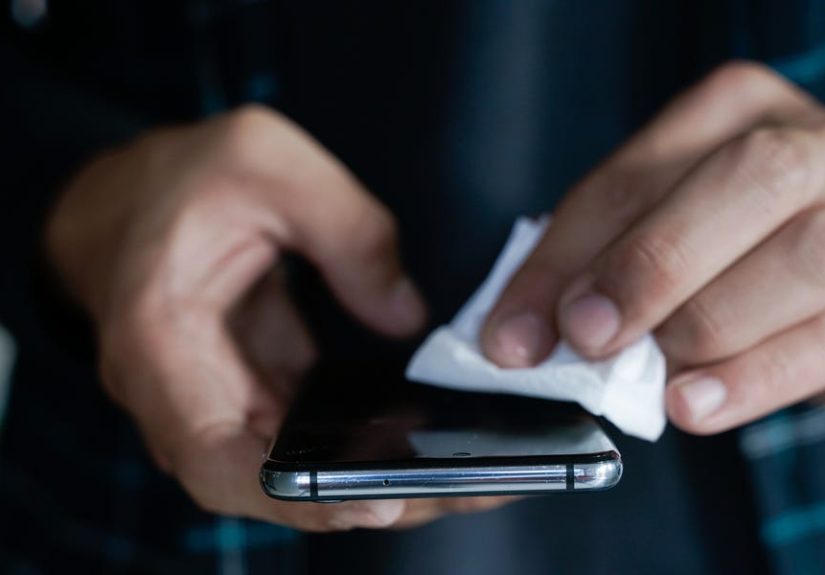
you from smearing grime into a “modern art” masterpiece. - Disinfect with a phone-safe wipe (or a lightly dampened cloth).
Use a 70% isopropyl alcohol wipe (or another manufacturer-approved disinfecting wipe) and
gently wipe the front, back, and sides. Use light pressure. Avoid saturating the phone and keep moisture
away from openings.If you’re using liquid alcohol: dampen a corner of a microfiber clothjust enough to be slightly moist, not
wet. Then wipe the phone’s exterior surfaces. - Detail the high-touch zones.
Focus on the areas your hands actually touch: the edges, buttons, around the camera bump, and the lower
half of the phone (where thumbs do most of their daily work). Use a cotton swab that’s barely damp (not
dripping) to carefully reach around buttons and seams. Keep swabs away from ports and speaker openings. - Let it air dry completely.
Give the phone a few minutes to fully dry before turning it back on or putting it into the case. Air drying
is part of the processmany disinfectants work best when left to sit briefly before being wiped away.
Pro tip: If your screen looks streaky afterward, finish with a dry microfiber cloth. Streaks
don’t mean it’s dirtythey mean your phone is dramatic.
How to Clean Your Phone Case (Because It’s the Germ Motel)
Sanitizing the phone and ignoring the case is like washing your hands and then putting on the same dirty gloves.
Here’s how to clean common case types:
Silicone and TPU cases
- Wash with mild dish soap and warm water.
- Rinse thoroughly and dry completely.
- For a quick disinfect: wipe the outside with a 70% alcohol wipe, then let it air dry.
Hard plastic cases
- Soap and water works well; use a soft cloth or sponge.
- Avoid abrasive scrubbers that can dull the finish.
- Dry fully before reassembly.
Leather, fabric, and specialty materials
- Follow the manufacturer’s care instructions.
- Avoid heavy disinfecting wipes unless the brand specifically says it’s safe.
- Spot clean gently; let it dry fully.
Don’t Forget the Accessories (They Touch Your Face, Too)
Your phone is the star of the show, but the supporting cast is just as germ-friendly. Add these to your
cleaning routine:
Charging cables + power adapters
- Unplug first.
- Wipe the exterior with a slightly damp microfiber cloth or disinfecting wipe.
- Avoid getting moisture near the connector tips and ports.
Earbuds + cases
- Wipe hard surfaces gently with a slightly damp cloth.
- Use a dry soft brush for speaker mesh; avoid saturating openings.
- Let everything dry completely before charging or wearing again.
Phone grips, wallets, and rings
- These are high-touch surfaces; wipe them down regularly.
- If removable, clean them separately so you don’t trap moisture against the phone.
What About the Charging Port and Speaker Grills?
These areas are where “helpful cleaning” can turn into “why doesn’t it charge anymore?” very quickly.
Keep it dry:
- Charging port: If you see lint, turn the phone off and use a soft, dry brush.
Avoid liquids, and avoid jamming sharp objects inside. - Speaker/mic grills: Use a dry, soft brush. Do not saturate with liquid or try
to “flush” the openings.
If you suspect moisture got inside, stop cleaning, power down, and let the phone dry thoroughly before charging.
How Often Should You Clean Your Phone?
There’s no single perfect schedule, but here’s a practical approach that balances hygiene with protecting your
phone’s finish:
Daily (30–60 seconds)
- Quick wipe with a microfiber cloth.
- If you’ve been in public transit, the gym, a hospital, or crowded places: use a disinfecting wipe.
Weekly (5 minutes)
- Full disinfect routine (screen, sides, back).
- Wash or wipe down the case.
- Clean accessories you use daily (earbuds, grip, charger).
Immediately (when it matters)
- After cooking with raw meat or handling messy foods.
- After travel days, shared devices, or high-contact environments.
- After someone in your home is sick (follow public-health guidance and manufacturer instructions).
Are UV Phone Sanitizers Worth It?
UV phone “sanitizer boxes” can sound appealing because they feel like a sci-fi solution: you place your phone in
a glowing pod, close the lid, and imagine germs filing a polite resignation letter.
Here’s the practical reality: UV devices can be limited by line-of-sight (shadowed areas may not
be treated), and they don’t remove oils, grime, or sticky residue. Many experts still prefer a wipe-down method
for reliable, full-surface cleaningespecially for the greasy fingerprints that UV can’t “beam away.”
If you use a UV sanitizer, treat it as a supplementnot a replacementfor wiping down your phone.
Common Questions (So You Don’t Panic-Clean Your Phone)
Will alcohol wipes ruin my screen?
Many major manufacturers provide guidance that certain alcohol-based wipes can be used on exterior surfaces.
The key is gentle wiping, avoiding openings, and not over-saturating
the device. Over-cleaning with harsh products or excessive pressure is what tends to cause problems.
Can I use hand sanitizer?
Not recommended. Hand sanitizer can contain additives (like fragrances or gels) that leave residue or may be too
harsh for screen coatings. Stick to wipes intended for electronics or a properly used alcohol wipe.
Can I clean my phone with soap and water?
You can use a cloth lightly dampened with soapy water for general cleaning, but you should avoid excess moisture
and never run the phone under water or submerge it. Use the smallest amount of moisture necessary.
Quick Habit Upgrades That Keep Your Phone Cleaner Longer
- Wash your hands before eating or cooking, and you’ll transfer fewer germs to your phone.
- Keep your phone off the kitchen counter during food prep (especially around raw meat).
- Use a wipeable case and consider a screen protector for easier cleaning.
- Avoid bathroom scrolling if you can. Your phone doesn’t need to see everything you see.
- Designate a “phone parking spot” at home so it’s not always on the table where food lives.
Conclusion: A Clean Phone is a Happy Phone (and a Happier You)
The best way to sanitize your smartphone is simple: power it down, wipe off grime, disinfect gently with a
phone-safe wipe (or a lightly damp cloth), avoid openings, and let it dry completely. Add in regular case
cleaning and a few hygiene habits, and you’ll keep your phone cleaner without turning it into a full-time
cleaning project.
Your phone will still end up with fingerprintsbecause physicsbut at least it won’t feel like it’s auditioning
to be a science experiment.
Field Notes: Real-World Phone Cleaning Experiences (500+ Words of “Yep, Been There”)
Phone-cleaning advice sounds straightforward until real life shows up with snacks, sweat, and surprise gravity.
Here are some very relatable moments that make phone sanitizing feel less like a chore and more like damage
controlwith better lighting.
1) The “Gym Bag Microclimate” Situation
You finish a workout, toss your phone into your gym bag, and later pull it out like it’s been on an all-inclusive
vacation in a tropical rainforest. Between warm air, sweaty hands, and shared equipment, your phone basically
spent an hour speed-dating germs. This is the perfect time for a quick disinfecting wipe on the screen and
edgesthen a dry microfiber polish so you’re not doing thumb-slides on a streaky skating rink. Bonus lesson:
wipe your case, too. The case is where moisture likes to hide and throw a tiny afterparty.
2) The “Cooking Show Host” Fantasy (Featuring Raw Chicken)
You start cooking with confidencethen you need to check a recipe. Suddenly your phone is the sous-chef, and
your hands are… not clean. That’s how phones get “seasoned” with invisible kitchen chaos. The best move is not
heroic disinfectant spraying. It’s prevention: wash hands, use voice assistants, or set the phone on a stand and
use a knuckle or clean utensil to scroll. If you did touch the phone mid-prep, sanitize afterward: wipe the
screen, edges, and the lower half where your hands naturally grab. Your future self will thank you when the
screen no longer feels like it has a glaze.
3) The “Public Transit Pole + Phone Combo”
Commuting can turn your hands into a highlight reel of shared surfacesrailings, elevator buttons, door handles,
and that one seat that feels suspiciously warm. The phone usually becomes the next stop on the tour. A practical
habit is a quick wipe-down when you get home (or at least before you eat). The real secret weapon, though, is
hand hygiene. If your hands are clean, your phone stays cleaner longer. Wiping is great, but fewer transfers in
the first place is even better.
4) The “Kids Borrowed My Phone” Plot Twist
The phone goes to a kid for “one minute” and comes back looking like it survived a frosting incident. The
cleaning approach here is: calm, gentle, and thorough. Dry wipe first to remove crumbs and sticky residue.
Then disinfect with a phone-safe wipe, making sure you get the sides and back where tiny hands grip like they’re
holding onto a roller coaster. If the case is silicone, wash it with soap and water. If the phone had a screen
protector, congratulationsyou accidentally made your life easier.
5) The “Workplace Hot Desk / Shared Device” Reality
If your phone sits next to shared keyboards, conference room tables, or communal chargers, it’s smart to treat
it like a high-touch object. A simple wipe routine at the end of the day keeps things under control without
overdoing it. This is also where a wipeable case shines: it’s easier to clean than a fabric case that absorbs
everything like a sponge with branding.
6) The “I Dropped It… Somewhere” Emergency Clean
Sometimes the phone falls. Sometimes it falls in a place that makes you question reality. When that happens,
don’t panic-spray disinfectant like you’re putting out a fire. Power down, remove the case, dry wipe, then
disinfect gentlyespecially around the edges and the back. Let it dry completely. Clean the case separately.
And take a deep breath. The phone may have suffered emotionally, but it can recover physically if you keep
moisture away from openings and don’t go full bleach-warrior.
The takeaway from all these moments is simple: smartphone sanitizing doesn’t have to be complicated.
A quick, consistent routineand a little preventionbeats occasional panic-cleaning every time.