Table of Contents >> Show >> Hide
- Instagram DMs 101: What “Direct Message” Means (and Where to Find It)
- How to Send a Direct Message on Instagram (Step-by-Step)
- 7 Fast Ways to Start a DM (So You Don’t Have to Hunt for the Compose Button)
- What You Can Send in Instagram DMs
- Message Requests: How to Accept, Decline, and Stay Sane
- How to Edit, Unsend, or Delete Messages (a.k.a. Your DM Safety Net)
- Vanish Mode and Disappearing Content: When You Want the Chat to Self-Destruct
- Read Receipts: How “Seen” Works (and How to Control It)
- Organize Your Inbox Like You Have Places to Be
- Privacy & Safety Tools: Block, Restrict, Mute, and Report
- Troubleshooting: When Instagram DMs Don’t Work
- Pro-Level DM Tips (Creators, Small Businesses, and Anyone With Too Many Messages)
- FAQ: Quick Answers About Instagram DMs
- Real-World DM Experiences (500+ Words): What People Learn the Hard Way
Instagram DMs (Direct Messages) are where the real conversations happenfriends making plans, creators answering questions,
brands handling customer service, and yes… the occasional “Hey” that arrives with zero context like a mystery novel with
the last page ripped out.
This guide walks you through exactly how to direct message on Instagram, what you can send, how to manage your inbox like
a functional adult, and how to protect your privacy when your DMs start feeling like a public sidewalk.
Instagram DMs 101: What “Direct Message” Means (and Where to Find It)
A direct message is a private chat between you and one or more people on Instagram. You’ll find your inbox by tapping the
Messages area (often shown as an envelope or Messenger-style icon, depending on your app version).
Inside your inbox, you may see separate areas for:
- Regular chats (people you already message or follow)
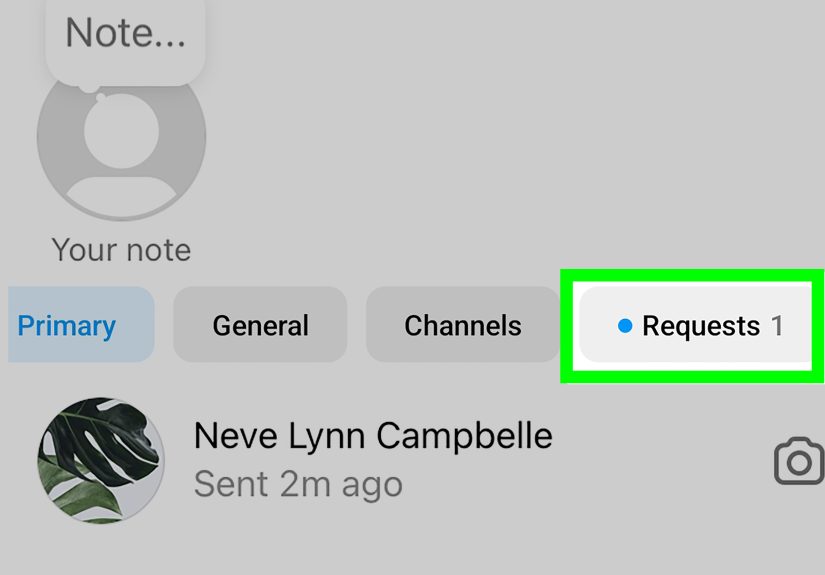
- Message Requests (people you don’t follow, new contacts, or filtered chats)
- Group chats (multiple people, multiple opinions, zero decisions made)
If someone you don’t follow messages you, Instagram often routes it to Message Requests so you can accept
or decline before it becomes a full chat. That’s your first line of defense against spam, scams, and “investment opportunities”
from a profile picture that looks suspiciously like a stock photo.
How to Send a Direct Message on Instagram (Step-by-Step)
On the Instagram app (iPhone/Android)
- Open Instagram and go to your Messages (inbox).
- Tap Compose (usually a pencil/new message icon).
- Select one or more people you want to message.
- Type your message (or add media like photos, GIFs, voice notes, etc.).
- Tap Send.
On Instagram.com (desktop)
- Log in on Instagram.com.
- Click Messages in the left menu.
- Select a conversation or start a new one.
- Type your message and click Send.
Example: You’re trying to plan dinner with a friend. A solid DM is:
“Are you free Thursday around 7? I’m craving tacos and moral support.”
A less solid DM is: “Thursday?” (That’s not a message, that’s a calendar jump-scare.)
7 Fast Ways to Start a DM (So You Don’t Have to Hunt for the Compose Button)
Instagram makes it easy to message someone from multiple places. Here are the quickest routes:
- From their profile: Go to their profile and tap Message.
- From a Story: Reply to their Story (your reply becomes a DM).
- From a post or Reel: Tap the share icon and choose Send to in DMs.
- From your inbox search: Search their name and open the thread.
- From comments: If you’re already chatting in comments, move it to DMs for details.
- From a group chat: Add them to an existing group if it makes sense.
- From a QR invite (group chats): Some group chats can be shared via invite tools like QR codes.
What You Can Send in Instagram DMs
DMs aren’t just text. They’re a whole multimedia buffet:
Text messages
The classic. Works for quick questions, links, apologies, and “sorry I accidentally liked your photo from 2019”
situations.
Photos and videos
Send photos/videos from your camera roll or take a new one inside the chat. You can also send disappearing photos or
videos in certain chat modes, if you want something to vanish after it’s viewed.
Voice notes
Useful when your message is too long to type, or when you need to convey tonelike “I am calm” (said calmly) versus
“I AM CALM” (typed in all caps like a dramatic headline).
GIFs, stickers, and reactions
Sometimes a GIF communicates what no human language can: “I am both excited and slightly overwhelmed.”
Posts, Reels, and Stories
You can share content straight into DMs, which is basically Instagram’s love language. (“I saw this and immediately
thought of you” is the most emotionally responsible way to send a meme.)
Video chat
Instagram supports video chat features in Direct, which is great for quick face-to-face check-insless great if you
forgot your camera defaults to “unforgiving lighting.”
Message Requests: How to Accept, Decline, and Stay Sane
Message Requests are where new or unknown senders typically land. When you open a request, you’ll usually get options like:
Accept, Delete/Decline, or sometimes Block/Report.
This keeps strangers from instantly landing in your main chat list.
Best practice: Treat requests like email spam
- If it feels sketchy, don’t engage. Block or report.
- If it’s legitimate (a client, classmate, friend-of-friend), accept and reply.
- If it’s “Hello dear” + a crypto pitch, run.
How to Edit, Unsend, or Delete Messages (a.k.a. Your DM Safety Net)
Edit a sent DM (when you spot the typo after you hit send)
Instagram supports editing a message you’ve sent within a limited time window. Generally, you press and hold the message,
tap Edit, fix it, and confirm. It’s perfect for correcting “Let’s meat later” to “Let’s meet later”
before someone invites you to a barbecue you didn’t agree to.
Unsend a message (when you wish you could time travel)
If you sent the wrong message to the wrong person (or sent the right message in the wrong emotional era), you can often
unsend it by pressing and holding the message and choosing Unsend.
Delete a chat or remove messages “for you”
Cleaning up your inbox can mean deleting an entire conversation from your view, or deleting selected messages for yourself.
Keep in mind: deleting “for you” doesn’t necessarily remove it for the other personso don’t treat it like an invisibility cloak.
Vanish Mode and Disappearing Content: When You Want the Chat to Self-Destruct
Instagram offers disappearing-message features (often called vanish mode or disappearing messages),
where messages may disappear when someone leaves the chat or turns the mode off.
This can be useful for temporary info (“Here’s the door code”) or casual conversations you don’t need archived forever.
It is not a magic spell that guarantees nobody can capture what you sent. Use common sense, not cinematic spy logic.
Read Receipts: How “Seen” Works (and How to Control It)
Read receipts are the “Seen” indicators that tell someone you opened their message. Depending on your settings,
Instagram may let you manage read receipts inside a chat (usually under something like Privacy & safety).
If you want fewer awkward “Why did you read that and not reply?” moments, turning off read receipts (when available)
can reduce pressure. Just remember: it’s a two-way streetsometimes you won’t see their read status either.
Organize Your Inbox Like You Have Places to Be
Pin chats (keep important conversations at the top)
If your inbox is busy, pinning helps. Instagram allows pinning up to a limited number of chats (commonly up to three)
so they stay at the top of your inboxgreat for family, your best friend, and that group project that keeps “starting tomorrow.”
Pin messages inside a chat (keep key info visible)
In many chats, you can pin specific messages (again, often limited to a small number, like three) so important details
don’t get buried under memes and “lol.”
Schedule messages (say it later, without trusting your memory)
Instagram has rolled out message scheduling in some regions/accounts. A common workflow is typing your message, then
pressing and holding the send button (or using a schedule option), selecting a date/time, and letting Instagram send it later.
This is incredibly useful for time zones, birthdays, and remembering to follow up like a person who has their life together.
Translate messages (when your group chat goes multilingual)
Instagram supports translating messages in chats in many cases by pressing and holding a message and tapping Translate.
It’s helpful for international friends, travel planning, or deciphering slang that makes you feel 900 years old.
Privacy & Safety Tools: Block, Restrict, Mute, and Report
DMs should feel safe. Instagram gives you several levels of controlthink of them as different “do not disturb” settings
for humans.
Mute (for peace without drama)
Muting a person or a group chat can reduce notifications without leaving the chat. Great for loud group chats, less great
if you forget you muted it and miss the one message that mattered.
Restrict (soft boundary mode)
Restricting someone can limit how they interact with you and may reduce what they can see about your activitylike whether
you’re online or whether you’ve read their messages. It’s a quieter boundary when blocking feels too nuclear.
Block (hard boundary mode)
Blocking stops someone from messaging you and interacting with your profile. If you block someone and they message you,
you won’t receive those messagesand they typically won’t “deliver later” even if you unblock.
Report (for scams, harassment, or harmful behavior)
If someone is sending abusive messages, impersonating, or trying to scam you, report the message/chat or the account.
You’re not “overreacting”you’re using the tools.
Extra note for teens and parents
Instagram has also rolled out safety-focused account experiences for teens, which can include stricter defaults around who
can contact a teen account. If you’re under 18 (or managing a teen’s account), it’s worth checking message controls and
privacy settings.
Troubleshooting: When Instagram DMs Don’t Work
“Why can’t I message this person?”
- They may have message controls set to limit who can DM them.
- You may have been blocked (or restricted in a way that affects messaging).
- Your account may be temporarily limited due to spam-like behavior or policy issues.
- They may only accept requests from certain groups (followers, mutuals, etc.).
“My message sent, but they didn’t respond.”
A few possibilities: it landed in their requests, notifications are muted, they’re busy, or they saw it and forgot.
(You’ve done that too. We all have. The inbox is chaos.)
“My inbox looks different from my friend’s.”
Instagram rolls out features gradually. If you don’t see scheduling, translation, pinning options, or read receipt toggles,
your app may need an updateor your account simply hasn’t received that feature yet.
Pro-Level DM Tips (Creators, Small Businesses, and Anyone With Too Many Messages)
Use pinned chats for VIP conversations
Pin your top conversations: your best customers, collaborators, or your “family group chat that actually shares useful info.”
This prevents important threads from sliding down under a pile of memes.
Pin key messages in a chat for quick reference
If you’re coordinating an event, pin the location, time, or checklist message so nobody has to scroll back 200 messages to find it.
(They won’t scroll. They will ask again. Pin it.)
Schedule messages for follow-ups
If you do client work, scheduling can help you send timely follow-ups without being online at odd hours. It also helps you
avoid the “I’ll reply later” trap that turns into “I replied two weeks later.”
Turn off read receipts in high-pressure chats (when available)
If you manage a brand account or you’re juggling multiple requests, you don’t always want a “Seen” timestamp to become a deadline.
Adjust read receipt settings where possible so you can respond thoughtfully, not instantly.
FAQ: Quick Answers About Instagram DMs
Can I DM someone who doesn’t follow me?
Often yesbut your message may go to their Message Requests folder, depending on their settings.
Can I unsend a DM?
In many cases, yespress and hold the message and choose Unsend.
Can I edit a DM after sending it?
Yes, if the feature is available on your account and you’re within the allowed time window.
Can I hide “Seen” on Instagram?
Instagram may allow you to manage read receipts in a chat’s privacy settings. Availability can vary by account/app version.
Are Instagram DMs safe?
Use privacy tools like message controls, restricting, blocking, and reporting. Don’t share sensitive personal info with strangers.
Treat suspicious links like you’d treat gas-station sushi: technically possible, emotionally risky.
Real-World DM Experiences (500+ Words): What People Learn the Hard Way
Most people don’t learn Instagram DMs from a manualthey learn them from moments. Like the time someone tried to message a
friend, clicked the wrong profile, and accidentally sent “On my way!” to a person they hadn’t spoken to since middle school.
That single DM created three outcomes: panic, an immediate unsend attempt, and a vow to never multitask again. The lesson?
Slow down when you’re selecting recipientsespecially if you’re sending anything that sounds like it belongs in an ongoing conversation.
Another common experience: the Message Requests folder becomes a second universe. Creators and small business owners
often notice that legitimate messagescollab proposals, customer questions, even a friend’s new accountcan land in requests.
People who check requests regularly tend to catch opportunities sooner. People who never check it sometimes discover a gem
months later, like “Hi, are you available for an interview next week?” from 27 weeks ago. The practical move is to set a
personal routine: scan requests once a day (or a few times a week) and delete anything sketchy immediately.
Read receipts are another “learn it by living it” feature. In high-stakes chatsdating, job leads, client workpeople often
feel pressured by the moment their message shows as seen. Some users reduce that pressure by turning off read receipts where
it’s available, especially for busy periods. Others keep read receipts on but use a different boundary: they reply when they
can reply well. The key is remembering that an inbox is not an emergency room. If someone expects instant responses 24/7,
that’s not an Instagram featureit’s a relationship expectation. Decide what works for you and set it consistently.
Group chats create their own set of “character-building experiences.” Someone will inevitably ask for the address five times.
Someone will reply “lol” to a serious question. Someone will send 14 messages in a row while others are offline. People who
have smoother group chats usually do two things: they pin the key message (address/time/plan) and they keep the chat name
clear (“Saturday Dinner 7PM” beats “We Ball”). It sounds small, but it prevents the endless scroll and the repeated questions
that make everyone slightly grumpier than they need to be.
The newest wave of DM featureslike scheduling, translation, and pinning toolsalso changes how people communicate. Scheduling
is especially popular with long-distance friendships and international teams: users write the message when they think of it,
then schedule it for a reasonable hour in the recipient’s time zone. Translation helps keep momentum in conversations where
language differences used to slow everything down. Instead of hopping between apps, people translate in place, respond faster,
and feel more connected. The shared lesson across these experiences is simple: Instagram DMs work best when you treat them like
a real communication channelnot a chaotic dumping ground. Organize what matters, use privacy tools when needed, and write
messages that make sense without requiring the other person to read your mind.

![How Do Millionaires Make Their Money? [2024 IRS Data]](https://gearxtop.com/wp-content/uploads/2026/03/how-do-millionaires-make-their-money-2024-irs-data-sCfhCHdr-thumb.jpg)