Table of Contents >> Show >> Hide
- What “Free Trial” Means on Spotify (and Why It Changes)
- Before You Start: Quick Eligibility Checklist
- Method 1: Get a Spotify Premium Free Trial Using a Web Browser
- Method 2: Get a Spotify Premium Free Trial on Android
- Payment Methods: What Works (and What Usually Doesn’t)
- How to Cancel the Trial (Correctly) So You Don’t Get Charged
- Maximize Your Trial: A “Get Your Money’s Worth” Checklist (While Paying $0)
- Troubleshooting: Common Free Trial Problems (and Fixes)
- Legit Ways to Get Premium Longer (Without Sketchy Hacks)
- FAQ
- Bonus: Real-World Experiences Using the Spotify Premium Free Trial (500+ Words)
- Conclusion
Spotify Premium is the “no-ads, no-skips, no-problem” version of Spotify. And when you can test-drive it for $0,
you absolutely shouldbecause nothing reveals your true relationship status like creating a shared playlist and
watching your partner add 47 consecutive breakup songs.
This guide shows exactly how to start a Spotify Premium free trial using a web browser
or an Android phone, how to avoid common signup traps (the boring kind, not the true-crime kind),
and how to cancel correctly so your “free trial” doesn’t become your “recurring donation to the streaming gods.”
What “Free Trial” Means on Spotify (and Why It Changes)
Spotify’s trial offers and pricing can change by time, account history, and promotion availability. In the U.S. right now
(as of early February 2026), Spotify has promoted an Individual Premium offer of $0 for 2 months for eligible new users,
then a monthly price afterward, with an advertised promo end date. Your account may show a different trial length
(or none at all) depending on eligibility.
Translation: the “free” part is real, but the offer is conditional. Spotify typically requires you to add a valid payment method
and will charge after the trial ends unless you cancel in time.
Before You Start: Quick Eligibility Checklist
Most Spotify Premium free trials are for people who haven’t had Premium before. Eligibility can be affected by:
- Having used a Spotify Premium trial in the past (even on an older account)
- Having paid for Premium before (not just “tried it”)
- Having been a member of Premium Family or Premium Duo in the past
- Trying to use an invalid payment method for trials (like certain prepaid methods or gift cards)
If you don’t see a trial, it doesn’t automatically mean something is brokenoften it means you’re simply not eligible for that specific promo.
Don’t worry: there are still legit ways to save, which we’ll cover later.
Method 1: Get a Spotify Premium Free Trial Using a Web Browser
This is the cleanest method because it’s straightforward, works on desktop or mobile browsers, and usually makes it obvious
whether your subscription is billed directly through Spotify (which matters for cancellation).
Step-by-Step (Desktop or Mobile Browser)
- Go to Spotify’s Premium page in your browser and choose the plan you want (most people start with Individual).
- Sign in (or create an account). If you’re new, you can sign up with email, phone number, or supported login options.
- Confirm the offer shown on your screen: trial length, price after trial, and the billing date.
Take a screenshotfuture you will appreciate this more than future you appreciates past you’s “spontaneous bangs” decision. - Add a valid payment method and complete checkout. Spotify typically won’t charge you at signup for a $0 promo,
but you’re authorizing future billing after the trial unless you cancel. - Verify Premium is active by checking your account status (look for “Premium” and a next billing date).
Pro Tip: Set Your “Cancel Decision” Reminder Immediately
If you might cancel, set a reminder 3–5 days before the trial ends. That buffer is your safety net for:
busy weeks, time zone weirdness, and the universal law that subscription renewals happen when you’re least emotionally prepared.
How to Confirm Who Bills You
On your Spotify account page, look for wording that implies billing is handled by Spotify versus a partner (like Google Play).
This matters because cancellation steps differ depending on who processes the subscription.
Method 2: Get a Spotify Premium Free Trial on Android
On Android, you can often start Premium inside the app. In many cases, Spotify will offer checkout with
Google Play billing (or route you to a web checkout). Either way, the steps below keep you on the official path.
Step-by-Step (Android App)
- Install or update the Spotify app from the Google Play Store.
- Log in to your Spotify account.
- Go to Premium inside the app (often found on the bottom navigation bar or in your profile menu).
- Choose your plan and review the offer details shown (trial length, renewal price, and billing date).
- If you see an option like Pay with Google Play billing, select it and follow the on-screen prompts.
- After checkout, reopen Spotify and confirm Premium features are active (no ads, offline downloads, unlimited skips).
Google Play Billing vs. Spotify Billing: Why You Should Care
If you subscribed via Google Play, your subscription is often managed through Google Playmeaning cancellations and plan changes
can behave differently than Spotify-direct billing. The “who bills me?” question is the difference between a 30-second cancel
and a “why is this button hiding from me?” cancel.
Payment Methods: What Works (and What Usually Doesn’t)
Spotify’s accepted payment methods can vary, but trials generally require a recurring payment method (like a debit/credit card
or PayPal where available). What trips people up:
- Gift cards: great for paying, but often not usable to start a trial or discounted plan.
- Some prepaid cards: may not qualify for trial promos.
- Mismatch errors: name, address, or card country not matching account region can trigger declines.
If checkout fails, try a different payment method, double-check your billing address, or switch between Spotify-direct billing and Google Play billing
if both options appear.
How to Cancel the Trial (Correctly) So You Don’t Get Charged
Here’s the big one. The main reason people get charged during a “free” trial is simple: they forget to cancelor cancel in the wrong place.
If You’re Billed by Spotify (Web Signup or Spotify-Direct Billing)
- Open your Spotify Account page in a web browser.
- Go to Manage your plan (or similar plan management area).
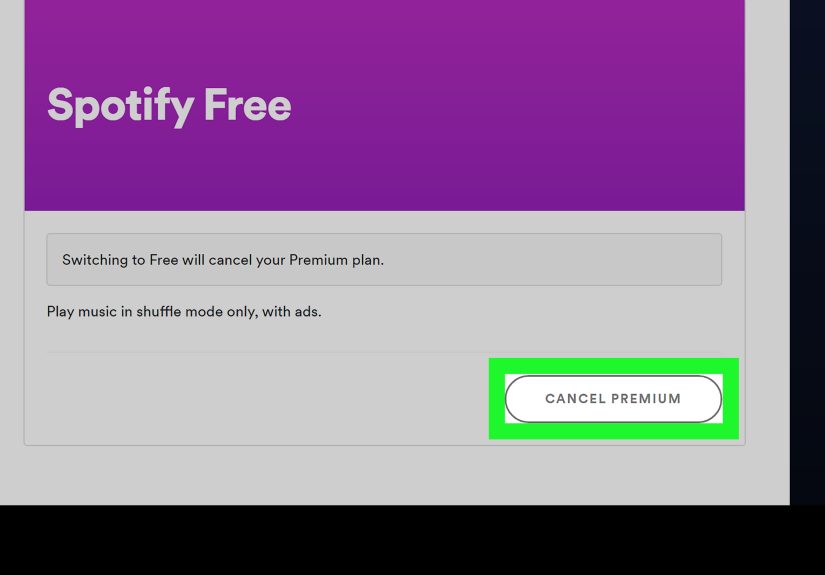
- Select Cancel subscription and follow the prompts until you see confirmation.
Important detail: for some $0 trials, canceling can switch your account back to the free tier immediately instead of letting you finish the trial period.
Always read the cancellation screen so you know what to expect.
If You’re Billed Through Google Play (Android In-App Checkout)
- Open the Google Play Store app.
- Tap your profile icon → Payments & subscriptions → Subscriptions.
- Find Spotify → tap Cancel subscription and follow prompts.
After canceling, double-check your Spotify account page and Google Play subscriptions list to ensure it shows the correct end date and status.
Maximize Your Trial: A “Get Your Money’s Worth” Checklist (While Paying $0)
Premium isn’t just “Spotify but quieter.” Use the trial to test features you’ll actually miss if you go back to free:
1) Offline downloads (the airplane mode flex)
- Download your commute playlist, gym mix, and a “rainy day” playlist.
- Test download speed on Wi-Fi and how playback behaves without data.
2) Audio quality (especially with decent headphones)
- Switch audio quality settings and compare on the same song.
- Try it with your best headphonesnot the ones that came free with a phone from three presidents ago.
3) Skip freedom + on-demand play
- Try long listening sessions and see if you value unlimited skips and full control enough to keep Premium.
4) Family “household” reality check
If you’re considering Duo or Family later, use the trial to test your listening habits and whether you’d benefit from separate accounts
under one roof (and whether everyone can agree on what “under one roof” means).
Troubleshooting: Common Free Trial Problems (and Fixes)
You don’t see a free trial offer
- You may be ineligible due to prior Premium/trial history or past Duo/Family membership.
- Try checking from a web browser and the Android appsometimes the available offers differ by checkout path.
- Look for other legit promos (student, partner bundles, limited-time trials).
You were charged immediately
- Confirm whether the “trial” was actually a discounted first month or a $0 promo.
- Check your billing provider (Spotify vs. Google Play) and the stated billing date.
- Review eligibility: in some cases, non-eligible users proceed straight to paid Premium.
Premium features aren’t showing after signup
- Log out and back in to force an account refresh.
- Update the app and restart your phone.
- Confirm you’re using the correct Spotify account (it happens more often than people admit).
Legit Ways to Get Premium Longer (Without Sketchy Hacks)
If you’re not eligible for the standard trial, don’t go hunting for “Premium APK” shortcuts. Besides being unsafe,
unofficial apps can lead to account issues and security risks. Stick with official options.
1) Premium Student (if you qualify)
Spotify often offers a discounted Student plan with a free trial period (terms and eligibility apply).
Some Student promos have included bundle perks like Hulu in the U.S., depending on the current offer.
2) Partner promotions (limited-time deals)
Spotify promotions sometimes appear through partners such as:
- Microsoft Rewards (redeem points for Spotify Premium trial offers in some cases)
- Credit card or bank promos (example: occasional extended trials through partners)
- Streaming perks programs (example: rotating perks that can include Spotify trials)
The key: read the promo terms carefully. Many partner offers are “new to Premium” only and have specific redemption windows.
FAQ
Do I need a credit card to start the Spotify Premium free trial?
Usually, yesyou typically need a valid recurring payment method to activate a $0 trial offer. Gift cards often can’t be used to start trial promos.
Can I cancel right after signing up and still keep the trial?
Sometimes services allow that, but Spotify’s behavior can vary by offer. Some $0 trials may end immediately upon cancellation.
Read the cancellation screen before confirming.
What happens when the trial ends?
Unless you cancel, Spotify generally bills you automatically at the listed monthly price starting on the billing date shown at signup.
Is the free trial available on Duo or Family?
Sometimes Spotify runs promos across different plans, but availability depends on your account and the current offer. Many trials are tied to Individual first.
Bonus: Real-World Experiences Using the Spotify Premium Free Trial (500+ Words)
Let’s talk about what it actually feels like to do a Spotify Premium trial on web browser vs. Androidbecause the experience is
where you discover whether Premium is a “nice-to-have” or a “why did I ever live without this” upgrade.
First, most people notice the silence. Not the peaceful, meditative kindthe suspicious kind. When ads disappear,
you suddenly realize how often you were being interrupted before. For a lot of trial users, that’s the moment Premium “clicks.”
You hit play, walk away, and the music just keeps going like it has a job and shows up on time.
On Android, the biggest “aha” is usually offline downloads. Trial users tend to download a couple playlists,
then forget they did ituntil they’re in an elevator, subway, parking garage, or any other place where cell signal goes to cry quietly.
That’s when you appreciate that offline listening isn’t a fancy feature; it’s a small miracle. The common pattern is:
download a commute playlist, then download a workout mix, then download “just one more” playlist, and suddenly you’re curating a
survival kit for every mood you’ve ever had.
The web browser signup experience is often smoother because the plan details are displayed in a big, readable format,
and it’s easier to screenshot the offer terms. People who sign up on desktop tend to feel more in control of the fine print
like the trial length and exactly what the monthly price will be afterward. It’s also easier to find your account page afterward,
which matters when you’re canceling (or deciding not to cancel because you’ve become emotionally attached to your “Discover Weekly”).
Android users who subscribe through Google Play billing often say the convenience is the best part: you’re already signed into Google,
you tap through a familiar checkout flow, and it’s done. The tradeoff is that cancellation lives in Google Play, not always in Spotify’s account settings,
which can confuse people later. A classic story: someone tries to cancel in the Spotify app, doesn’t see the right button, and assumes it “won’t let them.”
Then they find the subscription inside Google Play and it’s a 10-second fix. The lesson: always confirm who bills you.
Audio quality is another real-world divider. Some trial users can’t tell much difference, especially on basic earbuds in noisy places.
But the moment you try a decent pair of headphonesat home, in a quiet roomhigher quality streaming can feel more spacious and detailed.
It’s not that every song becomes a religious experience… but a few do, and that’s enough to make you reconsider canceling.
Finally, there’s the “trial psychology.” People often sign up thinking, “I’ll cancel before it charges,” and then life happens.
The users who feel best about the trial are the ones who set a reminder right away, then use the trial intentionally:
they test offline mode, compare audio quality, build playlists, and figure out whether Premium fits their habits.
Whether you keep it or cancel it, the win is making a deliberate choicenot waking up to a charge and whispering, “Oops.”
Conclusion
Getting a Spotify Premium free trial is simple when you follow the official paths: sign up via a web browser for clarity,
or use Android for conveniencethen confirm your billing provider and set a reminder so you stay in control.
Use the trial to test the features that matter (offline, audio quality, skip freedom), and you’ll know by the end whether Premium is worth it for you.