Table of Contents >> Show >> Hide
- What LeRobot Actually Brings to the Table
- The LeRobot Recipe: Data → Policy → Real-World Behavior
- Why Hobbyists Care: Affordable Robots Are Finally “Learnable”
- What “Autonomy” Looks Like on Your Workbench
- Where Things Still Break (So You Don’t Blame the Robot for Being a Robot)
- Practical Tips for Better Results (Without Turning Your Garage Into a Lab)
- Why LeRobot Feels Like a Turning Point
- Field Notes: Real-World Experiences When You Build with LeRobot (About )
- Conclusion
- SEO Tags
For decades, “hobby robotics” meant one of two things: (1) a robot that does exactly what you scripted, or (2) a robot that does exactly what you scripted… except now it also occasionally does a surprise interpretive dance because a wire came loose. Real autonomyrobots adapting to slightly messy, real-world situationsusually lived behind lab doors, expensive hardware, and software stacks that looked like they were assembled during an all-night hackathon fueled by cold pizza and questionable optimism.
LeRobot is part of a new wave that’s changing that reality. It’s an open-source, end-to-end robot learning toolkit designed to make “teach the robot by example” feel less like a PhD qualifying exam and more like a weekend project you can actually finish. And yes, that means hobby-grade robotsespecially low-cost, 3D-printable armscan start doing tasks with a level of flexibility that used to be reserved for research labs.
What LeRobot Actually Brings to the Table
Autonomy, but make it practical
When people say “autonomy” in robotics, it can mean anything from “it follows a line without crying” to “it can generalize across tasks, rooms, and lighting conditions while gracefully handling surprises.” LeRobot aims for something in the sweet spot: practical learned behavior for real robots, using modern machine learning approaches that improve as you collect better demonstrations and more data.
The big idea is simple: instead of hand-coding every movement and edge case, you show the robot how to do a task by teleoperating it (think: you drive, the robot watches). LeRobot records what the robot sees and how it moves, then trains a policya neural network controllerthat can reproduce the behavior and adapt within the boundaries of what it learned.
One stack instead of a pile of mismatched tools
Robot learning projects often fall apart not because the ML is “too hard,” but because the workflow is fragmented: hardware control in one place, data logging in another, dataset formats that don’t match, training scripts that assume a different robot, and deployment glue code held together by hope.
LeRobot’s core pitch is vertical integration: it connects low-level robot control, teleoperation, dataset recording, storage, training, evaluation, and deployment under one roof. That reduces the amount of “plumbing work” you have to do before your robot can do anything impressiveand in hobby robotics, lowering that barrier is basically everything.
The LeRobot Recipe: Data → Policy → Real-World Behavior
Step 1: Record demonstrations through teleoperation
Most hobby robot arms aren’t “smart” out of the box. They’re obedient. They’ll move to angles, open a gripper, and follow a scriptperfectly. But scripts break the moment your object is two inches away from where you expected, or the lighting changes, or your cat decides the workspace is now a nap zone.
Teleoperation flips the script: you become the robot’s teacher. Using a leader arm, a phone, a keyboard, or other supported controllers, you guide the robot through the task while LeRobot records synchronized streamscamera views plus robot state/action signalsso the model can learn the mapping from “what I see” to “what I do.”
Step 2: Store data in a format built for robotics reality
In robot learning, data is not just “a folder of images.” You’re dealing with time-series signals at different rates: joint positions, gripper state, timestamps, multiple cameras, and often additional sensors. LeRobot’s dataset approach is designed for that multi-modal, sequential nature.
The format commonly pairs high-frequency state/action streams in a columnar table (efficient for large-scale processing) with video streams for vision. That matters because even a “small” robot learning dataset can balloon fast: a few minutes of RGB video at 30 FPS plus telemetry across episodes becomes real storage pressure, real download time, and real pain if your format is inefficient.
Step 3: Train a policy using proven robot-learning approaches
Once you have demonstrations, you train a policy. In plain English, a policy is the robot’s “brain” that decides actions from observations. LeRobot includes multiple families of approachesespecially imitation learning methods designed to transfer from training to real hardware without requiring you to hand-engineer the entire perception + planning pipeline.
Practically, this means you can start with a well-supported baseline, train on your dataset, and then evaluate on your real robot to measure success rate, consistency, and failure modes.
Step 4: Deploy and evaluate like you mean it
A trained model that only works inside a notebook is a very expensive desk ornament. Deployment is where hobby projects usually get stuck: controlling a physical device at a reliable control rate, dealing with latency, ensuring the model can run fast enough, and making the whole system robust to small hiccups.
LeRobot’s workflow emphasizes evaluation and repeatability: you don’t just “run it once and celebrate.” You run multiple episodes, measure success rates, and iterate: add demonstrations where the model fails, tighten your setup, and retrain.
Why Hobbyists Care: Affordable Robots Are Finally “Learnable”
Low-cost arms like SO-100/SO-101 are ideal teaching platforms
The most exciting part of this story isn’t just softwareit’s the pairing of software with affordable hardware. 3D-printable arms built from consumer-grade parts can be assembled for a fraction of what proprietary industrial arms cost, yet they’re “good enough” to demonstrate core robot-learning ideas: perception-driven manipulation, imitation learning, and closed-loop control with a camera.
These arms are especially useful because they make repetition affordable. Robot learning thrives on iterations: more demos, better calibration, improved camera placement, and incremental improvements to task design. If your robot is expensive, iteration becomes scary. If your robot is affordable, iteration becomes normal.
A real example: learning from ~50 demonstrations
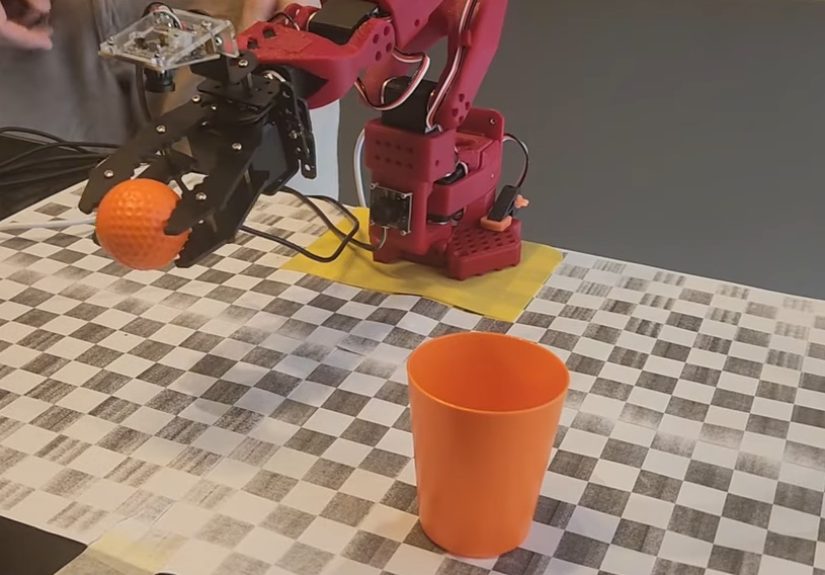
The headline-grabbing demos tend to be simplebut revealing: a robot arm picking up a ball and placing it into a cup, even when the ball and cup move around. That’s a big deal because it shows perception-driven behavior: the model isn’t following one memorized path; it’s using vision to adjust its motion.
In at least one widely shared example, roughly fifty demonstrations were enough to train a model that could complete the task under moderate variation (object positions changing, color changes, and mid-task movement). That doesn’t mean “50 demos solves robotics,” but it does show that hobby-grade autonomy is no longer fantasyit’s an engineering workflow.
What “Autonomy” Looks Like on Your Workbench
Autonomy is usually “robust imitation,” not magic
A good hobby-robot autonomy goal isn’t “general intelligence.” It’s “robust behavior for a clearly defined task in a defined workspace.” Think:
- Pick-and-place: grab a block and drop it into a bin even if the block is slightly offset
- Sorting: move objects of different colors/shapes to different zones
- Simple assembly steps: place a part into a fixture or align it with a marked location
- Drawer-ish interactions (with caution): approach a handle, pull a short distance, or push it closed
The win is not the complexity of the taskit’s the reduction of brittleness. Your robot stops being a choreography machine and becomes a perception-aware system that can handle small variations without you rewriting a script.
The hidden hero: consistency in the setup
Hobby robot learning succeeds when the environment is stable enough to learn from. You don’t need a laboratory, but you do need consistency: a repeatable camera angle, a defined workspace, and a task that fits your robot’s mechanical capabilities.
If your gripper can barely grasp one object reliably, the smartest neural policy in the world won’t fix physics. Good autonomy starts with honest constraints: pick objects your gripper can handle, use surfaces that don’t cause constant slipping, and keep the task definition tight.
Where Things Still Break (So You Don’t Blame the Robot for Being a Robot)
Data quality beats model cleverness
In hobby setups, the most common failure is not “the algorithm is bad.” It’s that the demonstrations are inconsistent or poorly aligned with what the model needs to learn. If your teleoperation is jerky, if resets are inconsistent, or if the camera sometimes can’t see the object, the model will learn exactly that chaos. Faithfully.
Mechanical reality is loud
Low-cost arms often have backlash, encoder noise, serial latency, and variable repeatability across power cycles. Those quirks don’t just annoy youthey affect the causal relationship between observation and action. If the robot’s action arrives late, the model learns a slightly wrong mapping. If joint readings drift, the model learns a shaky sense of “where it is.”
Generalization has boundaries
Vision-based policies can generalize within the envelope of what they’ve seen. But they are not mind-readers. If you trained under bright overhead lighting and then switch to a moody desk lamp, your model may act like it’s never seen an object before. (To be fair, humans also struggle under dramatic lighting. We just call it “a vibe.”)
Practical Tips for Better Results (Without Turning Your Garage Into a Lab)
Design the task for learning
- Start with one object and one clear goal (e.g., “put the cube in the bin”).
- Use a workspace boundary (tape a rectangle on the table) so resets are consistent.
- Keep the object and target within a reasonable reach zone so your demos don’t include awkward stretches.
Collect demonstrations that include variation
- Vary object placement within the camera view (but don’t go wild on day one).
- Include a few “near-failure” demos so the model learns recovery behaviors.
- Record enough episodes that the model sees different paths to success, not one perfect motion.
Be serious about safety
Even small arms can pinch, snag cables, or knock things off a desk. Keep hands clear during autonomous runs, consider a quick power cutoff option, and avoid tasks involving anything fragile or risky until your system is reliable. Autonomy should be funpreferably in a way that doesn’t end with you explaining to your family why the robot “just wanted to see what gravity felt like.”
Why LeRobot Feels Like a Turning Point
The maker world has always had the hardware creativity. What it hasn’t always had is a shared, scalable path from “robot moves” to “robot learns.” LeRobot helps because it treats data as a first-class citizen, uses modern policies that have demonstrated real-world transfer, and encourages sharing datasets and models so hobbyists can build on each other’s progress instead of starting from zero every time.
It also normalizes a healthier robotics workflow: record, visualize, train, evaluate, iterate. That loop is where autonomy is bornnot from a single heroic script, but from repeated refinement.
Field Notes: Real-World Experiences When You Build with LeRobot (About )
If you’re coming from classic hobby robotics, your first “LeRobot moment” will probably be emotional whiplash. You’re used to thinking in angles, delays, and “if this, then that.” Suddenly you’re thinking in episodes, datasets, and success rates. It’s less like programming a robot and more like training a tiny employee who learns from watching youexcept your employee is a robot arm and it never asks for a lunch break.
Most builders report the same early surprise: the hardest part isn’t training the model. It’s getting a clean, repeatable data collection routine. Teleoperation feels intuitiveuntil you realize your demos accidentally encode your own habits. If you always approach the object from the left because it “feels natural,” your policy may also prefer the left even when the right would be better. The fix isn’t philosophical; it’s practical: intentionally vary your approach angles, object placements, and timing so the model sees a richer set of “successful styles.”
Another common experience is learning how much camera placement matters. Move the camera two inches, change the lens field of view, or tilt it slightly, and the robot’s world changes. Many hobbyists end up treating the camera mount like part of the robotsomething you don’t casually bump between runs. A stable mount, consistent lighting, and a workspace that keeps objects in frame will do more for performance than swapping to a fancier model on day one.
People also discover that “reset discipline” is real. If every episode begins with the robot in a slightly different pose, or the object starts half outside the typical region, you’re creating a harder learning problem. That can be greateventually. Early on, it’s a recipe for a policy that looks confused. A practical rhythm emerges: keep the starting state consistent, get the model to succeed, then broaden the distribution (more variation) once you have a baseline that works.
You’ll likely hit at least one “why is it failing now?” moment after a seemingly successful training run. The usual suspects are mundane: a little extra latency, slight mechanical looseness, a change in friction on the table surface, or a USB camera that silently changed exposure behavior. The best builders respond by treating failures as data: they record the failure cases, add demonstrations that address them, and retrain. Over time, this becomes the most satisfying part of the workflowwatching the robot get less brittle because you improved the dataset, not because you wrote a more complicated script.
Finally, there’s a specific kind of joy in the first autonomous run that works “for the right reason.” Not luck. Not because the object happened to be in the exact spot. But because the robot sees it, reaches, adjusts, and completes the task with a little wiggle of real-world adaptability. That’s the moment hobby robots start feeling like systems that learnnot toys that obey.
Conclusion
LeRobot doesn’t magically turn every hobby robot into a sci-fi sidekick. What it does is more valuable: it gives makers a clear, modern workflow for building autonomy through data and learning. Pair that with affordable, 3D-printable hardware and a growing culture of shared datasets and models, and you get something new in hobby robotics: a realistic path from “it moves” to “it adapts.”
If you’ve ever wanted your robot to handle the messy reality of a workbenchobjects slightly out of place, small variations, minor surprisesLeRobot’s approach is worth your time. Because the future of hobby robotics may not be more code. It may be better demonstrations, better datasets, and robots that learn the way humans do: by watching, trying, and improving.