Table of Contents >> Show >> Hide
- What Mercedes-Benz Is Actually Adding (and Why It’s Not Just “Teams in the Dashboard”)
- Where It Shows Up First: The CLA, MB.OS, and the “Software-Defined Car” Moment
- How In-Car Teams Is Expected to Work: A Practical Walkthrough
- Safety Guardrails: “Yes, You Can Be Seen”… but “No, You Can’t Watch the Meeting”
- Security and IT: Why Intune in a Car Is a Big Deal
- Copilot in the Cabin: Productivity… or a Faster Way to Burn Out?
- Availability, Subscriptions, and the Fine Print You’ll Want to Read
- Who This Is For (and Who Should Politely Decline the Invite)
- The Unspoken Issue: Meeting Culture Will Adapt Faster Than Cars Can
- So… Is This the Future of Driving or the Future of Overwork?
- Experiences on the Road: What “Teams in a Mercedes” Feels Like in Real Life
If you thought your commute was the one place your calendar couldn’t find you, Mercedes-Benz would like a word. Actually, it would like a meeting. A Microsoft Teams meeting. In your car.
Mercedes isn’t just tossing a random app icon onto a touchscreen and calling it innovation. The company is building a “mobile work” stack that blends conferencing, identity, and enterprise security into the vehicle’s softwarethen wrapping it all in guardrails meant to keep drivers from treating rush-hour traffic like a conference room. The result is part fascinating, part terrifying, and 100% a sign of where modern cars (and modern work) are headed.
What Mercedes-Benz Is Actually Adding (and Why It’s Not Just “Teams in the Dashboard”)
The headline is “Microsoft Teams in a Mercedes,” but the real story is a set of connected features designed to make in-car productivity feel native rather than duct-taped to a phone mount. Mercedes-Benz has highlighted an updated Meetings for Teams experience, paired with deeper business-account integration and IT-grade controls.
1) An upgraded Meetings for Teams app, built for the car
The updated Meetings for Teams app is designed to let drivers join scheduled calls without juggling a phone. Expect a workflow that looks more like “tap once and talk” than “unlock, open, search, connect, apologize.” Mercedes has described a dashboard-style view that surfaces upcoming appointments (think “what’s next?” at a glance), plus faster access to frequent contacts and meeting actions.
2) A camera twist that people will argue about at length
The most buzz-worthy piece: Mercedes says drivers can use the vehicle’s built-in camera to appear on Teams while the car is movingbut with restrictions designed to minimize distraction. In practice, the driver can be visible to others, while the driver’s own view is limited for safety. No slide decks. No shared screens. And no staring at a grid of faces like it’s a reality show called “Quarterly Business Review.”
3) Enterprise security via Microsoft Intune integration
This is the part that makes corporate IT teams perk up (and then immediately ask about policy controls). Mercedes has said it’s integrating Microsoft Intune into its vehicle operating system so organizations can manage business accounts, separate work and personal data, and enforce security requirementsmore like a managed device than a toy.
4) Microsoft 365 Copilot work is part of the roadmap
Mercedes also describes work with Microsoft to bring Microsoft 365 Copilot into the vehicle experience for meeting prep and information retrieval via voice promptsthink summarizing emails, pulling key details, and helping a driver get oriented without digging through screens.
Where It Shows Up First: The CLA, MB.OS, and the “Software-Defined Car” Moment
Mercedes has positioned these features as part of its next-generation software foundationspecifically its new operating system (MB.OS) and the newest generation of its infotainment interface. Translation: this isn’t a one-off experiment for one trim level. It’s a signal that the car is becoming a platform for servicesnavigation, entertainment, productivity, and whatever comes next.
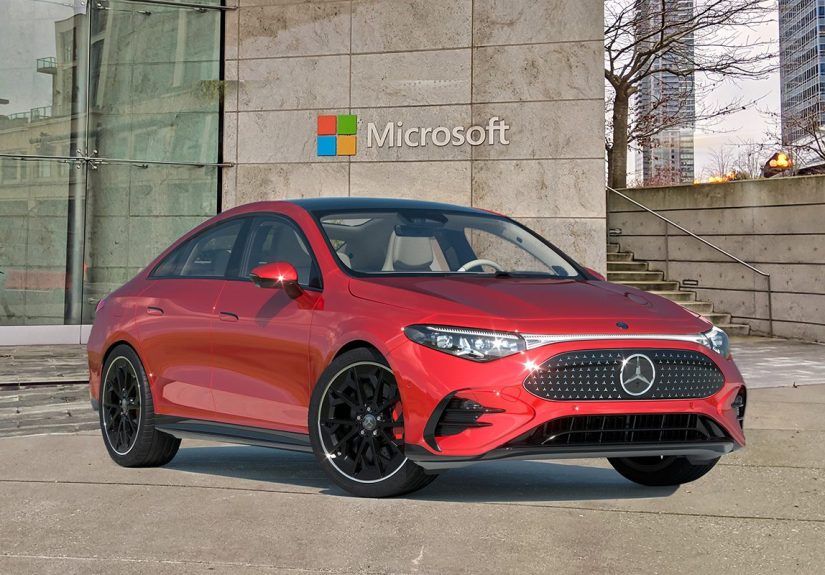
The early rollout focus has been tied to newer vehicles built with that software stack, starting with the all-new CLA. From there, coverage is expected to broaden as more models ship with the right hardware (camera, microphones, connectivity) and the right software baseline.
And yesthis matters. Because “Teams in the car” isn’t just a feature; it’s a bet that the cabin is becoming a third workspace alongside the office and the home office. Some people will love that. Some people will want to throw their calendar into a lake. Both reactions are valid.
How In-Car Teams Is Expected to Work: A Practical Walkthrough
Let’s talk about the day-to-day reality. If this works the way Mercedes describes, a driver experience might look like:
- Get in, get connected. The car’s system connects to its data service (and your account is available). This is where subscriptions and connectivity packages matterno data, no meeting magic.
- See what’s next. A “Next Meetings” style view surfaces upcoming calendar items so you can decide what’s realistic. (Pro tip: if your next meeting is “Quarterly Deep Dive: Spreadsheet Edition,” you might want to reschedule for when you’re parked.)
- Join with minimal steps. A tap or voice prompt joins the meeting. Audio is routed through the car speakers and microphones. The goal is fewer “Can you hear me?” moments and more “Yes, I’m here, and yes, traffic is also here.”
- Use voice for messaging. Expanded chat functions and voice input can help you respond without typing on a glass slab. This is critical, because typing while driving is not “multitasking,” it’s “auditioning for a terrible insurance story.”
- Camera rules kick in. If camera use is allowed where you are, your camera feed may be enabled so others can see you. Meanwhile, the driver-facing display behavior is restricted to reduce distractionno shared screens, no slides, and limited visuals.
Safety Guardrails: “Yes, You Can Be Seen”… but “No, You Can’t Watch the Meeting”
The biggest question is also the simplest: Does this make driving less safe? Mercedes’ approach aims to thread the needle: enable professional presence (others can see you) while limiting what the driver sees.
What’s restricted on purpose
- No shared screens or slides for the driver. The system is designed so the driver won’t view presentation content.
- Video from other participants is limited while driving. The driver is not meant to “watch” the meeting.
- The camera can be turned off. Drivers should be able to disable the in-car camera at any time.
- Legal compliance varies by market. Availability and behavior depend on local regulations and vehicle configuration.
Why that matters
There’s a difference between “being on a call” and “being in a video meeting.” Many drivers already take audio calls hands-free. Mercedes is trying to keep the driver experience closer to that audio-call model, even if your face is visible to others. It’s essentially: talk like you’re in a meeting, but don’t consume meeting visuals like you’re in a meeting.
Still, the best safety feature is the one between the seat and the steering wheel: judgment. If a meeting is stressful, contentious, or likely to tempt you into “just one quick glance,” it’s not a driving meeting. It’s a parking-lot meeting.
Security and IT: Why Intune in a Car Is a Big Deal
For companies that live and die by compliance, a car participating in work workflows raises immediate questions: Where does the data go? Who controls it? What happens when an employee leaves? Can IT enforce device policies?
Mercedes’ Intune integration is aimed at answering those questions with familiar tools. In a best-case scenario, the vehicle can act like an enterprise-managed endpoint for certain work functions:
- Separation of personal and business data so a work account doesn’t become a free-for-all in the cabin.
- Central policy enforcement (access requirements, account restrictions, security rules) under IT administration.
- Account lifecycle controlhelpful for fleet vehicles, executive cars, or shared corporate vehicles.
This also hints at Mercedes’ target customer: not only individual drivers, but also business fleets and professionals who treat their car like a rolling office between sites, clients, airports, and everything in between.
Copilot in the Cabin: Productivity… or a Faster Way to Burn Out?
Mercedes has described work to integrate Microsoft 365 Copilot for meeting preparation and task help via voice prompts. Done well, this could be genuinely useful: quickly summarize unread emails, surface meeting prep notes, or retrieve basic client details without digging through apps.
Where Copilot could shine
- Pre-meeting briefings: “Give me the last email thread summary before this call.”
- Task capture: “Create a follow-up reminder for tomorrow morning.”
- Light research: “What did we decide in last week’s meeting?” (assuming your work systems allow it).
Where Copilot could get dicey
AI tools are only as safe as their usage context. A car is a high-stakes environmentdistraction has real consequences. The right design principles here are simple: audio-first, short responses, minimal cognitive load, and zero temptation to “check just one thing” on a screen.
If Mercedes and Microsoft keep it focused on quick voice interactions, the feature can feel like a smarter version of what many people already do: hands-free calling and quick reminders. If it pushes toward complex back-and-forth while driving, it risks becoming the world’s fanciest way to make traffic worse for everyone.
Availability, Subscriptions, and the Fine Print You’ll Want to Read
In-car productivity features don’t exist in a vacuum. They ride on connectivity, vehicle hardware, market laws, and sometimes paid packages. Mercedes has indicated that some features require an active entertainment/connectivity package and data volume, and that availability can vary by vehicle model, configuration, and region.
In other words: even if your coworker’s car can do it, your car might notat least not yet. The features are tied to newer software platforms and vehicles equipped with the necessary camera and infotainment hardware.
Who This Is For (and Who Should Politely Decline the Invite)
This makes sense for…
- Field sales and account teams moving between client sites who need quick check-ins and scheduling flexibility.
- Consultants and service professionals who spend large parts of the day traveling between locations.
- Executives and managers who want to join briefly, give an update, and dropwithout fumbling with phones.
- Fleet and corporate vehicles that benefit from IT-managed access controls.
This is probably not for…
- Anyone who finds meetings stressful (which is, statistically, most of the human population).
- Drivers in dense city traffic where every extra moment of distraction is a bad trade.
- People who need to watch slides (because the system is designed to prevent that while driving).
- Anyone craving boundaries between “work” and “life” (because this feature is basically a boundary bulldozer).
The Unspoken Issue: Meeting Culture Will Adapt Faster Than Cars Can
Even if the tech is safe-by-design, culture tends to exploit whatever’s available. Once “I’m driving” stops being an automatic excuse, some workplaces will treat commutes as fair game. That’s not a technology problemit’s a boundaries problem wearing a Bluetooth headset.
If you’re the person expected to be available at all times, the best feature might be the one Mercedes doesn’t ship: a big red button labeled “Decline with Confidence.”
Smart etiquette rules if you use Teams in your Mercedes
- Use it for audio-first participation. Updates, listening, quick Q&Asave deep work for later.
- Turn the camera off by default. You don’t need to prove you’re driving; your punctuality already did that.
- Don’t “present” while driving. If you need to share your screen, you need to be parked.
- Set expectations. Tell your team: “I can join for audio only; I’m on the road.”
So… Is This the Future of Driving or the Future of Overwork?
It’s both, depending on how it’s used.
On the one hand, Mercedes and Microsoft are building something genuinely sophisticated: a secure, integrated way to handle work communications in a vehicle, with guardrails that acknowledge driver distraction is not a joke. On the other hand, the mere existence of this feature nudges society toward a world where the last quiet minutes of the day get replaced by “quick sync?” messages.
The healthiest way to view Teams-in-car is as a tool for rare, practical moments: a late-running check-in, a short status update, an unavoidable schedule crunch. Not a mandate. Not a lifestyle. And definitely not a new KPI called “Meetings Attended Per Mile.”
Experiences on the Road: What “Teams in a Mercedes” Feels Like in Real Life
To understand why Mercedes-Benz adding Microsoft Teams to cars is such a lightning-rod idea, it helps to picture the everyday moments it’s aiming to servethe ones where work and travel collide, and your options are basically: miss the meeting, pull over, or improvise.
The “airport-to-client” scramble
Imagine a consultant landing late, grabbing a car, and seeing the next calendar alert pop up before the parking garage exit. With an in-car Teams workflow, joining can be a single stepno fumbling for earbuds, no balancing a phone on a cupholder, no awkward “hold on while I connect” routine. Audio comes through the cabin speakers, the microphone is already positioned for hands-free conversation, and the driver can contribute to the call without doing the digital equivalent of juggling knives. For quick updates“We’re on track,” “I’ll be there in 20,” “Send the deck and I’ll review when parked”it can feel like the car is helping you stay organized rather than tempting you into risky behavior.
The “I just need to listen” meeting
Many meetings are listen-heavy: project status calls, weekly syncs, leadership updates. In those situations, participating from a car can feel similar to listening to a podcastexcept you occasionally unmute to say one sentence that proves you’re alive. The value isn’t flashy; it’s convenience. If the interface keeps visuals limited while driving and emphasizes voice controls, a driver can stay informed without staring at a screen. Done responsibly, this kind of usage can reduce the temptation to grab a phone and “just check what they shared,” because the system is explicitly designed not to show you the presentation content.
The “camera controversy” moment
Then there’s the part people will talk about at dinner parties: appearing on camera while driving. In practice, the experience can be oddly one-sided. Your colleagues see you; you don’t see them. It’s like being on stage without getting to watch the audience reactionprobably a blessing, honestly. Some professionals might appreciate the accountability: “Yes, I’m present, I’m listening, and I’m not secretly folding laundry.” Others will find it invasive: the last thing they want is to feel “watched” while navigating traffic. The best experience here depends less on technology and more on workplace culturewhether teams treat the feature as optional, or as a new expectation.
The sales rep’s rolling office
For a sales rep moving from appointment to appointment, in-car Teams can feel like reclaiming little pockets of time: joining a quick internal huddle, confirming a change with a colleague, sending a voice-driven chat response that prevents a small issue from snowballing. In that scenario, the car becomes a bridge between stops, not a replacement for real work. The “sweet spot” is short interactions: confirm, coordinate, and move on. The moment a meeting turns into a slide review or a tense negotiation, the smart move is pulling overbecause the value of the feature disappears if it increases stress or distracts from driving.
The boundary test
The most realistic “experience” may be psychological: the first time you’re running late and you realize you could join from the driver’s seat, you’ll feel a tiny tugmaybe I should. The tool makes it easier, which can be empowering when used sparingly. But it also makes it harder to defend personal boundaries. The practical solution isn’t complicated: decide your rule ahead of time. Maybe it’s “audio-only while driving,” “camera always off,” or “only for meetings I’m listening to.” Whatever it is, the best user experience is the one where the feature supports your life instead of expanding your workday into every mile.
In the end, Mercedes-Benz adding Microsoft Teams to cars isn’t just a tech update. It’s a mirror held up to modern work: we’re all trying to move faster, communicate more, and somehow still be human. The car can helpif you let it. It can also blur the line between “available” and “alive.” The difference is how you choose to use it.