Table of Contents >> Show >> Hide
- Before You Start: What “Free Music” Really Means
- 1. Use Free Music Streaming Apps
- 2. Get Free Music with Your Public Library Card
- 3. Download Free Legal Music from Artist and Archive Sites
- 4. Transfer or Upload Music You Already Own
- Which Free Music Method Should You Choose?
- Safety Tips for Getting Free Music on iPhone or iPad
- Extra Experience: What It Is Actually Like to Use Free Music on an iPhone or iPad
- Conclusion
Good news: your iPhone or iPad can become a tiny jukebox without your wallet making that dramatic “please stop” noise. The trick is knowing the difference between free music, legal music, and “mysterious MP3 download button surrounded by 19 pop-ups.” Spoiler: we are staying far, far away from the third one.
Whether you want free music streaming on an iPhone, offline songs for a road trip, legal MP3 downloads, library-powered albums, or a better way to enjoy the songs you already own, there are safe options. Some are ad-supported. Some use your public library card. Some focus on independent artists. Some simply help you move music files you already have onto your Apple device.
This guide breaks everything down into four simple, realistic methods. No piracy, no sketchy apps, no “download this profile to your phone” nonsense. Just practical ways to get free music on an iPhone or iPad while keeping your device, your Apple ID, and your sanity intact.
Before You Start: What “Free Music” Really Means
Free music does not always mean the same thing. On an iPhone or iPad, it usually falls into four categories:
- Free streaming with ads: Apps let you listen at no cost, but ads appear between songs or features are limited.
- Free music through a library card: Public library apps may offer music streaming or downloads paid for by your library system.
- Free legal downloads: Artists, archives, or Creative Commons platforms allow downloads under specific terms.
- Your own music files: Music you already own can be synced or uploaded for listening on your iPhone or iPad.
The key word is legal. If a site promises every new album for free, with no ads, no account, no artist permission, and a download button shaped like a casino banner, that is not a music service. That is a digital alleyway wearing a fake mustache.
1. Use Free Music Streaming Apps
The easiest way to get free music on an iPhone or iPad is to use a legitimate streaming app with a free tier. You will not own the songs, and offline listening is usually reserved for paid plans, but you can access a huge amount of music without paying upfront.
Best free music apps for iPhone and iPad
Spotify is one of the most popular options. Its free plan lets users listen to music, discover playlists, follow artists, and build a library of favorites. The trade-off is that you will hear ads, and some mobile features may be limited depending on region and app updates. Still, for casual listening, playlists, workouts, and “I need background music while cleaning the kitchen like I’m in a movie montage,” Spotify Free is hard to beat.
YouTube Music is another strong choice, especially if you love live performances, covers, remixes, DJ sets, and tracks that are not always easy to find on traditional music platforms. The free version is useful for discovery, but background play and offline downloads are generally premium features. That means if you lock your iPhone screen, your free YouTube Music session may not behave like a regular audio app. It is still great when you are actively using the screen or exploring music videos.
Pandora works especially well if you prefer radio-style listening. Instead of building every playlist by hand, you create stations based on artists, songs, or genres. It then learns your taste over time. This is ideal for people who say, “I want something like Fleetwood Mac, but not exactly Fleetwood Mac, and please do not make me think too hard.”
iHeartRadio is excellent for live radio stations, podcasts, and curated music playlists. If you miss the feeling of turning on a local radio station but want it on your iPhone or iPad, this app makes sense. It is especially useful for news, sports, talk shows, and genre-based stations.
Amazon Music also offers free listening with ads and does not require a credit card for its free tier. It is a convenient option if you already use Amazon services, though the best features are typically found in Prime or Amazon Music Unlimited plans.
SoundCloud is where you go when you want to discover emerging artists, DJs, producers, remixes, underground tracks, and songs that have not been polished into corporate elevator music. Many artists upload directly to SoundCloud, making it one of the best free music apps for finding new sounds before they hit the mainstream.
When free streaming is the best option
Free streaming is perfect when you have reliable Wi-Fi or mobile data and do not need permanent downloads. It works well for everyday listening, playlists, music discovery, and casual background sound. The downside is that free tiers usually include ads, fewer playback controls, and limited offline listening.
For most users, the best strategy is simple: install two or three free music apps and use each for its strength. Spotify for playlists, YouTube Music for rare performances, Pandora for radio stations, iHeartRadio for live radio, and SoundCloud for independent artists. Your iPhone will not complain. It has handled worse, including 4,000 unread screenshots.
2. Get Free Music with Your Public Library Card
Here is the method too many people forget: your library card. Yes, that humble rectangle hiding in your wallet may unlock more than books and stern memories of overdue fines. Many public libraries in the United States offer digital music services that work on iPhone and iPad.
Try Freegal Music
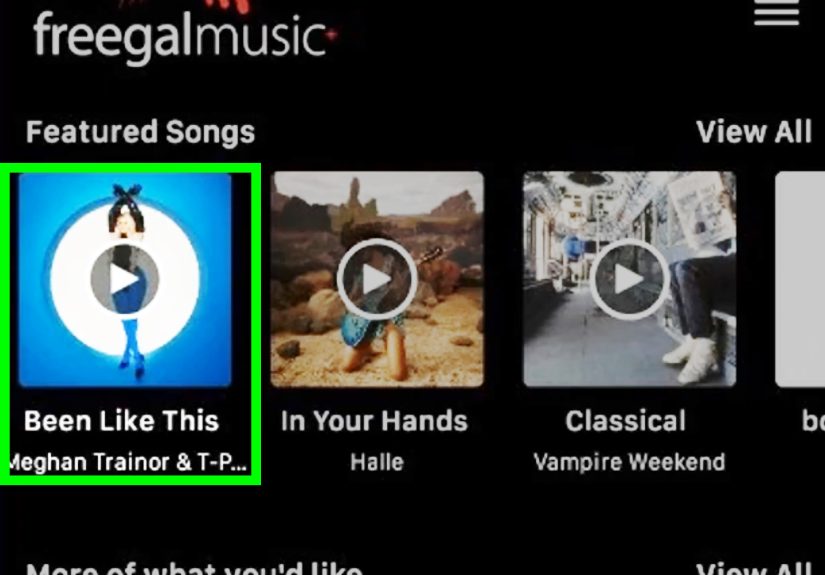
Freegal Music is a library-based music service available through participating public libraries. With the Freegal app, users can stream music and, depending on the library’s rules, download a limited number of songs each week. Some library systems allow DRM-free MP3 downloads, meaning the songs are not locked to one device in the same way subscription downloads often are.
The exact number of weekly downloads varies by library. For example, some libraries allow three songs per week, while others allow five. Many also offer unlimited or generous streaming. The catalog includes millions of songs across many genres, including pop, classical, jazz, country, blues, children’s music, and international releases.
Try Hoopla
Hoopla is another library-powered service that often includes music albums along with ebooks, audiobooks, comics, TV shows, and movies. If your library supports Hoopla, you can borrow albums digitally and stream them through the Hoopla app on your iPhone or iPad. Some titles may also be available for temporary download inside the app for offline listening.
Unlike free commercial streaming apps, library music services usually do not interrupt your listening with ads. The cost is covered by the library system, which means you get a pleasantly civilized listening experience. It feels like sneaking into the VIP lounge, except the bouncer is a librarian and she absolutely knows where everything is.
How to check if your library offers free music
- Visit your local public library website.
- Look for sections called “Digital Library,” “eLibrary,” “Streaming,” “Downloads,” or “Music.”
- Search for Freegal, Hoopla, or other digital media services.
- Download the matching iPhone or iPad app from the App Store.
- Log in with your library card number and PIN.
This is one of the best ways to get free music on an iPhone legally because it supports licensed access. You are not ripping off artists, and you are not feeding your device suspicious files from the internet’s basement.
3. Download Free Legal Music from Artist and Archive Sites
If you want actual music files instead of only streaming access, look for platforms that clearly explain their licenses. Legal free music downloads do exist, especially for independent artists, public domain recordings, live performances, educational audio, and Creative Commons releases.
Use Free Music Archive
Free Music Archive offers access to independent artists and original music that can be played, downloaded, and shared according to each track’s license. This is a strong source for people who enjoy exploring beyond the Top 40. You can find instrumental music, electronic tracks, folk, experimental audio, soundtrack-style pieces, and more.
Before using a track in a video, podcast, or commercial project, check the license carefully. Some songs are free for personal listening but require attribution if reused. Others may not allow commercial use. For simply listening on your iPhone or iPad, the process is usually much easier: download the file legally, store it, and play it through a compatible app.
Explore Internet Archive
Internet Archive is a nonprofit digital library with large audio collections, including music, live recordings, old radio, public domain material, and community-uploaded audio. It is especially useful for historical recordings, older music, and unusual collections you will not find in mainstream apps.
One caution: not everything on a large archive is automatically free for every possible use. Always check the rights information on the item page. Public domain recordings and Creative Commons works can be excellent resources, but the details matter.
Browse Jamendo
Jamendo focuses on independent music and offers free streaming and downloads from artists around the world. It is a good place to discover new bands, ambient music, electronic tracks, acoustic songs, and background music for personal listening. Like other Creative Commons-style platforms, licensing terms can vary, so read before reusing music in public projects.
How to save downloaded music on iPhone or iPad
On iPhone and iPad, downloaded audio files often appear in the Files app, especially in folders such as Downloads, iCloud Drive, or On My iPhone. You can play many audio files directly from Files, save them to a cloud folder, or open them in a third-party music player that supports local files.
If you want those songs inside the Apple Music app itself, you usually need to import the files into the Music app on a Mac or Apple Music/iTunes on Windows, then sync them to your iPhone or iPad. This takes a few extra steps, but it gives you a cleaner library experience.
4. Transfer or Upload Music You Already Own
Not all free music has to come from a new service. Sometimes the best free music is the music you already paid for, ripped from CDs, downloaded legally years ago, or created yourself during that one ambitious garage-band phase. Your iPhone or iPad can play those files if you move them properly.
Sync music from a Mac
If you use a Mac, you can import songs into the Music app, connect your iPhone or iPad with a cable or Wi-Fi sync, and use Finder to sync selected music, albums, artists, or playlists. Apple’s current Mac system uses Finder for device syncing, while the Music app manages your library.
This is useful for MP3, AAC, Apple Lossless, and other supported formats. It also works well if you like carefully organized playlists and album artwork. In other words, this is the neat-freak option, and honestly, respect.
Sync music from Windows
On Windows, you can use iTunes or Apple’s newer Windows apps, depending on your setup. You can import music files into your library, connect your iPhone or iPad, then sync music to the device. If you have a folder full of MP3s, this is one of the most reliable ways to move them into your Apple ecosystem.
Make sure the files are actually yours to use. Music from old purchases, CDs you own, or artist-approved downloads is fine for personal listening. Random files from questionable download sites are not worth the risk.
Upload personal music to YouTube Music
YouTube Music also allows users to upload personal music files from a computer. Supported formats include common types such as MP3, FLAC, M4A, OGG, and WMA. Once uploaded, your personal library can be accessed through YouTube Music. This is handy if you have rare songs, old demos, live recordings, or personal audio files you want available across devices.
Uploads are different from piracy. You are not grabbing songs from strangers; you are storing your own library for personal access. Think of it as putting your music collection in the cloud instead of leaving it trapped on a dusty laptop named “HP-OLD-DO-NOT-DELETE.”
Which Free Music Method Should You Choose?
Choose streaming apps if you want convenience
If you just want to press play and hear music instantly, free streaming apps are the fastest route. Use Spotify, Pandora, iHeartRadio, Amazon Music, YouTube Music, or SoundCloud. Expect ads and some feature limits, but enjoy massive catalogs and easy discovery.
Choose library apps if you want ad-free listening
If your local library supports Freegal or Hoopla, start there. These services can feel surprisingly premium because they are licensed through your library and often have fewer interruptions. They are especially good for families, students, budget-conscious listeners, and anyone who enjoys getting value from public services.
Choose legal download sites if you want files
If you want downloadable songs, explore Free Music Archive, Internet Archive, Jamendo, and artist websites. This route is perfect for independent music fans, creators, collectors, and people who like having files available outside subscription apps.
Choose syncing or uploading if you already own music
If you have a personal music collection, do not ignore it. Sync it from your computer or upload it to YouTube Music. This can be the cleanest way to listen without paying for a new subscription.
Safety Tips for Getting Free Music on iPhone or iPad
Free music should not come with malware, stolen passwords, or a calendar full of spam events. Keep these safety tips in mind:
- Download apps only from the official App Store.
- Avoid websites that promise unlimited new album downloads for free.
- Check licenses before downloading or reusing Creative Commons music.
- Do not install unknown configuration profiles to get “free music.”
- Be careful with apps that ask for unnecessary permissions.
- Use Wi-Fi when streaming heavily to avoid mobile data surprises.
- Back up any legal MP3 downloads you want to keep long term.
Also remember that “offline listening” in many streaming apps does not mean you own the song. It usually means the app stores a temporary protected copy while your subscription or service access remains active. If you want permanent files, use library downloads where allowed, public domain tracks, Creative Commons downloads, artist-approved MP3s, or your own purchased music.
Extra Experience: What It Is Actually Like to Use Free Music on an iPhone or iPad
After trying different free music options on an iPhone or iPad, the biggest lesson is that no single app does everything perfectly. The best experience comes from mixing methods. Free streaming apps are great when you are connected to Wi-Fi and want instant access. Library apps are better when you want fewer ads. Download sites are fun when you are in a discovery mood. Syncing your own files is best when you want full control.
For everyday use, a simple setup works beautifully. Keep one mainstream streaming app for popular songs and playlists. Spotify or Amazon Music can fill that role. Add YouTube Music for live performances, covers, and rare versions. Then install a radio-style app like Pandora or iHeartRadio for moments when you do not want to choose every song manually. This combination turns your iPhone into a flexible music hub without needing a paid subscription.
The iPad experience is slightly different. Because the screen is larger, YouTube Music and SoundCloud feel more comfortable for browsing. It is easier to read artist pages, scroll through playlists, and discover new releases. If you use your iPad while cooking, studying, drawing, or working, free streaming apps can be perfect. Just remember that some free services may stop playing when the screen locks, especially if background play is a paid feature.
Library apps are the hidden gem. Many people overlook them because they sound old-fashioned, but Freegal and Hoopla can be shockingly useful. The login process may feel less polished than a big commercial music app, and availability depends on your local library, but the value is excellent. If your library allows weekly downloads, set a reminder every Monday or Friday to grab a few songs. Over time, you can build a small legal collection without spending anything.
Legal download sites are more adventurous. Free Music Archive, Internet Archive, and Jamendo are not always where you go for the newest chart hit. They are where you go to find a jazz recording from another era, a dreamy electronic track from an independent producer, or an acoustic song that sounds like it was recorded in a cabin with one microphone and a very emotional lamp. The search process takes more patience, but the reward is discovering music that feels personal.
Managing downloaded files on iPhone takes practice. Unlike a computer, iOS does not always put every song neatly into one universal music folder. The Files app helps, but some users may prefer syncing through a Mac or Windows computer so tracks appear in the Music app. If you care about album art, playlists, and organization, syncing is worth the extra effort. If you only need to play a few files occasionally, the Files app is usually enough.
The most important experience tip is to avoid chasing “too good to be true” solutions. Free music is available, but legal free music usually has a reason it is free: ads, library licensing, public domain status, Creative Commons permission, artist promotion, or personal ownership. When a website skips all those explanations and just screams “FREE LATEST SONGS DOWNLOAD NOW,” close the tab. Your future self will thank you, and your iPhone will remain blissfully un-haunted.
In the end, getting free music on an iPhone or iPad is less about finding one secret trick and more about building a smart listening system. Use free streaming for convenience, library services for value, legal archives for discovery, and syncing tools for music you already own. Do that, and you can enjoy hours of music without breaking the law, breaking your budget, or breaking into a cold sweat every time a pop-up appears.
Conclusion
Getting free music on an iPhone or iPad is absolutely possible, but the best options are the legal ones. Use free streaming apps for fast access, public library apps for surprisingly powerful benefits, Creative Commons and public domain sites for legal downloads, and Apple syncing or personal uploads for music you already own. The result is a flexible, budget-friendly music setup that keeps your playlists full and your conscience clean.
You may not get every premium feature for free. Offline playback, ad-free listening, unlimited skips, and background play are often paid perks. But with the right combination of apps and services, you can still enjoy a huge world of free music on your iPhone or iPad without wandering into piracy or sketchy download territory. Your ears win. Your wallet wins. Your device avoids digital swamp creatures. Everybody gets a chorus.