Table of Contents >> Show >> Hide
- What Is Herobrine in Minecraft PE?
- Before You Try: How to Prepare Your Minecraft PE World
- 10 Ways to Summon Herobrine on Minecraft PE Using a Mod
- 1. Use the Herobrine Spawn Egg
- 2. Build a Classic Herobrine Shrine
- 3. Use a Custom Summoning Item
- 4. Activate a Command-Based Summon
- 5. Trigger Herobrine at Night
- 6. Use a Modded Altar Recipe
- 7. Enter a Herobrine Dimension or Structure
- 8. Summon Herobrine Through a Boss Phase Event
- 9. Use a Herobrine Map With Built-In Add-Ons
- 10. Create Your Own Herobrine Summon With Add-On Tools
- Best Tips for Fighting Herobrine in Minecraft PE
- Common Problems When Summoning Herobrine
- Experience Section: What It Feels Like to Summon Herobrine in Minecraft PE
- Conclusion
Herobrine is the Minecraft legend that refuses to log off. He has haunted forum posts, fake screenshots, YouTube thumbnails, campfire stories, and probably at least one cousin’s “totally real” survival world since the early days of the game. But here is the blocky truth: Herobrine is not a standard mob in vanilla Minecraft PE, now part of Minecraft Bedrock Edition. To summon Herobrine on Minecraft PE, you need a mod, add-on, behavior pack, or custom map that actually adds him to the game.
This guide explains ten fun, creative ways players commonly summon Herobrine in Minecraft PE using a mod. Because different Herobrine add-ons use different mechanics, the exact recipe may vary. Some use spawn eggs. Some use command items. Some use creepy altars. Some wait until night and make you regret every life choice involving dark oak forests. The good news? Once you understand how Minecraft PE mods and add-ons work, you can create a spooky Herobrine experience without stuffing your world with random files like a chest full of unorganized cobblestone.
Before we grab the gold blocks and nervous laughter, remember one important rule: always use trusted add-ons, create a backup world, and check whether the mod supports your Minecraft version. Herobrine may be fictional, but broken worlds are very real.
What Is Herobrine in Minecraft PE?
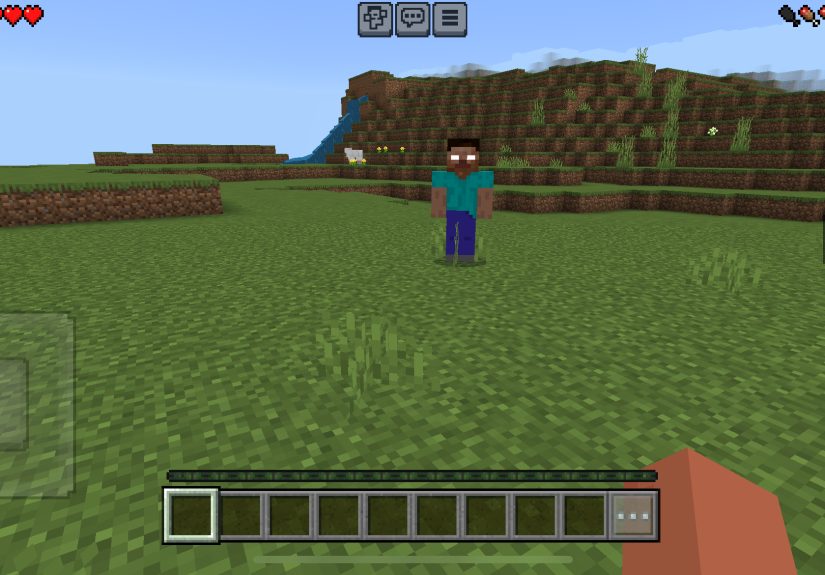
Herobrine is one of Minecraft’s most famous myths: a mysterious, Steve-like figure with glowing white eyes who supposedly appears in abandoned worlds, builds strange structures, stalks players, and generally behaves like the world’s creepiest server admin. The character began as a community legend, not an official gameplay feature. Over time, Herobrine became so famous that modders turned him into bosses, stalker mobs, horror entities, and custom adventure-map villains.
In Minecraft PE, which runs on Bedrock Edition, most “mods” are usually add-ons. These often include a behavior pack, which controls entity behavior, and a resource pack, which controls textures, models, sounds, and visual effects. When both are activated correctly, the game can add custom mobs, items, structures, sounds, particles, and boss fights. That is how Herobrine enters the chatuninvited, naturally.
Before You Try: How to Prepare Your Minecraft PE World
Before summoning Herobrine, set up your world properly. Many Herobrine add-ons need both the behavior pack and resource pack enabled. If you only activate one, you may end up with invisible mobs, missing textures, or an entity that looks less like a terrifying legend and more like a confused block of cheese.
Create a Backup World
Herobrine mods can add aggressive mobs, lightning, explosions, structure generation, custom effects, or boss mechanics. Do not test them in your favorite survival world where you spent six months building a castle, a villager trading hall, and an emotional attachment to a horse named Pickles. Copy the world first or create a new test world.
Use Creative Mode First
Creative mode lets you find spawn eggs, custom items, altar blocks, and command tools more easily. Once you know how the mod works, you can try the same summon method in survival mode if the add-on supports it.
Check Mod Instructions
Every Herobrine add-on is a little different. Some require Experimental Features. Some need Holiday Creator Features or Beta APIs. Some work only on certain Minecraft versions. Read the mod description before assuming the ancient ritual is “gold, netherrack, fire, panic.”
10 Ways to Summon Herobrine on Minecraft PE Using a Mod
1. Use the Herobrine Spawn Egg
The easiest way to summon Herobrine on Minecraft PE using a mod is with a custom spawn egg. Many Herobrine add-ons add a new egg to the Creative inventory. It may be named “Herobrine,” “Herobrine Boss,” “Cursed Herobrine,” “Herobrine Entity,” or something equally comforting, like “Do Not Spawn.” Naturally, that means everyone spawns it immediately.
To use this method, activate the Herobrine behavior pack and resource pack, create or open your world, switch to Creative mode, and search the inventory for the custom egg. Tap the ground to spawn Herobrine. If the add-on is working correctly, the entity should appear with its custom model, texture, sounds, and behavior.
This method is best for beginners because it avoids guessing recipes or commands. It is also useful for testing whether the add-on installed correctly. If the spawn egg appears but the mob looks invisible or strange, the resource pack may not be active. If the egg does nothing, the behavior pack may not be active or the mod may not match your Minecraft version.
2. Build a Classic Herobrine Shrine
The classic Herobrine shrine is the old-school ritual that launched a thousand spooky videos. The traditional design usually involves gold blocks, netherrack, redstone torches, mossy cobblestone, or fire. In vanilla Minecraft, this structure does nothing except look suspicious. With the right Herobrine mod, however, the shrine can trigger a custom summon event.
A common version uses gold blocks as the base, a special Herobrine block or netherrack in the center, and fire on top. Some mods detect the structure automatically. Others require you to use a special item on the shrine. The moment the ritual activates, you may see lightning, particles, chat messages, or sudden darkness. If your screen starts flickering and the cave noises begin, congratulations: your peaceful afternoon has been promoted to horror content.
This method is ideal for players who want a cinematic experience. It feels more dramatic than using a spawn egg and gives your world a story. You are not just spawning a mob; you are making a terrible architectural decision with consequences.
3. Use a Custom Summoning Item
Many Minecraft PE Herobrine mods add a special item used to call him into the world. It might be named “Herobrine Totem,” “Cursed Crystal,” “Dark Summoner,” “Herobrine Soul,” or “Ancient Relic.” These items often appear in the Creative inventory or can be crafted in survival mode if the add-on includes a recipe.
Once you have the item, the usual method is simple: hold it, tap or long-press on the ground, and wait for the event. Some add-ons make Herobrine appear instantly. Others begin a short sequence with thunder, fog, warning messages, or hostile minions.
This method is great because it gives players more control. You can choose the exact location, set up an arena, prepare supplies, invite friends, and then make everyone question why they trusted you. For best results, summon Herobrine far away from important builds. Boss mobs with custom powers are not known for respecting interior design.
4. Activate a Command-Based Summon
Some Herobrine add-ons support command-based summoning. In Minecraft PE, commands can spawn entities if the add-on registers them correctly. The command format varies by mod, but it often uses a custom entity identifier. For example, a mod may include an entity with an identifier similar to “herobrine:herobrine” or another custom namespace.
This is a cleaner method for players who enjoy testing add-ons or creating maps. Commands make it possible to summon Herobrine at exact coordinates, inside arenas, at the start of an adventure map, or when a player steps on a pressure plate connected to a command block.
Use this method carefully. If you spawn too many Herobrines at once, your phone may respond with the digital equivalent of “absolutely not.” Mobile devices have limits, especially when add-ons include custom particles, animations, sounds, minions, or boss attacks.
5. Trigger Herobrine at Night
Some Herobrine mods are designed around atmosphere instead of instant boss fights. These add-ons may spawn Herobrine only at night, during thunderstorms, or when the player enters dark areas. Instead of summoning him directly, you create the right conditions and let the mod do the haunting.
To try this method, set the time to night or wait naturally in survival mode. Explore forests, caves, abandoned villages, or custom structures if the mod adds them. Herobrine may appear briefly, teleport away, spawn minions, leave signs, or stalk from a distance. This style works especially well for players who want a scary survival experience rather than a one-minute boss battle.
The best part is the suspense. With a spawn egg, you know exactly when trouble begins. With a night-trigger mod, every sound becomes suspicious. Was that a zombie? Was that Herobrine? Was that your own footstep? Minecraft suddenly becomes less “cozy block game” and more “why is there a figure standing between those trees?”
6. Use a Modded Altar Recipe
Some Herobrine add-ons include a more advanced altar system. Instead of building a decorative shrine, you must place specific blocks in a specific pattern. The recipe might include soul sand, crying obsidian, redstone, nether blocks, candles, skulls, or a custom Herobrine block. Once complete, the altar activates and summons the entity.
This method is popular because it makes the summon feel earned. Players gather materials, build the structure, and prepare for the fight. In survival mode, that gives the process a mini-quest feeling. You are not just tapping an egg; you are collecting cursed ingredients like a chef whose restaurant has terrible safety ratings.
If the altar does not work, double-check the pattern, block orientation, world settings, and add-on version. Some mods require the ritual to happen at night. Others require fire, lightning, or a special item to complete the final step.
7. Enter a Herobrine Dimension or Structure
More ambitious Minecraft PE Herobrine mods may add custom structures, dungeons, portals, or boss arenas. In these add-ons, Herobrine is not summoned in the ordinary overworld. Instead, players must locate or create a special place where the boss appears.
For example, a modded world may include a ruined temple, cursed cave, mysterious portal, or custom arena. When the player enters, Herobrine spawns as part of the scripted event. This is one of the most exciting methods because it feels like an adventure map. You explore, discover clues, fight minions, and eventually meet the legend himself.
This method works well for multiplayer. Friends can prepare together, divide supplies, and then blame each other when someone accidentally triggers the boss early. It also gives content creators a better story structure: setup, journey, discovery, battle, and dramatic screaming.
8. Summon Herobrine Through a Boss Phase Event
Some add-ons treat Herobrine as a multi-stage boss. Instead of appearing immediately, he may be summoned after you defeat another mob, break a cursed block, complete a ritual, or survive waves of enemies. This makes the encounter more challenging and less predictable.
A boss phase event may begin with weak minions, then introduce stronger enemies, lightning attacks, teleportation, and finally Herobrine himself. The mod may give him a health bar, special sounds, custom drops, or rare loot. If you enjoy boss fights, this is one of the best ways to summon Herobrine because it adds progression.
Bring armor, food, a bow, blocks, and a backup plan. Also bring humility. Herobrine boss mods are famous for turning overconfident players into inventory explosions.
9. Use a Herobrine Map With Built-In Add-Ons
Another easy method is to download or create a Herobrine-themed world that already includes the required add-ons. Many Minecraft PE horror maps come packaged with behavior packs and resource packs. When you open the world, the Herobrine mechanics are already installed, and the map guides you through the summon naturally.
This approach is excellent for players who do not want to configure packs manually. The map may include signs, dialogue, clues, command blocks, custom structures, and scripted scares. Instead of asking, “How do I summon Herobrine?” the map answers, “Walk into this obviously cursed hallway.”
For SEO searchers looking for “Herobrine Minecraft PE mod,” “MCPE Herobrine add-on,” or “how to spawn Herobrine in Minecraft PE,” maps are often the most beginner-friendly option. They combine installation, atmosphere, and gameplay into one experience.
10. Create Your Own Herobrine Summon With Add-On Tools
If you like tinkering, you can create your own Herobrine-style summon using Minecraft Bedrock add-on tools. This requires more effort, but it gives you full control. A custom behavior pack can define a new entity, while a resource pack can give it a Herobrine-like texture. You can also use commands, loot tables, functions, animations, sounds, and spawn rules to make the encounter unique.
For a simple version, you could create a custom mob with a Steve-like model, glowing white eyes, increased speed, high attack damage, and teleport-like behavior. Then you could connect the summon to a function command, an item, or a structure trigger. This is the “I became the modder” route, and it is perfect for players who want more than a pre-made add-on.
It also teaches useful Bedrock Edition concepts: resource packs, behavior packs, entity files, textures, manifests, and world settings. Herobrine may be the spooky hook, but the real reward is learning how add-ons work. That is how you go from “I downloaded a mod” to “I made my friends afraid of my custom forest biome.”
Best Tips for Fighting Herobrine in Minecraft PE
Prepare the Arena
Do not summon Herobrine in your storage room unless you enjoy sorting items while crying. Build an arena with space to move, walls to block attacks, and light to reduce extra mob spawns. Flat terrain helps, especially if the mod gives Herobrine teleportation or ranged attacks.
Bring Strong Gear
Use diamond or netherite armor if the mod is difficult. Bring a shield if supported, plenty of food, golden apples if available, a bow, arrows, blocks, and backup weapons. Some Herobrine mods spawn minions, so area control matters.
Play With Friends
Herobrine is more fun in multiplayer. One player can distract him, another can attack from range, and one brave soul can run around yelling, “I have half a heart!” which is technically not strategy but does improve the drama.
Lower Your Settings if Needed
If the mod uses heavy particles, lightning, fog, or many mobs, reduce render distance and fancy graphics. Minecraft PE runs on many devices, and performance can vary. A smooth fight is better than a slideshow starring Herobrine.
Common Problems When Summoning Herobrine
The Spawn Egg Does Not Appear
If the Herobrine spawn egg is missing, the behavior pack may not be enabled. Check your world settings and make sure the correct pack is active. Also confirm that the add-on supports your current Minecraft PE version.
Herobrine Is Invisible
This usually means the resource pack is missing or inactive. The behavior exists, but the texture or model is not loading. Enable the matching resource pack and restart the world.
The Ritual Does Nothing
The structure may be incorrect, the mod may require a specific time of day, or you may need to use a custom item on the altar. Read the add-on’s instructions and test in Creative mode.
The Game Crashes
Some add-ons are too heavy for certain mobile devices or conflict with other packs. Try using only one Herobrine add-on at a time, lower graphics settings, and test in a fresh world.
Experience Section: What It Feels Like to Summon Herobrine in Minecraft PE
The first time you summon Herobrine in Minecraft PE using a mod, the experience is usually half excitement and half “why did I do this alone at night?” The setup often feels harmless. You create a new world, activate the packs, grab a few blocks, and build a little shrine. Everything looks normal. The grass is green, the sheep are judging you silently, and your inventory is full of suspicious items. Then you light the top block, use the custom summoning item, or tap the spawn egg, and suddenly the world does not feel normal anymore.
A good Herobrine mod understands pacing. The scariest moment is not always the fight. Sometimes it is the few seconds before anything happens. The sky darkens. Thunder hits nearby. A strange sound plays. A message appears in chat. You turn around because you thought you saw something between the trees. Maybe it was just a leaf block. Maybe it was not. Minecraft’s simple graphics make this surprisingly effective. A figure with white eyes standing far away can be creepier than a highly detailed monster, because your imagination fills in the blanks like an overworked horror director.
In survival mode, the experience becomes even better. You are not just testing a feature; you are risking your gear. Suddenly, every practical choice matters. Did you bring enough food? Did you set your spawn point? Did you build the arena far enough from your house? Did you remember that your pet wolf is nearby and absolutely not ready for supernatural combat? Herobrine turns a normal world into a story, and that is why players keep returning to the myth. The fun is not only defeating him. The fun is creating a moment that feels legendary.
Multiplayer makes the whole thing even more chaotic. One player wants to read the instructions carefully. Another player is already lighting the shrine. A third player says, “What does this button do?” and the answer is usually lightning. When Herobrine appears, everyone instantly develops a different strategy. Someone fights bravely. Someone builds a dirt tower. Someone runs into a cave and claims it was “tactical repositioning.” These messy, funny reactions are exactly what make Minecraft PE mods so entertaining.
After the fight, the world feels changed. Maybe you earned a custom drop. Maybe the shrine is destroyed. Maybe your base survived, except for the part that used to be a wall. Either way, the summon becomes part of the world’s history. That is the real magic of Herobrine mods: they turn a simple sandbox into a shared legend. Vanilla Minecraft gives you blocks; mods give you myths to build around them.
Conclusion
Summoning Herobrine on Minecraft PE using a mod is one of the most iconic ways to add mystery, danger, and a little pixelated paranoia to your world. Whether you use a spawn egg, build a classic shrine, trigger a custom item, explore a haunted map, or create your own add-on, the key is understanding that Herobrine comes from community-made contentnot vanilla Minecraft.
For the best experience, use a compatible Minecraft PE add-on, activate both behavior and resource packs, test in Creative mode, and create a backup before unleashing a legendary nightmare next to your favorite build. Herobrine may not be real in the official game, but with the right mod, he can become very real in your worldusually right when you least want him to be.