Table of Contents >> Show >> Hide
- What You Need Before Recording CD to Cassette
- Important Setup Rules for Better Cassette Recordings
- Method 1: Use the Amplifier’s Tape Loop
- Method 2: Use the Amplifier’s Record Output Selector
- Method 3: Connect the CD Player Directly to the Cassette Deck and Use the Amplifier for Monitoring
- Method 4: Use a Modern Receiver’s Zone 2, Pre-Out, or Line Output
- Method 5: Use an All-in-One CD/Cassette Recorder with the Amplifier
- How to Set Recording Levels Like You Know What You’re Doing
- How to Split CD Tracks Across Cassette Sides
- Troubleshooting Common Problems
- Best Practices for Recording CD to Cassette
- Real-World Experience: What It Feels Like to Record a CD to Cassette Using an Amplifier
- Conclusion
Recording a CD to an audio cassette using an amplifier sounds like something your cool uncle did in 1992 while wearing socks with sandalsand honestly, he was onto something. Cassettes are warm, portable, nostalgic, and just fussy enough to make the process feel like a tiny home-studio ritual. The good news? You do not need a recording engineering degree, a soldering iron, or a time machine. You need a CD player, a cassette deck, an amplifier or receiver, the right cables, and a little patience.
This guide explains five practical ways to transfer music from CD to cassette through an amplifier setup. Whether you have a vintage stereo receiver with a proper tape loop, a modern amp with limited outputs, or an all-in-one CD/cassette recorder, the goal is the same: send a clean line-level signal from the CD source into the cassette recorder, monitor the sound through your amplifier, and set recording levels so your tape sounds lively instead of crunchy.
Before we start, one important warning: never connect speaker outputs from an amplifier directly into a cassette deck’s line input. Speaker outputs are amplified power signals, not recording signals. Feeding them into a tape deck can damage the deck, the amplifier, or both. Cassette decks want line-level audio from jacks labeled “REC OUT,” “TAPE OUT,” “LINE OUT,” “PRE OUT,” or similarnot the terminals that drive speakers.
What You Need Before Recording CD to Cassette
To record a CD to an audio cassette using an amplifier, gather the following basics:
- A working CD player, DVD player, Blu-ray player, or CD transport with analog audio output
- A cassette deck with recording capability
- An amplifier or stereo receiver
- Two or three stereo RCA cables, depending on the connection method
- A blank cassette tape, preferably Type I normal or Type II chrome if your deck supports it
- Headphones or speakers for monitoring
- A clean cotton swab and isopropyl alcohol for cleaning the tape path
Most classic home audio systems use red and white RCA connectors. Red is right channel, white is left channel. If your CD player only has a 3.5 mm headphone output, you can use a 3.5 mm-to-RCA cable, but a true line output is usually cleaner and easier to control. If your amplifier has a “TAPE,” “REC OUT,” or “TAPE MONITOR” section, congratulationsyou own the cassette-recording equivalent of a secret passageway.
Important Setup Rules for Better Cassette Recordings
Use Line-Level Connections
Cassette decks are designed to record from line-level inputs. That usually means RCA jacks labeled “LINE IN,” “REC IN,” or “INPUT.” Your CD player’s analog output, amplifier’s tape record output, or receiver’s record output is suitable. Speaker terminals are not.
Clean the Tape Heads First
If your cassette recording sounds dull, muffled, or uneven, the tape deck may not be the villainit may just be dirty. Clean the record/playback head, capstan, and pinch roller before making an important recording. A clean tape path improves high-frequency response and helps prevent wobbly sound.
Choose the Right Tape Type
Type I normal tapes are widely compatible and great for everyday recording. Type II chrome or high-bias tapes can offer better high-frequency performance if your deck supports them. Avoid old, damaged, sticky, or squeaky tapes unless you enjoy the sound of your favorite album being eaten by a plastic rectangle.
Set Recording Levels Carefully
Cassette recording is a balancing act. Too low, and the tape hiss becomes obvious. Too high, and the music distorts. A safe starting point is to let the loudest parts of the CD peak around 0 dB on the deck’s meter, with occasional peaks slightly above that if the tape and deck handle it well. If the meters stay buried in the red, back off the record level.
Understand Dolby Noise Reduction
If your deck has Dolby B, Dolby C, or another noise reduction system, use it only if you plan to play the tape back with the same setting. Dolby can reduce hiss, but mismatched settings may make playback sound dull or unnaturally bright. For a tape that will be played on random boomboxes, car stereos, or mystery machines from a thrift store, Dolby B or no Dolby may be the safest choice.
Method 1: Use the Amplifier’s Tape Loop
The classic and most reliable way to record a CD to cassette is by using an amplifier or receiver with a dedicated tape loop. This is how many home stereo systems were designed to work. The CD player sends audio into the amplifier, and the amplifier sends that selected source out to the cassette deck for recording.
How to Connect It
- Connect the CD player’s RCA output to the amplifier’s “CD,” “AUX,” or “LINE IN” input.
- Connect the amplifier’s “TAPE REC OUT” or “TAPE OUT” jacks to the cassette deck’s “LINE IN” or “REC IN” jacks.
- Connect the cassette deck’s “LINE OUT” or “PLAY OUT” jacks back to the amplifier’s “TAPE IN” or “PLAY IN” jacks.
- Select “CD” on the amplifier as the source.
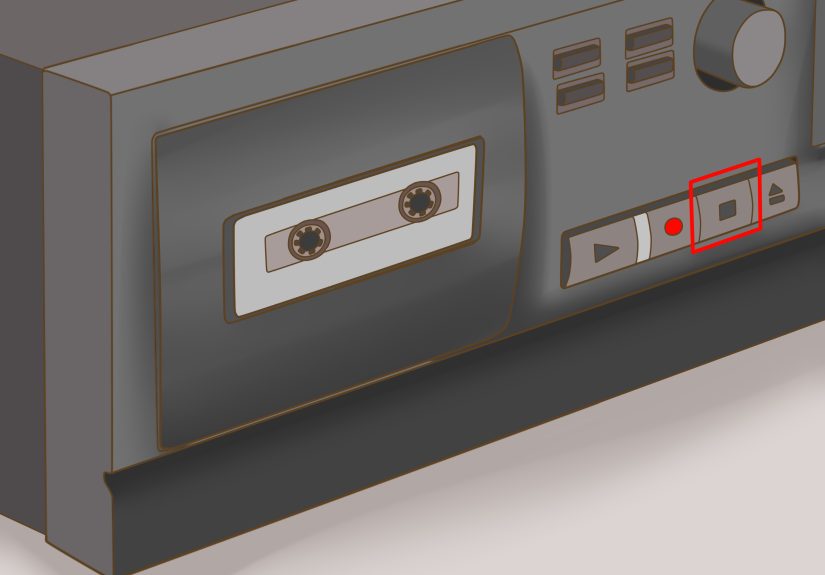
- Insert a blank cassette and press record-pause on the deck.
- Start the CD, adjust the cassette deck’s recording level, rewind or restart the CD, then begin recording.
This method is popular because the amplifier acts as the routing hub. You can listen through your speakers while the cassette deck receives a stable line-level signal. If your amplifier has a “Tape Monitor” button, you may be able to compare the incoming CD signal with the recorded signal while the tape is rolling, especially on a three-head cassette deck.
Example: Suppose you are copying a 12-track jazz CD to a C-60 cassette. A C-60 gives you about 30 minutes per side. If the album is 48 minutes long, you can place tracks 1–6 on Side A and tracks 7–12 on Side B, leaving a few seconds of silence between sides. Very fancy. Very mixtape-era professional.
Method 2: Use the Amplifier’s Record Output Selector
Some vintage amplifiers and receivers include a separate “REC SELECTOR” or “Record Out Selector.” This feature lets you choose which source goes to the cassette deck independently from what you are listening to. It is a small knob with big studio energy.
Why This Method Is Useful
A record output selector is helpful when you want to record the CD while listening to something else, or when your amplifier has multiple tape decks connected. In many setups, the selected recording source is sent through the “REC OUT” jacks at a fixed level, while the volume knob only affects the speakers.
Steps to Record
- Connect the CD player to the amplifier’s CD input.
- Connect the amplifier’s tape record output to the cassette deck’s record input.
- Connect the cassette deck’s output back to the amplifier for playback monitoring.
- Set the record selector to “CD.”
- Put the cassette deck in record-pause mode.
- Play the loudest track or chorus on the CD and set the recording level.
- Restart the CD and begin recording.
The main advantage is control. The amplifier’s volume control normally does not change the signal being recorded from the record output, so you can turn the speakers down without affecting the tape. This is perfect for late-night recording when everyone else is asleep and you are trying to preserve a CD like an analog archaeologist.
Method 3: Connect the CD Player Directly to the Cassette Deck and Use the Amplifier for Monitoring
If your amplifier does not have a tape record output, you can still use it in the system by sending the CD player directly into the cassette deck, then sending the cassette deck’s output to the amplifier for monitoring. This is a simple workaround for modern amplifiers that have inputs but no recording outputs.
How to Connect It
- Connect the CD player’s analog RCA output directly to the cassette deck’s “LINE IN” or “REC IN.”
- Connect the cassette deck’s “LINE OUT” to an amplifier input such as “AUX,” “LINE,” or “TAPE.”
- Select that input on the amplifier so you can hear the deck.
- Insert a blank cassette and press record-pause.
- Play the CD and adjust the cassette deck’s recording level.
- Restart the CD and begin the recording.
This method bypasses the amplifier for the actual recording signal, but still uses the amplifier to monitor playback. It is clean, direct, and often produces excellent results because the CD player feeds the deck without extra switching circuitry in between.
One limitation: if your CD player has only a variable headphone output, the headphone volume becomes part of your recording level. Start low, increase gradually, and watch the cassette deck’s meters. If the CD player’s headphone output is too hot, the deck may distort even when its record level is set modestly. In that case, use a lower headphone volume or a proper line output if available.
Method 4: Use a Modern Receiver’s Zone 2, Pre-Out, or Line Output
Many modern AV receivers dropped traditional tape loops, probably because someone in a conference room decided cassettes were “over.” Rude, but survivable. Some modern receivers still provide useful analog outputs such as “Zone 2 Out,” “Pre Out,” or “Line Out.” Depending on the model, these outputs may be able to send analog audio to your cassette deck.
How to Try This Safely
- Connect the CD player to the receiver using analog RCA inputs if possible.
- Connect the receiver’s “Zone 2 Out,” “Line Out,” or compatible analog output to the cassette deck’s “LINE IN.”
- Connect the cassette deck’s output to an available analog input on the receiver or to a separate amplifier.
- Select the CD input for the output zone or record path.
- Test with record-pause and watch the cassette deck’s meters.
This method depends heavily on the receiver. Some Zone 2 outputs only work with analog sources, not HDMI or optical digital inputs. If your CD player is connected by optical cable only, the receiver may not pass that digital source to the analog output. The easy fix is to connect the CD player using stereo RCA cables, or use an external digital-to-analog converter between the CD player and cassette deck.
Also check whether the output is fixed or variable. A fixed output is usually easier for recording because the receiver’s volume knob will not change the signal. A variable output can still work, but you must set the volume carefully and avoid accidental knob-twisting disasters. One enthusiastic volume adjustment can turn your smooth recording into a crunchy cassette sandwich.
Method 5: Use an All-in-One CD/Cassette Recorder with the Amplifier
An all-in-one CD/cassette recorder is the easiest path if you want fewer cables and fewer chances to mutter at the back of your stereo cabinet. Units from brands such as TEAC and TASCAM combine a CD player and cassette recorder in one component. Many can record from CD to cassette internally, while the amplifier simply handles playback through speakers.
How It Works
- Connect the all-in-one unit’s line output to an amplifier input such as “AUX” or “CD.”
- Insert the CD and a blank cassette.
- Select CD as the recording source on the unit.
- Choose the cassette direction and tape type if required.
- Set the recording level if the unit allows manual control.
- Start the CD-to-tape recording function.
This method is convenient because the CD and cassette sections are already matched inside one device. Some models also allow recording from line input, cassette to USB, CD to USB, or USB to cassette. If you want a neat setup for a family room, school media lab, church archive, or small studio, an all-in-one recorder is refreshingly practical.
The tradeoff is flexibility. A high-quality standalone cassette deck connected to a good amplifier may give you more control over bias, levels, tape type, monitoring, and noise reduction. But for everyday CD-to-cassette recording, an all-in-one deck is simple and dependable. It is the “press fewer buttons, spill less coffee” option.
How to Set Recording Levels Like You Know What You’re Doing
Good cassette recording is mostly about levels. CDs can have strong peaks, especially modern remastered albums. Start by playing one of the loudest songs on the CD while the cassette deck is in record-pause mode. Watch the meters and adjust the deck’s recording level.
For Type I tapes, aim for peaks around 0 dB, with occasional brief movement above that if the sound remains clean. For Type II tapes, many decks can handle slightly hotter peaks, but do not assume every tape loves punishment. Listen carefully. If cymbals splash, vocals sound fuzzy, or bass turns into a cardboard thunderstorm, reduce the level.
If your deck has left and right recording controls, balance both channels so one side is not louder than the other. Some CDs are mixed asymmetrically, so do not obsess over every flicker of the meter. The goal is a strong, clean average levelnot a meter-reading masterpiece worthy of a museum plaque.
How to Split CD Tracks Across Cassette Sides
A cassette side has a time limit. A C-60 cassette gives about 30 minutes per side, a C-90 gives about 45 minutes per side, and a C-120 gives about 60 minutes per side. C-120 tapes are thinner and more fragile, so they are not ideal for important recordings. C-60 and C-90 tapes are safer choices.
Before recording, check the CD’s total running time and track lengths. Plan where Side A should end. If the album is 42 minutes long, a C-60 is easy. Put roughly half the album on each side. If the album is 74 minutes long, use a C-90 and divide it carefully. Leave a few seconds of silence at the beginning and end of each side so the tape leader does not cut off the music.
Troubleshooting Common Problems
The Cassette Records Silence
Check that the cassette deck is connected to an output, not another input. “TAPE OUT” or “REC OUT” from the amplifier should feed “LINE IN” on the deck. Also make sure the amplifier’s correct source is selected.
The Recording Is Distorted
Your input level is too high. Lower the cassette deck’s record level. If using a headphone output from a CD player, reduce that volume too. Distortion recorded to tape cannot be fixed later by apologizing to it.
The Recording Is Too Quiet
Increase the cassette deck’s record level and confirm the CD player is outputting a strong signal. If using a variable output, raise it gradually while watching the meters.
The Tape Sounds Dull
Clean the tape heads, check the tape type setting, and make sure Dolby playback matches the Dolby setting used during recording. Also remember that old blank tapes may have degraded.
Only One Speaker Has Sound
Check the RCA cables. Red should go to red, white to white. A loose cable can drop one channel. Swap cables to see whether the problem follows the cable, the deck, or the amplifier.
Best Practices for Recording CD to Cassette
Use the best source connection available. A clean analog output from a CD player is usually better than a noisy headphone jack. Use short, decent-quality RCA cables, but do not fall into the trap of thinking a cable that costs more than your cassette deck will magically summon studio angels.
Record in real time. High-speed dubbing can be convenient, but real-time recording usually gives you better control and fewer surprises. Monitor the first few minutes of the tape, especially if the cassette deck has been sitting unused for years.
Label your tapes immediately. Write the album name, date, Dolby setting, tape type, and source. Future you will be grateful. Future you may also wonder why you recorded a Christmas CD in July, but that is between you and your playlist.
Finally, respect copyright. Making a personal cassette copy of music you own for private listening may be acceptable in many everyday situations, but distributing copies is a different matter. Keep your mixtape magic personal unless you have permission.
Real-World Experience: What It Feels Like to Record a CD to Cassette Using an Amplifier
The first thing you notice when recording a CD to cassette through an amplifier is that the process slows you down in a surprisingly pleasant way. Streaming makes music feel weightless. A cassette makes it feel like an event. You choose the CD, open the tray, place the disc inside, unwrap or inspect a blank tape, check the tabs, clean the deck, and press buttons with real mechanical commitment. Nothing says “I am serious about this album” like waiting for a cassette leader to pass before the music starts.
In practice, the tape-loop method feels the most natural if you have vintage gear. The amplifier becomes command central. The CD player sits on one input, the cassette deck sits on the tape loop, and everything behaves exactly as classic hi-fi designers intended. You can sit between the speakers, watch the cassette meters bounce, and adjust the level during a loud chorus. There is a small thrill in catching the hottest part of a song and setting the record level just right. It is not difficult, but it rewards attention.
The direct CD-to-deck method is more minimalist. It feels almost like plugging a microphone into a recorder: source goes in, tape comes out. This is useful when a modern amplifier lacks record outputs. You still use the amplifier for monitoring, but the signal path is shorter. The main lesson from this setup is to trust the meters more than your excitement. Many people record too hot at first because louder sounds better for about five secondsthen the chorus arrives and the tape folds like a lawn chair.
Using a modern receiver’s Zone 2 or line output can be satisfying, but it is also where you learn that modern home theater gear does not always love old-school recording. Some receivers refuse to send digital sources to analog outputs. Others require a separate zone setting buried in a menu that looks like it was designed by a committee of sleepy robots. When it works, it works well. When it does not, the simplest fix is usually to connect the CD player with analog RCA cables instead of relying on optical or HDMI.
All-in-one CD/cassette recorders are the easiest emotionally. You press fewer buttons, use fewer cables, and spend less time behind furniture. For schools, offices, churches, or anyone transferring spoken-word CDs to cassette, this method is wonderfully practical. For hobbyists, though, a separate deck and amplifier can feel more rewarding because you control more variables. You can choose a favorite deck, compare tape brands, experiment with Dolby, and fine-tune levels by ear.
The biggest experience-based tip is to make a test recording before committing a full album. Record one loud song, stop, rewind, and play it back. Listen for distortion, hiss, dullness, channel imbalance, or warble. If it sounds good, continue. If not, fix the problem before recording 45 minutes of disappointment. Tape is forgiving, but not psychic.
Another practical habit is to keep a small notebook or label sheet. Write down the tape type, deck used, Dolby setting, and recording level. It sounds nerdy because it is nerdy, but it helps. If one tape sounds fantastic, you will know how you made it. If another sounds like it was recorded inside a toaster, you will know what not to repeat.
In the end, recording a CD to cassette using an amplifier is not just about copying audio. It is about making a physical version of a listening choice. You are building a little analog artifact from a digital source. The cassette may not be technically perfect, but it has charm, texture, and personality. And when you press play later and hear that tiny pre-music hiss, you may find yourself smiling before the first track even starts.
Conclusion
Recording a CD to an audio cassette using an amplifier is simple once you understand the signal path. The best method is usually the classic tape loop: CD player into amplifier, amplifier record output into cassette deck, cassette deck output back into amplifier. If your gear does not have a tape loop, you can connect the CD player directly to the deck, use a modern receiver’s analog output, or choose an all-in-one CD/cassette recorder.
The secret to a great cassette copy is not magic. It is clean equipment, correct cables, safe line-level connections, sensible recording levels, and a tape that still has some life left in it. Plan your cassette sides, monitor the meters, avoid speaker outputs, and make a short test before recording the whole CD. Do that, and your cassette will sound warm, listenable, and proudly old-schoolin the best possible way.
Note: This article is written for personal audio-transfer education. Always use line-level audio outputs for recording and respect copyright rules when copying music.