Table of Contents >> Show >> Hide
- What Is the Solid No. 1 Monitor Stand?
- Why a Monitor Stand Is More Than a Decoration
- What Makes the Solid No. 1 Monitor Stand Stand Out
- Where It Wins and Where It Does Not
- Monitor Stand vs. Monitor Arm
- How to Use It Well in a Real Desk Setup
- Who Will Love the Solid No. 1 Monitor Stand?
- Is It Still a Smart Choice Today?
- Experience: What Living With a Solid Monitor Stand Feels Like
- Final Thoughts
- SEO Tags
Some desk accessories whisper. The Solid No. 1 Monitor Stand walks in wearing steel boots and somehow still looks elegant. In a world packed with bamboo shelves, plastic risers, and suspiciously optimistic “ergonomic” gadgets, this monitor stand has a very different personality. It is simple, geometric, durable, and refreshingly free of gimmicks. No blinking lights. No dramatic claims about changing your life by Tuesday. Just a clean, sturdy platform that raises your screen, frees up desk space, and makes your workspace look like it finally got its act together.
That alone would make it appealing. But the bigger story is why a monitor stand still matters. A well-positioned monitor can support a more comfortable setup, reduce the constant downward neck angle that turns a workday into a shoulder complaint, and help keep the screen at a more natural height. Add a design-forward build, a durable steel body, and just enough room underneath for a keyboard or laptop, and the Solid No. 1 Monitor Stand becomes more than a shelf. It becomes one of those rare office accessories that is both practical and pleasing to look at.
This article takes a close look at what makes the Solid No. 1 Monitor Stand interesting, where it works best, where it falls short, and whether it deserves a place in a modern desk setup. Spoiler: if your taste leans minimalist and your workspace needs a little discipline, this stand makes a very strong case for itself.
What Is the Solid No. 1 Monitor Stand?
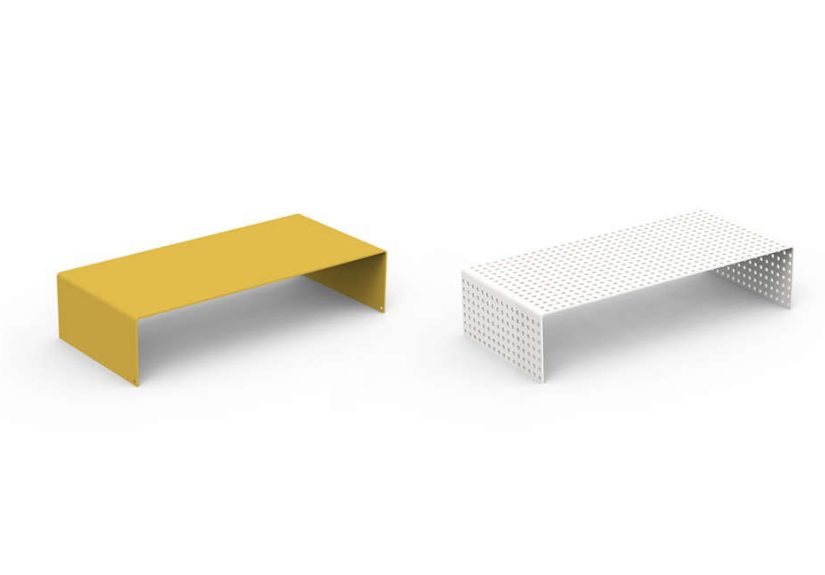
The Solid No. 1 Monitor Stand is a minimalist steel monitor riser associated with Heartwork, a U.S.-made furniture and workspace brand known for industrial-inspired office pieces. Its appeal is not flashy technology but material honesty. It is made from bent steel, finished with durable powder coating, and shaped into a straightforward form that feels more like a piece of useful architecture than a disposable desk accessory.
In practical terms, the stand is compact enough for smaller desks but substantial enough to feel solid under a display. Its classic dimensions make it suitable for many everyday setups, and its open space underneath is one of its smartest features. That gap can hold a keyboard, a closed laptop, a notebook, or the collection of desk clutter people swear is “part of the workflow.”
What makes the design memorable is its restraint. The Solid No. 1 Monitor Stand does not try to be ten products at once. It is not pretending to be a spaceship, a charging station, a filing cabinet, and a spiritual awakening. It is a monitor stand. A very good-looking one. That clarity of purpose is part of why it stands out.
Why a Monitor Stand Is More Than a Decoration
Let’s talk ergonomics without sounding like a sad office memo. The position of your monitor matters. When a screen sits too low, many people angle their head downward for hours at a time. That posture may seem harmless at first, but over a full workday it can contribute to neck tension, shoulder fatigue, and a general feeling that your desk setup was designed by a raccoon with no upper back.
A good monitor stand helps bring the display closer to a comfortable height. In many desk setups, the goal is to keep the top of the screen at or slightly below eye level and the monitor roughly an arm’s length away. That does not mean every user needs the same height, of course. Your chair, desk, monitor size, and even whether you wear bifocals can change the ideal position. Still, the principle stays the same: raise the screen enough to support a more neutral posture without forcing you to look upward like you are waiting for divine tech support.
Beyond posture, a monitor riser also improves desk organization. The underside space can store a keyboard when not in use, create a home for a laptop, or simply reclaim visual breathing room. And that matters more than it sounds. A tidy desk is easier to use, easier to clean, and less likely to make you feel as though your inbox has escaped into the physical world.
What Makes the Solid No. 1 Monitor Stand Stand Out
1. A Material That Feels Serious
Plenty of monitor stands look fine in photos and then arrive with the emotional stability of a cracker. The Solid No. 1 Monitor Stand goes in the opposite direction. Steel gives it real presence. That matters because a stand should feel trustworthy, especially when it is holding an expensive display over a hard desk surface. The use of powder-coated steel also adds durability, which is good news for people who expect their workspace accessories to survive more than one coffee spill and a couple of cable yanks.
The design world tends to love this kind of piece because it reads as intentional. It is not trying to imitate wood grain or disguise plastic under a trendy finish. It looks like what it is. That honesty gives it character.
2. Minimalist Design With Actual Function
Minimalism can sometimes mean “less useful, more expensive.” Here, the simplicity does real work. The flat platform is easy to style, easy to clean, and easy to live with. The open underside turns unused vertical space into storage. On a crowded desk, that small detail can make a surprising difference.
This is especially useful in home offices where every inch counts. Slide your keyboard under it after work. Tuck a notebook beneath it during video calls. Hide the visual noise just enough that your desk stops looking like a tech support hostage situation.
3. A Strong Aesthetic Identity
The Solid No. 1 Monitor Stand has a distinctly industrial-modern look. It feels at home in minimalist interiors, creative studios, modern home offices, and workspaces built around neutral palettes or bold accent colors. Because the form is so simple, it complements a surprising range of setups. Pair it with a matte black monitor and it looks sharp. Put it under a bright display in a colorful office and it still holds its own.
In other words, it is the rare desk accessory that does not scream for attention but still improves the whole scene. It is the visual equivalent of good posture: subtle, effective, and immediately noticeable once it is there.
Where It Wins and Where It Does Not
The biggest strength of the Solid No. 1 Monitor Stand is also its biggest limitation: it is fixed. That means it offers stability and simplicity, but not much adjustability. If the height works for your body and your monitor, great. If not, there is no lever, spring arm, or pivot to save the day.
This matters because monitor positioning is personal. A four-inch rise may be excellent for one user and not nearly enough for another. Someone with a height-adjustable monitor stand built into the display may find the combination ideal. Someone with a low-sitting monitor base on a tall desk may still need more elevation. That is why fixed stands are best viewed as part of a setup, not a universal cure.
Weight capacity and footprint matter too. The Solid No. 1 Monitor Stand is well suited to many standard monitors, but users with very large ultrawide displays or unusually heavy screens should always confirm compatibility before assuming a minimalist steel platform can handle “just one more inch.” Desk confidence is good. Desk overconfidence is how things get expensive.
Monitor Stand vs. Monitor Arm
A fair question is whether a product like this is better than a monitor arm. The honest answer is: it depends on what you need. A monitor arm is the king of adjustability. It usually offers more freedom to raise, lower, tilt, swivel, rotate, and pull the screen closer or farther away. For users with dual monitors, changing tasks, standing desks, or specific ergonomic needs, an arm often wins on flexibility.
But a fixed monitor riser still has real advantages. It is usually easier to set up, places no clamp or mount on your desk edge, and often adds storage space that an arm cannot. It also avoids the VESA compatibility question that comes with many monitor arms. If your goal is straightforward elevation, better organization, and a cleaner-looking desktop, a solid stand remains a smart option.
The Solid No. 1 Monitor Stand fits that second category beautifully. It is not trying to replace a fully adjustable arm. It is offering a cleaner, simpler, more sculptural answer for people who do not need aircraft-cockpit levels of movement.
How to Use It Well in a Real Desk Setup
Single-Monitor Workstation
This is the easiest win. Place the monitor stand centered on the desk, set the display on top, and check whether the viewing height feels natural. If your monitor has its own height adjustment, use that together with the riser to fine-tune the screen position. Keep the display directly in front of you rather than off to one side unless you enjoy turning your neck into a weather vane.
Laptop-and-Monitor Combo
The shelf underneath can be especially helpful here. A laptop can slide beneath the stand when connected to an external monitor, which instantly reduces visual clutter. For hybrid workers, that is a practical little luxury. When the workday ends, the laptop disappears under the stand and the desk looks calm again, which is emotionally healthier than staring at unfinished tabs until bedtime.
Creative Studio or Design Desk
If aesthetics matter as much as utility, this stand really shines. Its industrial character works well with metal task lamps, clean cable management, neutral desk mats, and modern peripherals. It helps create a workspace that feels considered instead of accidental.
Who Will Love the Solid No. 1 Monitor Stand?
This stand makes the most sense for people who want three things at once: better screen elevation, better desk organization, and a better-looking workstation. It is especially appealing for:
- Home office users who want a cleaner desktop without adding bulky furniture.
- Design-minded shoppers who care about materials and visual simplicity.
- Writers, students, and office workers using a standard-size monitor.
- Anyone tired of cheap plastic risers that look one coffee away from retirement.
It is less ideal for users who need frequent height changes, run very heavy or oversized monitors, or prefer the flexibility of a VESA-mounted arm. In those cases, an adjustable arm will likely be the better long-term choice.
Is It Still a Smart Choice Today?
Yes, with one important condition: you should buy it for what it is, not for what it is not. The Solid No. 1 Monitor Stand is not a dock, not a motorized riser, and not a giant command center for a multi-screen empire. It is a thoughtfully designed steel monitor stand that does a few things very well. It elevates. It organizes. It lasts. It looks good doing all three.
In a market where some desk accessories seem to exist mainly to add ports, lights, and complexity, there is something refreshing about a product that simply solves a problem with good proportions and durable materials. If your workspace needs a more polished foundation and your monitor setup does not require constant reconfiguration, this stand remains a compelling option.
Experience: What Living With a Solid Monitor Stand Feels Like
The experience of using a product like the Solid No. 1 Monitor Stand is less dramatic than buying a new monitor and more satisfying over time. On day one, the difference seems visual. Your screen looks more intentional. The desk immediately appears cleaner because the monitor is no longer squatting directly on the surface like it pays rent in crumbs. There is a sense of order. The platform gives the display a proper place, and that small change can make the entire workstation feel more finished.
By the end of the first week, the practical benefits become clearer. The storage underneath starts earning its keep. A keyboard slips under the stand when not in use. A laptop has a temporary parking spot. Sticky notes, a notebook, or even a slim external drive can disappear from view without actually being hard to reach. That matters because clutter is sneaky. It builds one harmless object at a time until the desk starts looking like a lost-and-found bin for productivity.
Then there is the posture effect. A fixed stand does not magically solve every ergonomic problem, but it often improves the basic line of sight enough that you notice less downward head tilt during long sessions. The benefit feels subtle, not theatrical. You do not sit down and hear a choir sing. You just realize, a few hours later, that you have been sitting more naturally and fussing with your setup less often. For many people, that kind of quiet improvement is exactly what good workspace design should do.
There is also something reassuring about the material itself. Steel feels stable in a way that lighter materials often do not. When you place a monitor on a sturdy platform and it stays put, the whole setup feels calmer. No wobble. No creak. No weird little flex that makes you instinctively reach out and steady the screen every time you type with enthusiasm. It is not glamorous, but it is deeply appreciated.
The aesthetic impact keeps growing too. Because the form is so restrained, it does not get visually tiring. In fact, the opposite happens. The more you live with it, the more it seems like it was supposed to be there all along. That is usually the sign of strong design. It blends in, improves function, and makes everything around it look more deliberate. A sleek lamp looks better next to it. A tidy keyboard setup looks sharper. Even your coffee mug seems to behave.
Of course, the fixed height is the one thing you keep evaluating. If your monitor and chair proportions line up well, the stand feels like a permanent upgrade. If they do not, you notice the limit. That is the honest trade-off. This is a product for people who value stability, simplicity, and style over constant adjustability. When it matches your body and your desk, it feels excellent. When it does not, it reminds you that ergonomics are personal and no single riser can rule them all.
Overall, the day-to-day experience is best described as quietly excellent. The Solid No. 1 Monitor Stand does not beg for attention. It improves your desk, supports your monitor, reduces surface chaos, and lets the rest of your setup breathe. That may not sound flashy, but over months of real use, it is exactly the kind of upgrade people tend to appreciate most.
Final Thoughts
The Solid No. 1 Monitor Stand earns its appeal through discipline. It does not chase trends. It does not overpromise. It simply delivers a durable, visually clean, function-first platform that helps raise a monitor, reclaim desk space, and sharpen the look of a workspace. For users who want a steel monitor stand with personality, structure, and minimal fuss, it is a remarkably strong choice.
No, it will not outperform a premium monitor arm in flexibility. That is not the point. The point is that it offers a beautifully simple solution for people who value a neat desk, sturdy materials, and modern design. In a category crowded with forgettable accessories, the Solid No. 1 Monitor Stand manages to feel memorable. That is not easy. And honestly, your desk could use a win.