Table of Contents >> Show >> Hide
- Why the Apple Watch Blood Oxygen Feature Disappeared
- How the Blood Oxygen Monitor Came Back
- Which Apple Watch Models Are Affected?
- How the Redesigned Blood Oxygen Feature Works
- How to Take a Good Blood Oxygen Reading
- What Blood Oxygen Numbers Mean
- Why This Feature Matters to Apple Watch Users
- The Legal Battle Is Part of the Story
- Is the New Two-Device Experience Better or Worse?
- Privacy and Health Data Considerations
- What Users Should Do Now
- Real-World Experience: What It Feels Like to Have Blood Oxygen Back
- Conclusion
The Apple Watch’s Blood Oxygen monitor is back in the United States, and yes, that sentence comes with the kind of legal footnote energy usually reserved for prescription ads and printer warranties. After a long patent fight, a temporary feature blackout, and enough regulatory back-and-forth to make even a smartwatch ask for a nap, Apple has restored blood oxygen tracking for affected U.S. Apple Watch users through a redesigned software experience.
For many owners, this is welcome news. The Blood Oxygen app was never meant to replace a doctor, a clinical pulse oximeter, or common sense, but it became one of those quiet wellness tools people liked having around. It offered a quick way to check oxygen saturation, spot personal trends, and add one more data point to the growing Apple Health dashboard. Then, for newer U.S.-sold models, it disappeared. Now it has returned, but with a twist: the Apple Watch still collects the sensor data, while the paired iPhone performs the analysis and displays the results in the Health app.
In other words, the feature is back, but it is no longer a solo act. It is now more of a duet between your wrist and your pocket.
Why the Apple Watch Blood Oxygen Feature Disappeared
The story begins with Apple’s pulse oximetry technology, which uses light sensors on the back of the Apple Watch to estimate blood oxygen saturation, often called SpO2. Apple introduced blood oxygen monitoring with Apple Watch Series 6, and it later became part of the broader health-tracking appeal of Apple Watch models that included the required sensors.
Then came the legal storm. Medical technology company Masimo accused Apple of infringing patents related to blood oxygen measurement. The U.S. International Trade Commission eventually issued an import ban affecting certain Apple Watch models with the disputed technology. To keep selling watches in the United States, Apple began shipping affected models without the active Blood Oxygen feature.
The result was confusing for shoppers. Some older Apple Watches still had Blood Oxygen. Some watches sold outside the United States still had the original experience. But certain U.S.-sold Apple Watch Series 9, Apple Watch Series 10, and Apple Watch Ultra 2 models did not include the working feature. It was like buying a high-tech fitness companion and discovering one of its best-known health features had gone on an involuntary vacation.
How the Blood Oxygen Monitor Came Back
Apple brought the feature back through a redesigned system enabled by software updates. Affected users needed to update their paired iPhone and Apple Watch to supported versions of iOS and watchOS. Instead of calculating and showing the blood oxygen result directly on the watch, the updated approach sends sensor data from the Apple Watch to the paired iPhone. The iPhone then calculates the result and shows it inside the Health app under the Respiratory section.
This matters because the redesigned workflow changes the experience without requiring new hardware. The same general idea remains: the Apple Watch uses optical sensors to gather data from your wrist. The difference is where the analysis and result display happen. For U.S. users with affected models, the iPhone becomes the place where the finished blood oxygen reading lives.
That may sound like a small change, but in the world of patent disputes, small changes can carry big consequences. Apple’s workaround allowed the company to restore an important health and wellness feature while continuing to sell redesigned watches in the U.S. market.
Which Apple Watch Models Are Affected?
The redesigned Blood Oxygen experience primarily matters for Apple Watch models purchased in the United States during the period when the original feature was unavailable. Apple identifies affected watches as certain U.S.-sold models, including Apple Watch Series 9, Apple Watch Series 10, and Apple Watch Ultra 2, particularly units sold on or after January 18, 2024, with part numbers ending in LW/A.
Apple Watch units purchased before the change, units sold outside the United States, and models that already had the original Blood Oxygen feature are not affected in the same way. For those watches, the Blood Oxygen app experience remains closer to what users were already familiar with: take the reading on the watch, see the result on the watch, move on with life, maybe celebrate with a smug little wrist raise.
Apple Watch SE users should note one important detail: Apple Watch SE does not support the Blood Oxygen app because it does not include the required sensor hardware. Software magic can do many things, but it cannot invent hardware out of thin air. Yet.
How the Redesigned Blood Oxygen Feature Works
On supported models, the Blood Oxygen app uses red and infrared light along with photodiodes on the back crystal of the Apple Watch. The watch shines light into the blood vessels in your wrist and estimates oxygen saturation based on how light is reflected back. Oxygen-rich and oxygen-poor blood absorb light differently, which is the basic science behind pulse oximetry.
With the redesigned U.S. version, the Apple Watch still handles the sensing. The paired iPhone handles the calculation and stores the result in the Health app. Users can find blood oxygen data by opening the Health app, going to Search, selecting Respiratory, and choosing Blood Oxygen. From there, they can view readings by day, week, month, or longer periods.
The updated setup supports both on-demand readings and background measurements, depending on settings and conditions. Background readings usually occur when the user is still, such as during sleep. If you are waving your arm around while making coffee, arguing with a group chat, or trying to find where your cat hid your charging cable, the watch may politely decline to capture a clean reading.
How to Take a Good Blood Oxygen Reading
Getting a successful blood oxygen reading from Apple Watch is not complicated, but it does require a little cooperation. The watch should sit snugly but comfortably on top of your wrist. The back of the watch needs solid skin contact, and your wrist should stay flat and still during the measurement.
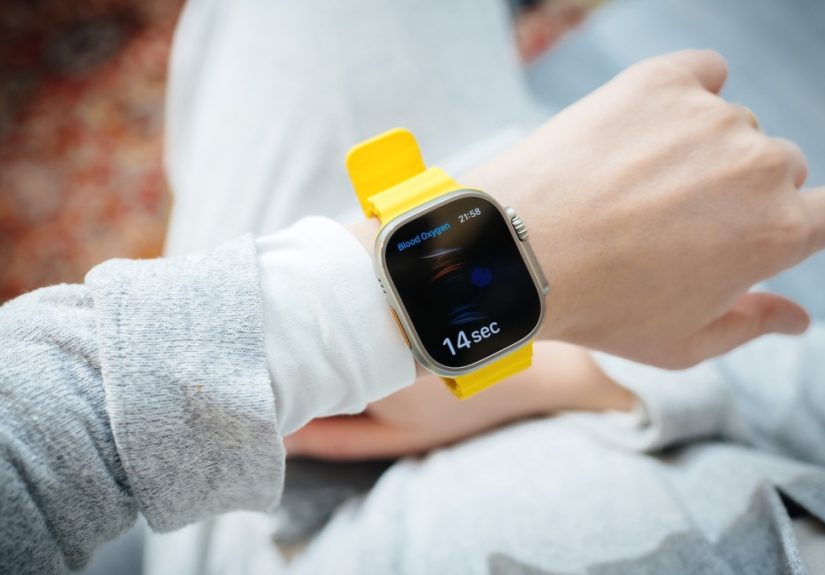
Apple’s measurement process usually takes about 15 seconds. During that time, resting your arm on a table or in your lap can help. The watch should not be too loose, too tight, or sitting directly on the wrist bone. Moving it slightly higher on the arm can improve contact for some users.
Several factors can affect readings. Cold skin, poor circulation, motion, certain tattoos, unusual wrist positioning, and a very high resting heart rate can make readings less reliable or prevent the watch from getting a result. This is normal for wrist-based optical sensors. They are convenient, but they are also trying to do delicate work from a moving body part that spends half the day typing, lifting, steering, cooking, and occasionally pointing dramatically at things.
What Blood Oxygen Numbers Mean
Blood oxygen saturation represents the percentage of oxygen carried by red blood cells from the lungs to the rest of the body. For many healthy adults, pulse oximeter values commonly fall around 95% to 100%. Some people may naturally have lower values, especially during sleep or at high altitude. People with lung or heart conditions may also have personal ranges that differ from the typical range.
That context is important. A single smartwatch reading should not send anyone into panic mode. Consumer wearable readings are best understood as wellness information and trend data, not a diagnosis. If a reading seems unusually low, repeat it under better conditions: sit still, warm your hands, adjust the watch fit, and try again. If low readings continue or appear with symptoms such as shortness of breath, chest pain, confusion, bluish lips, or severe fatigue, medical care is the correct next step.
The Apple Watch Blood Oxygen app is not intended for medical use, self-diagnosis, or medical consultation. That is not a boring disclaimer; it is the line between helpful wellness tracking and pretending your wrist is a hospital. The Apple Watch can be a great personal dashboard, but it is not a doctor in a rounded rectangle.
Why This Feature Matters to Apple Watch Users
The return of the Apple Watch Blood Oxygen monitor matters because it restores one of the wearable’s most recognizable health tools. Apple Watch has evolved far beyond step counting. It now sits at the intersection of fitness, safety, sleep tracking, heart rhythm awareness, medication reminders, fall detection, temperature sensing, and daily wellness coaching.
Blood oxygen tracking adds another layer. It can help users observe how their body responds to sleep, altitude, workouts, respiratory illness recovery, and overall wellness changes. For athletes, it may provide useful context during training blocks or travel. For frequent travelers, it can be interesting when adjusting to higher elevations. For sleep-focused users, overnight blood oxygen trends can become one more clue in the larger puzzle of rest quality.
The key word is “context.” Blood oxygen data is most useful when viewed alongside other signals such as sleep, heart rate, respiratory rate, activity, symptoms, and how you actually feel. A smartwatch number without context is just a number wearing a tiny tuxedo.
The Legal Battle Is Part of the Story
The Blood Oxygen comeback is not only a product story; it is also a legal and regulatory story. The dispute between Apple and Masimo stretched across years, involving patent claims, trade commission decisions, import restrictions, software changes, and appeals. In 2026, Apple gained an important win when the U.S. International Trade Commission declined to review a ruling that Apple’s redesigned watches did not infringe Masimo’s blood oxygen patents. Masimo later dropped a related lawsuit against U.S. Customs over the approval of Apple Watch imports with the redesigned feature.
For consumers, the practical takeaway is simple: Apple’s redesigned blood oxygen implementation appears to be the path forward for affected U.S. watches. The feature is back, but the U.S. experience may still differ from watches sold elsewhere or older watches that retained the original on-watch display.
This is also a reminder that modern gadgets are not just hardware and software. They are ecosystems shaped by patents, regulators, supply chains, lawsuits, health claims, privacy expectations, and user demand. Your smartwatch may look peaceful on your wrist, but behind the scenes, it has been through a courtroom obstacle course.
Is the New Two-Device Experience Better or Worse?
The answer depends on what you value. If you liked seeing blood oxygen results directly on your Apple Watch, the redesigned U.S. experience is less immediate. You now need to open the Health app on your iPhone to review results. That adds friction, especially for users who prefer quick glanceable data on the watch face.
However, the Health app is also where long-term wellness data makes the most sense. It offers charts, filters, and historical views that are easier to read on a larger screen. For people who care about trends rather than instant wrist-based confirmation, the iPhone-centered experience may be perfectly fine.
The best way to think about it is this: the Apple Watch is still the sensor, but the iPhone is now the scoreboard. Slightly less convenient? Yes. Still useful? Absolutely.
Privacy and Health Data Considerations
Health data is personal. Apple has repeatedly positioned privacy as a core part of its health platform, and Blood Oxygen data is stored inside the Health app ecosystem. Users can manage Health permissions, decide which apps can access certain data categories, and review privacy settings on their iPhone.
Anyone using blood oxygen tracking should periodically check Health app permissions. Third-party apps may ask to read or write health data, and users should only grant access to apps they trust. A smartwatch can collect valuable wellness information, but that value depends on keeping the data secure and meaningful.
What Users Should Do Now
If you own an affected Apple Watch and do not see Blood Oxygen data, start with software updates. Update the paired iPhone to the latest iOS version and the Apple Watch to the latest watchOS version available for your device. Then check whether the Blood Oxygen app is installed on the watch and whether the Health app shows Blood Oxygen under Respiratory.
Make sure your Health Profile includes your correct age, because the Blood Oxygen app is designed for users who are at least 18 years old. Also remember that availability can vary by country or region. If you bought your watch outside the United States, your experience may differ from a U.S.-sold model.
Once everything is updated, take a reading properly: sit still, rest your arm, keep the watch facing up, and wait through the measurement. If it fails, do not immediately blame the universe. Adjust the band, warm your wrist, move the watch slightly higher, and try again.
Real-World Experience: What It Feels Like to Have Blood Oxygen Back
The return of the Apple Watch Blood Oxygen monitor feels less like getting a brand-new feature and more like finding a missing tool back in the drawer. You may not use it every hour, and you probably should not obsess over every number, but it is comforting to know it is there. The best health features are often the quiet ones. They do not shout. They simply collect useful information and wait for you to notice a pattern.
In daily life, the most practical use is trend watching. For example, someone who wears Apple Watch overnight may check blood oxygen data in the morning alongside sleep duration, resting heart rate, respiratory rate, and wrist temperature. One lower reading during sleep may not mean much. A repeated pattern, especially with poor sleep or unusual fatigue, may encourage the user to pay closer attention and speak with a healthcare professional if symptoms appear.
Travel is another relatable example. A person flying from sea level to a mountain destination may see slightly different oxygen saturation readings at higher altitude. That does not automatically mean anything is wrong. It may simply reflect the body adjusting to thinner air. Still, seeing those numbers can make the invisible visible. The body is doing work behind the scenes, and the Apple Watch gives you a tiny window into that process.
Fitness users may also appreciate having the feature back. Blood oxygen is not the same as VO2 max, training readiness, or performance output, but it can add context. After hard workouts, illness, poor sleep, or stressful travel, health metrics can shift. Seeing blood oxygen readings alongside heart rate recovery and sleep quality may help users make smarter choices. Sometimes the smartest fitness decision is not another intense workout; it is hydration, rest, and not treating your body like a phone battery stuck at 3%.
The redesigned experience does require a habit change. On affected U.S. models, users need to check the iPhone Health app for results rather than expecting the watch to show everything directly. At first, that can feel slightly annoying. The Apple Watch is supposed to be the convenient screen, after all. But the iPhone view has advantages: larger charts, easier navigation, and a better place to compare multiple health trends at once.
The most important user experience lesson is not to overreact. Wearables are excellent at giving us data, but humans are excellent at turning data into drama. A single reading is not a medical verdict. A failed measurement is not a crisis. A slightly lower sleep reading is not a reason to cancel breakfast and write a farewell note to your treadmill. The Apple Watch Blood Oxygen monitor is most helpful when used calmly, consistently, and in context.
For Apple Watch owners who felt shortchanged during the feature’s absence, its return restores confidence in the device’s health toolkit. It also shows how deeply people now expect wearables to support everyday wellness. A decade ago, a watch told time. Now it tracks sleep, workouts, heart rhythm, oxygen trends, noise exposure, mindfulness minutes, and whether you stood up enough to satisfy a tiny digital coach. The Blood Oxygen monitor coming back is not just about one sensor. It is about the Apple Watch continuing its journey from gadget to personal health companion.
Conclusion
The Apple Watch’s Blood Oxygen monitor is back, but the comeback arrives with a redesigned U.S. workflow. For affected Apple Watch Series 9, Series 10, and Apple Watch Ultra 2 users, the watch gathers sensor data while the paired iPhone calculates and displays results in the Health app. It is a clever workaround, a useful restoration, and a reminder that health technology often lives at the messy intersection of innovation, law, medicine, and user expectations.
For everyday users, the advice is simple: update your devices, learn where the data appears, take readings correctly, and treat results as wellness information rather than medical diagnosis. Used wisely, the Blood Oxygen app can be a helpful part of a broader health picture. Used obsessively, it can turn your wrist into a tiny anxiety machine. Choose the first option. Your watch, your doctor, and probably your group chat will thank you.