Table of Contents >> Show >> Hide
- Before You Cancel Weight Watchers, Check This First
- Method 1: Cancel Weight Watchers Directly Through WW
- Method 2: Cancel Weight Watchers Through Apple Subscriptions
- Method 3: Cancel Weight Watchers Through Google Play
- What Happens After You Cancel WW?
- Common Problems When Trying to Cancel Weight Watchers
- What to Do if You Still Get Charged
- Tips to Make Canceling Weight Watchers Easier
- Is It Better to Pause, Switch, or Cancel?
- Final Thoughts on How to Cancel Weight Watchers
- Experiences People Commonly Have When Canceling Weight Watchers
Sometimes your budget changes. Sometimes your goals change. Sometimes you simply wake up, look at your monthly charges, and think, “Why am I still paying for this?” If that sounds familiar, this guide is for you. Canceling Weight Watchers, now commonly branded as WW, is usually pretty straightforward once you know where your subscription is billed. That last part matters more than most people expect.
Here’s the big secret: many cancellation headaches happen because people try to cancel in the wrong place. If you signed up directly through WW, cancel through WW. If you subscribed through Apple, cancel through Apple. If Google Play handles the billing, Google Play is your exit door. Not glamorous, but wonderfully effective.
In this guide, you’ll learn the three simplest ways to cancel Weight Watchers, how billing and refunds usually work, what to do if the cancel button seems to be hiding like a raccoon in your attic, and how to protect yourself from an extra charge.
Before You Cancel Weight Watchers, Check This First
Before you click anything dramatic, take two minutes to confirm how your membership is billed. This is the step that saves people the most time.
1. Check where you originally signed up
You may have joined WW in one of three common ways:
- Directly on the WeightWatchers website
- Through the Apple App Store on an iPhone, iPad, or other Apple device
- Through Google Play on an Android device
If you signed up inside the app, that does not always mean WW handles the billing. Apple or Google may be the merchant of record. That is why some people keep clicking around the WW account page and finding exactly zero useful buttons.
2. Check your plan type
WW offers different plan structures, including standard monthly plans, multi-month commitment plans, and prepaid savings plans. This matters because cancellation timing can vary. In plain English, you can usually cancel anytime, but the cancellation often takes effect at the end of your current billing period or at the end of your commitment term.
3. Check your next billing date
Look at your WW account settings, Apple subscriptions page, or Google Play subscriptions page and note your renewal date. Canceling a few days early is smarter than trying to beat the clock at 11:58 p.m. while your Wi-Fi decides to become philosophical.
Method 1: Cancel Weight Watchers Directly Through WW
This is the easiest route if you bought your membership straight from WeightWatchers.com. WW’s own cancellation page is built for this exact job.
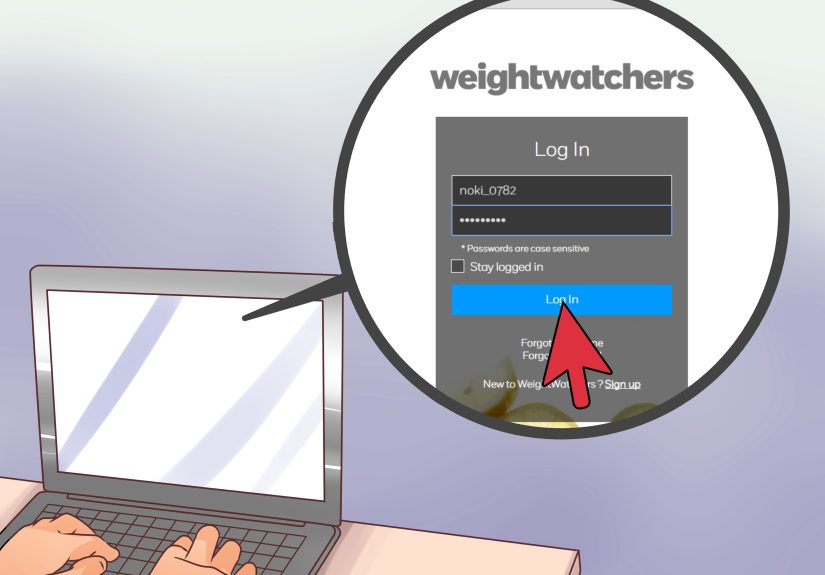
How to cancel on the WW website
- Log in to your WW account.
- Go to your account settings or account status area.
- Open the membership or billing section.
- Select the cancellation option.
- Follow the prompts until you receive confirmation.
WW’s help pages also point users to the account area for plan details and billing information. If the website route feels weirdly uncooperative, WW also offers support options such as chat and customer service assistance.
When does cancellation take effect?
For a standard monthly plan, cancellation typically takes effect at the end of the membership month in which you cancel. For multi-month commitment plans, cancellation generally takes effect at the end of the commitment period. For prepaid savings plans, it usually takes effect at the end of the initial plan period, then moves to month-end timing afterward if applicable.
That means canceling today does not always mean instant shutdown today. More often, it means “You won’t be billed for the next cycle.” That is an important difference.
Can you get a refund?
Refunds depend on the plan, the timing, and the terms that applied when you signed up. In some cases, WW notes that if you cancel near the end of a billing period and get charged for the next period by mistake, you should contact customer service to request a reversal. So yes, it is worth speaking up if the timing was messy.
Best for
This method is best for people who signed up on the WW website, see WW billing on their statements, or can access their membership status inside the WW account area.
Method 2: Cancel Weight Watchers Through Apple Subscriptions
If you subscribed through an iPhone or iPad, Apple may control the billing. In that case, canceling through WW may not work because WW is not the one charging you. Apple is.
How to cancel through Apple
- Open Settings on your iPhone or iPad.
- Tap your name.
- Tap Subscriptions.
- Select the WW subscription.
- Tap Cancel Subscription.
You can also manage subscriptions on a Mac through the App Store account settings, and Apple provides options for Windows users through Apple apps as well.
What if you do not see a cancel button?
Apple says that if there is no cancel button, or if you see an expiration message, the subscription may already be canceled. That is good news, even if it arrives dressed as confusion.
What about refunds from Apple?
If Apple billed you, refund requests usually go through Apple too. Apple’s support pages direct users to request a refund through its purchase problem system. Refund eligibility varies, so a refund is not automatic, but the request route is clearly available.
Best for
This is the right method for anyone whose WW subscription appears under Apple subscriptions or whose receipts come from Apple rather than WW.
Method 3: Cancel Weight Watchers Through Google Play
Android users, this one is your lane. If Google Play handles the subscription, that is where you cancel it.
How to cancel through Google Play
- Open Google Play on your Android device.
- Go to Subscriptions.
- Select your WW subscription.
- Tap Cancel subscription.
- Follow the remaining prompts.
One especially important note from Google: uninstalling the app does not cancel the subscription. Deleting the app feels satisfying for about six seconds, but it does not stop billing. The subscription must be canceled inside Google Play.
Can you pause instead of cancel?
Google Play allows some subscriptions to be paused, depending on the subscription setup. That can be useful if your issue is temporary and you just need a financial breather rather than a full breakup.
What about refunds from Google Play?
Google offers refund request options through Google Play, but it also notes that many apps are made by third-party developers and the developer may be the quickest route for purchase issues. In other words, for billing confusion you may need both Google Play and WW, depending on the exact situation.
Best for
This method is best for people who subscribed through Android billing and see the membership listed in Google Play subscriptions.
What Happens After You Cancel WW?
In most cases, you keep access until the end of the current paid period. That means you usually do not lose access the second you cancel. Think of it like giving notice instead of slamming the door and tossing your salad spinner out the window.
You should also receive some kind of confirmation, whether by email, on-screen confirmation, or both. Save it. Screenshot it. Archive it. Future You will be deeply grateful if a billing question pops up later.
Common Problems When Trying to Cancel Weight Watchers
You are trying to cancel in the wrong place
This is the biggest one. Direct WW memberships should be canceled with WW. App store subscriptions should be canceled with the app store that bills you.
You are on a commitment plan
Some people cancel and expect the plan to end instantly, then get annoyed when access continues until the term ends. That is not necessarily a failed cancellation. It may just be how the plan was structured from the beginning.
You waited too close to renewal
WW’s terms mention that cancellation requests are processed after they are received, and accidental renewal charges near the end of a billing cycle may need a support follow-up. Cancel early whenever possible.
You only deleted the app
Especially on Google Play, deleting the app is not the same as canceling the subscription. This is the digital equivalent of hiding from your mailbox and hoping your gym forgets you exist.
What to Do if You Still Get Charged
If a charge shows up after you canceled, do not panic. Start with the merchant that billed you. That means WW, Apple, or Google Play.
- Gather your confirmation email or screenshots.
- Contact the billing provider and explain the date you canceled.
- Request a refund or charge reversal if the renewal was unintended.
- Monitor your account for follow-up credits.
If recurring debits continue and the issue is not resolved, U.S. consumer finance guidance says you can revoke authorization with the company and notify your bank or credit union. A stop-payment order may also be available, though some financial institutions charge a fee. This is more of a backup plan than a first move, but it is a useful one.
Tips to Make Canceling Weight Watchers Easier
- Check your billing source before doing anything else.
- Cancel a few days before renewal, not a few minutes before.
- Save screenshots and confirmation emails.
- Review whether your plan is monthly, prepaid, or commitment-based.
- Request help through support if the cancel option is unclear.
- Check your next statement to confirm the billing has stopped.
Is It Better to Pause, Switch, or Cancel?
That depends on why you are leaving. If the issue is cost, a lower-tier option may be enough. If the issue is app fatigue, a clean cancellation may feel better. If you subscribed through Google Play and pause is available, that can be a nice middle ground. But if your gut says, “Nope, I’m done,” then cancellation is the cleanest answer.
Final Thoughts on How to Cancel Weight Watchers
Canceling Weight Watchers is not hard once you know which company controls the billing. For most people, the process falls into one of three buckets: cancel on the WW website, cancel through Apple subscriptions, or cancel through Google Play. After that, the main things to watch are your plan type, your billing date, and your confirmation proof.
The smartest approach is simple: confirm who bills you, cancel in the right place, save the receipt of your cancellation, and check your next statement. No drama, no mystery, no accidental donation to the land of forgotten subscriptions.
Experiences People Commonly Have When Canceling Weight Watchers
A lot of people expect canceling WW to take about thirty seconds. Sometimes it does. Sometimes it turns into a tiny detective story. One common experience is logging into WW, hunting through settings, and realizing the account page is not broken at all, you just subscribed through Apple two years ago and forgot. That moment usually comes with a long pause and the universal phrase, “Ohhh. That explains a lot.”
Another common experience is discovering that a person is not actually trying to cancel the service itself, but the automatic renewal. Those sound similar, but emotionally they are very different. Many users cancel, still keep access until the end of the paid period, and worry the cancellation failed because nothing disappeared immediately. Then they check again later and realize everything worked exactly as intended. It is less “instant breakup” and more “civilized lease ending.”
Some people run into trouble because they delete the app first. This is especially common with mobile subscriptions. There is a very human logic to it: app gone, problem gone. Unfortunately, subscription billing does not share that optimism. People often reinstall the app later just to figure out where the subscription lives, which is a mildly annoying plot twist nobody asked for.
There are also users who cancel because they hit a seasonal lull. Maybe motivation dropped. Maybe life got busy. Maybe grocery prices started acting like they had their own publicist. In those cases, canceling feels less like failure and more like simple housekeeping. Many people describe relief after canceling, especially when they realize they can always come back later if the program fits again.
Then there is the screenshot crowd, and honestly, they are the heroes of modern subscription life. These are the people who save the confirmation page, the email, the date, and probably the moon phase. When an unexpected charge appears, they are ready. Customer support conversations go much faster when you can calmly say, “I canceled on the 12th at 8:14 p.m., and here is the confirmation.” Beautiful. Efficient. A master class in adulting.
Some people also report that the hardest part is not the cancellation itself, but choosing whether to cancel at all. Weight-loss subscriptions can feel personal because they are connected to goals, routines, and self-image. Canceling can stir up guilt, even when the real reason is practical, like budget pressure or lack of use. That emotional layer is real. Plenty of people step away for perfectly reasonable reasons, and it does not mean the plan “failed” or that they failed. It just means the fit changed.
In the end, the most common experience is this: once people identify the correct billing source, the process becomes much easier. The stress usually comes from uncertainty, not complexity. Once that uncertainty is gone, the cancellation often takes only a few taps. And that, in the glamorous world of recurring subscriptions, counts as a genuine victory.