Table of Contents >> Show >> Hide
- Why confirming account closure matters
- First, know what PayPal allows and what it blocks
- The clearest ways to confirm your PayPal account is closed
- 1. You completed the closure process inside PayPal settings
- 2. You can no longer sign in to the old account dashboard
- 3. You do not see active wallet items, balances, or account options
- 4. Your recurring payments were canceled or unlinked
- 5. You already withdrew the balance and downloaded records
- 6. Customer support confirms the account is closed
- 7. You are not mistaking closure for data deletion
- Signs your PayPal account may not be fully closed yet
- How to verify closure step by step
- What to do before closing a PayPal account
- Common mistakes people make
- What happens after a PayPal account is closed?
- Real-world example: the “I thought it was closed” problem
- Experience and practical lessons from people dealing with PayPal closure
- Final takeaway
Closing a PayPal account sounds simple. Click a button, say goodbye, move on with your life, maybe celebrate with a dramatic sip of coffee. But the real question is not just how to close it. It is how to confirm that your PayPal account is actually closed so you do not get surprised later by a stray subscription, an old payment method, or an email that sends you into a mild panic at 11:47 p.m.
If you are trying to verify a closed PayPal account, this guide walks through the signs that prove closure, the red flags that suggest the account is still hanging around, and the smart cleanup steps most people forget. We will also cover what happens to your payment methods, transaction history, subscriptions, and personal data after the account is gone.
Why confirming account closure matters
Plenty of people assume that once they tap “Close Account,” the story is over. In reality, digital accounts are a little like glitter. They can leave traces everywhere. Your bank may still be linked elsewhere. A merchant may still have a billing agreement. You may still have archived transaction records you need for taxes, budgeting, or disputes.
That is why confirming a PayPal account is closed matters for more than peace of mind. It helps you:
- Prevent future recurring charges from merchants that used PayPal as the payment method
- Make sure no balance or unresolved issue kept the account from closing
- Save statements and transaction history before access disappears
- Reduce confusion if suspicious “PayPal closure” emails show up later
- Know whether you need account closure only, or full data-erasure follow-up
First, know what PayPal allows and what it blocks
Before you can confirm a PayPal account is closed, you need to know what would have prevented closure in the first place. PayPal generally does not allow you to close an account if there is still money in the balance, an account limitation, or other unresolved issues. In plain English: if the account still has loose ends, PayPal is not eager to let it vanish into the sunset.
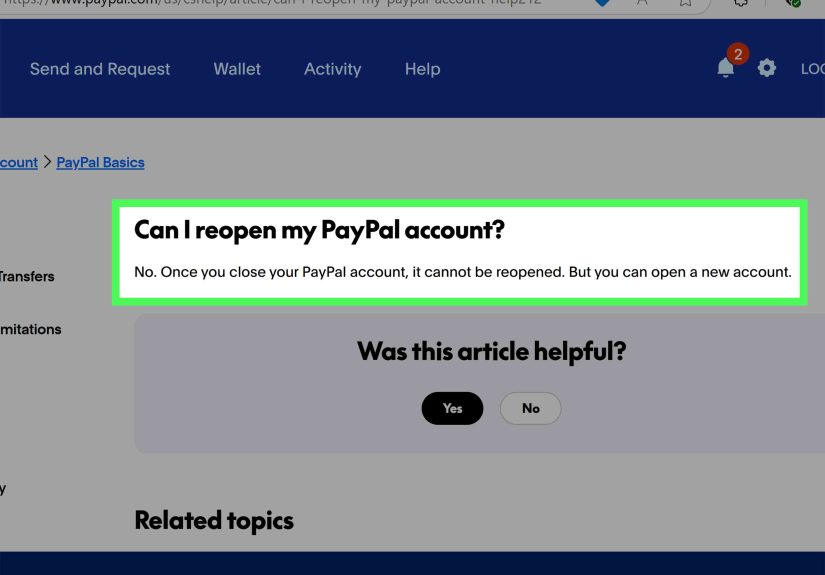
Also important: a closed PayPal account cannot be reopened. That is a big clue. If you later get back in as if nothing happened, your old account probably was not fully closed, or you created a new one with the same email address and forgot about it.
The clearest ways to confirm your PayPal account is closed
1. You completed the closure process inside PayPal settings
The most reliable confirmation starts with how the account was closed. On the web, PayPal directs users to go into Settings and choose Close your account. On the app, the option appears from the profile area. If you never finished that flow, then you did not “sort of” close the account. You just visited the idea of closing it.
If you remember getting interrupted halfway through, assume nothing. Go back and verify.
2. You can no longer sign in to the old account dashboard
This is one of the biggest practical signs. If the account is truly closed, you should not be able to sign in and access the old PayPal dashboard as an active account holder. But use caution here: a failed login by itself is not perfect proof. Bad passwords, outdated phone numbers, and login-security checks can all block access even when an account is still open.
Think of login failure as a clue, not a courtroom verdict.
3. You do not see active wallet items, balances, or account options
If you still have access and can still view your Wallet, linked cards, linked bank accounts, balance, profile settings, or automatic payments, the account is not closed. It may be limited, dormant, or merely ignored like that treadmill in the corner, but it is not closed.
A genuinely closed PayPal account should not be functioning like a normal live account.
4. Your recurring payments were canceled or unlinked
One of the smartest ways to verify closure is to check the merchants that previously billed through PayPal. PayPal lets users view and cancel automatic payments, subscriptions, and saved-business billing agreements from the Payments area. If those agreements are still active, your account may not have been fully cleaned up before closure, or the merchant may still have a separate billing relationship you need to cancel directly.
This is where people get tricked. They think, “I closed PayPal, so Netflix, Adobe, or that app I forgot I subscribed to must have magically moved on.” Nice thought. Not always how billing works.
5. You already withdrew the balance and downloaded records
A fully closed account usually follows a checklist: withdraw remaining funds, save needed statements, remove linked payment methods if desired, then close the account. If you still have money sitting in the account, or you never downloaded monthly statements or activity reports, there is a decent chance the process stalled before closure.
If you are still able to access statements through PayPal’s reporting tools, download what you need right away. That includes monthly statements, custom reports, and transaction history relevant to taxes, reimbursements, charge disputes, or business bookkeeping.
6. Customer support confirms the account is closed
If you want the gold-standard confirmation, contact PayPal support and ask them to verify the status of the account. This is especially useful when you have a business account, old disputes, or a half-memory of clicking the closure button sometime during the ancient era known as “last month.”
This is also the best move if you are locked out and cannot tell whether the account is closed, limited, or just inaccessible.
7. You are not mistaking closure for data deletion
This part matters. A closed PayPal account is not the same thing as immediate total data erasure. PayPal says it may retain certain personal data for legal, regulatory, fraud-prevention, audit, and compliance reasons, and a U.S. PayPal help page says some data may be kept for up to 10 years after permanent deactivation. So yes, the account can be closed while some records still exist behind the scenes.
In other words, “closed” does not mean “evaporated into the digital sky.”
Signs your PayPal account may not be fully closed yet
If any of the following are true, treat the account as potentially still active:
- You can still log in and access the account homepage
- You still see a balance, linked bank account, or linked debit or credit card
- You continue receiving legitimate transaction notifications tied to that account
- You still have unresolved disputes, account limitations, or verification requests
- A merchant continues charging you through a saved PayPal billing agreement
- You never received or observed a completed closure flow
None of these is the kind of thing you want to discover during tax season, budget review, or while trying to explain an odd subscription charge to your very unimpressed future self.
How to verify closure step by step
- Try to sign in using the original login method.
- Check your email for any legitimate PayPal messages related to closure, limitations, or unresolved issues.
- Review old linked merchants and see whether PayPal is still listed as an active payment method.
- Check your bank and card statements for any new PayPal-related debits.
- Look for saved records such as downloaded statements or notes showing you completed closure.
- Contact PayPal support if login status is unclear or the account may have been limited rather than closed.
What to do before closing a PayPal account
If you have not closed the account yet and want to do it right the first time, use this checklist:
Clear the balance
Withdraw any remaining funds. PayPal does not allow normal account closure with money still sitting in the account.
Resolve disputes and limitations
Visit the Resolution Center and address any open cases, unauthorized-payment reports, or account restrictions. A limited account may stop you from completing closure.
Cancel automatic payments and subscriptions
Go through every saved merchant and cancel recurring payments you no longer want. This is not optional if you enjoy not being charged for forgotten services.
Download statements and reports
Save monthly statements, activity reports, receipts, and any records you may need later. Once the account is gone, your convenient self-service access may be gone too.
Remove linked bank accounts and cards if needed
PayPal lets users remove linked bank accounts and cards from the Wallet. This is a useful cleanup step, especially if you are changing financial tools altogether.
Common mistakes people make
Assuming a closure-themed email is always real
Scammers love messages that create urgency. Fake PayPal emails may claim your account was closed, suspended, or hit by a suspicious transaction. Do not click random links or call phone numbers from the message. If you need to check account status, go directly to PayPal through its official site or app.
Confusing a locked account with a closed account
A limited, flagged, or inaccessible account is not the same as a closed account. If the system blocked access because of security or verification issues, the account may still exist.
Forgetting about merchants outside PayPal
Canceling PayPal access does not always cancel your contract with the merchant. The subscription itself may still exist on the merchant’s side. Always verify both places.
Thinking closed means all data disappears instantly
It does not. Account closure and personal-data retention are related, but not identical.
What happens after a PayPal account is closed?
Once closed, the old account cannot be reopened. If you decide to use PayPal again later, you may need to create a new account. In some cases, PayPal indicates that a closed account’s email address can be used to sign up again. That means seeing your old email in PayPal’s ecosystem later does not automatically prove the old account is still alive and kicking.
Also, if your main goal is privacy, remember that account closure may not be the last step. You may need to review PayPal’s privacy and data-rights processes depending on your situation, location, and whether you want to request erasure where available.
Real-world example: the “I thought it was closed” problem
Let’s say Monica closes her PayPal account after switching to a new bank. She deletes the app, feels productive, and moves on. Two months later, she notices a recurring charge from a software service she forgot about. Was the PayPal account still open? Maybe. But maybe not.
In many cases like this, the real issue is that the merchant relationship was never canceled properly. Monica should check whether the charge came through an old billing agreement, a direct card-on-file arrangement, or another payment method entirely. This is exactly why closure confirmation should include both account status and merchant billing cleanup.
Experience and practical lessons from people dealing with PayPal closure
One of the most common experiences people describe when trying to confirm a PayPal account is a weird mix of confidence and uncertainty. They remember clicking something. They remember being mildly annoyed. They definitely remember wanting the account gone. But a few days later, they are staring at old emails, trying to decode whether the account is truly closed or just temporarily inaccessible.
A typical experience goes like this: someone stops using PayPal for months, maybe years. Then they decide to clean up their digital life. They log in, notice old cards, old addresses, and maybe one embarrassingly ancient purchase receipt, then hit the close-account process. At that moment, everything feels neat and final. The trouble begins later, when they cannot remember whether they also canceled subscriptions, downloaded statements, or removed linked bank details. Suddenly, a simple account closure starts to feel like detective work.
Another common experience is getting nervous after receiving an email that mentions account closure, inactivity, or suspicious activity. This is where many users spiral into “Was that me? Did PayPal close it? Did I close it? Is this a scam? Should I panic now or after lunch?” The practical lesson is simple: never trust the email alone. Go directly to the official PayPal site or app and verify from there. Closure confirmation should come from your own direct check, not from a dramatic message with too many exclamation points.
Some users also discover that what they really wanted was not just account closure, but financial cleanup. Closing PayPal becomes a bigger project that includes removing recurring payments, updating merchants, changing automatic billing methods, and checking bank statements for surprise charges. In that sense, confirming a PayPal account is closed can feel a lot like moving apartments. You are not just leaving one place. You are also finding all the things that were quietly attached to it.
Business users often have an even messier experience. They may need old transaction reports for taxes, client payments, expense records, or reconciliation. For them, the biggest lesson is to save records before closing anything. Nothing ruins a productive afternoon faster than realizing the statement you suddenly need was available yesterday and is inconvenient today.
Then there is the emotional side, which is less technical but very real. People close payment accounts for all kinds of reasons: simplifying finances, switching tools, security concerns, ending a side hustle, or just getting tired of juggling too many platforms. Confirming closure gives a sense of finality. It is the digital version of making sure the stove is off before leaving the house. You probably know it is off, but checking once more lets your brain stop opening new tabs about it.
The best experiences usually come from people who treat PayPal closure like a checklist instead of a button. They withdraw the balance, cancel recurring payments, download reports, verify the account status, and then monitor their bank or card activity for a while. That approach is less glamorous, sure, but it beats the far more exciting alternative of discovering six weeks later that a forgotten subscription is still enjoying your money.
Final takeaway
If you want to confirm that your PayPal account is closed, do not rely on one sign alone. Use a layered check: confirm you completed the closure process, verify you cannot access the old dashboard as an active account, make sure there are no remaining balances or limitations, review recurring-payment merchants, and contact PayPal support if anything feels unclear.
The smartest approach is simple: close carefully, confirm thoroughly, and save your records before the digital door locks behind you. That way, your PayPal account becomes what you wanted it to be in the first place: history.