Table of Contents >> Show >> Hide
- Before You Delete Multiple TikToks: Read This First
- Can You Delete Multiple TikToks at Once Natively?
- Method 1: Delete TikToks Manually in the App
- Method 2: Use TikTok Studio or Desktop to Manage Posts Faster
- Method 3: Use a Trusted Bulk Deletion Tool Carefully
- Bonus Option: Delete Your TikTok Account
- Should You Delete or Make TikToks Private?
- Common Mistakes to Avoid
- Real-World Experience: What Cleaning Up Multiple TikToks Actually Feels Like
- Final Thoughts
So, you opened your TikTok profile, scrolled back a few years, and suddenly met your past self. Maybe it was a dance challenge filmed under suspicious bathroom lighting. Maybe it was a hot take that has aged like milk in a parked car. Or maybe you simply want a cleaner, more professional TikTok profile. Whatever the reason, learning how to delete multiple TikToks at once can save your profile from looking like a digital attic.
Here is the honest answer upfront: TikTok does not currently offer a simple native “select multiple videos and delete all” button for regular profile posts. In the official app, deleting a published TikTok is mainly done one video at a time. However, there are still three practical ways to clean up several TikTok videos quickly: delete them manually using an efficient workflow, use TikTok Studio or desktop tools to organize the process, or use a trusted third-party bulk deletion tool with caution.
This guide explains each method clearly, including what works, what does not, what to avoid, and how to protect your account before you start smashing the delete button like it owes you money.
Before You Delete Multiple TikToks: Read This First
Deleting TikTok videos is not the same as hiding them. When you delete a TikTok post, it is removed from your public profile and may remain recoverable for a limited time through TikTok’s recently deleted area. After that grace period, the video is meant to be permanently removed. Hiding a video, on the other hand, usually means changing its visibility so only you can see it.
That difference matters. If you are cleaning up old videos because they no longer fit your brand, making them private may be enough. If you want them gone for good, deletion is the stronger option. If you are not completely sure, start by saving important videos first. Your future self may want that goofy travel montage, even if your current self is pretending to be a minimalist.
Quick Backup Checklist
- Save any videos you might want later.
- Take screenshots of captions, comments, or performance data if needed.
- Write down which videos you want to remove before you begin.
- Check whether the post is public, private, pinned, sponsored, or part of a campaign.
- Use official TikTok tools first whenever possible.
Can You Delete Multiple TikToks at Once Natively?
For most regular users, the answer is no. TikTok’s standard mobile app does not provide a built-in bulk delete button for published videos. You can delete individual posts by opening the video, tapping the more options menu, and choosing delete. That is simple for one video, mildly annoying for ten videos, and spiritually exhausting for two hundred.
Still, you can make the process much faster with a smart cleanup system. The key is to decide whether you want to remove a handful of videos, clean up a creator profile, or wipe nearly everything. Each situation calls for a different method.
Method 1: Delete TikToks Manually in the App
This is the safest and most official way to delete multiple TikTok videos, even though you must delete each post individually. It is best for users who only need to remove a small or medium number of videos, such as old drafts that were posted accidentally, outdated trends, embarrassing clips, or content that no longer matches a personal brand.
How to Delete a TikTok Video in the App
- Open the TikTok app.
- Tap Profile at the bottom of the screen.
- Open the video you want to delete.
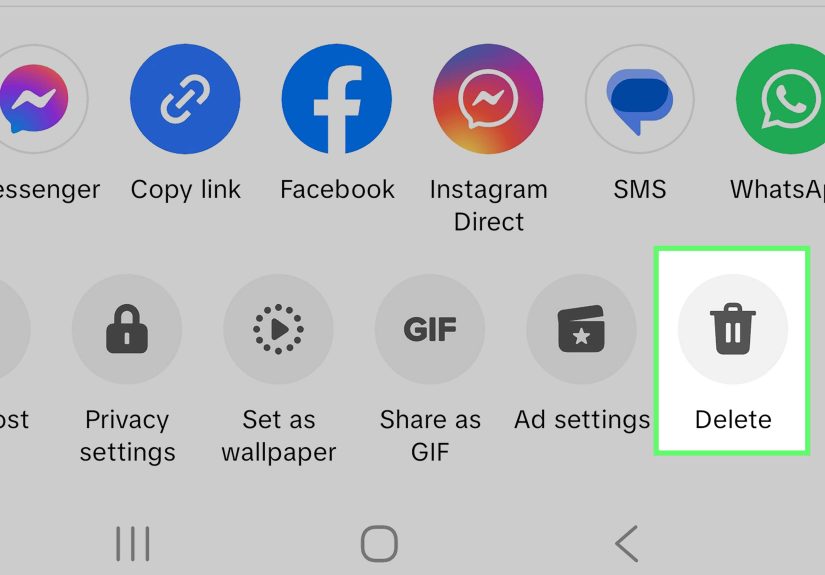
- Tap the More options button, often shown as three dots.
- Choose Delete.
- Confirm that you want to remove the post.
- Repeat the process for the next video.
Yes, “repeat” is doing a lot of work in that final step. But you can make it less painful by planning before you begin.
How to Speed Up Manual Deletion
Instead of scrolling randomly and deleting whatever makes you cringe first, use a system. Start at the oldest videos and work forward, or start with a specific category such as low-quality videos, off-brand posts, videos with outdated information, or posts with very low engagement. If you are deleting content for professional reasons, focus on videos that conflict with your current niche, tone, or audience.
For example, if your TikTok account used to be about random memes but now you create fitness content, you may want to delete or hide old unrelated clips. A few funny posts can show personality, but a profile full of chaotic leftovers can confuse new followers. TikTok profiles work like storefront windows. If someone walks by and sees a treadmill, a soup recipe, a breakup rant, and a frog costume, they may not know what business you are running.
Best For
- Deleting 5 to 30 videos.
- Removing specific posts carefully.
- Avoiding third-party tools.
- Keeping full control over what stays and what goes.
Pros and Cons
The biggest advantage of manual deletion is safety. You are using TikTok’s own tools, so there is less risk of account issues, accidental mass deletion, or giving access to a suspicious app. The downside is speed. If you have hundreds of videos, manual deletion can become a thumb workout nobody asked for.
Method 2: Use TikTok Studio or Desktop to Manage Posts Faster
TikTok Studio is designed for creators who want better control over their content, analytics, settings, and account management. It can make profile cleanup easier because you can review content more deliberately than you can while doom-scrolling your own profile on a tiny phone screen.
Depending on your account, region, and app version, TikTok Studio may let you manage post-related settings and visibility. If you delete a post inside TikTok Studio, that deletion applies to TikTok as well. This makes Studio useful for creators who want a more organized way to review posts before removing them.
How to Use TikTok Studio for Cleanup
- Open TikTok Studio on mobile or access creator tools where available.
- Review your posted content, analytics, and visibility settings.
- Identify videos that no longer fit your goals.
- Delete posts one by one where deletion is available.
- Consider changing visibility first if you are unsure about deleting.
This method is especially useful if you care about performance. Instead of deleting videos based only on emotion, you can look at views, engagement, comments, and whether the post still sends the right message. A video with 200 views and no strategic value may be an easy delete. A video with strong traffic, useful comments, or brand relevance may deserve to stay, even if the lighting looks like it was filmed inside a microwave.
Use Privacy Settings When Deletion Feels Too Final
If your goal is to remove videos from public view quickly, changing post visibility can be a smarter first step. Setting a video so only you can view it gives you breathing room. This is helpful when you are cleaning a profile for a job search, brand partnership, school application, or personal reset but do not want to permanently erase everything yet.
Think of privacy settings as the “put it in a drawer” option. Deleting is throwing it in the trash. Both can make your room look cleaner, but only one gives you a chance to change your mind later.
Best For
- Creators with lots of posts.
- Users who want to review analytics before deleting.
- Cleaning up a brand or business profile.
- Hiding questionable posts before deciding whether to delete them.
Method 3: Use a Trusted Bulk Deletion Tool Carefully
If you are searching for how to delete multiple TikToks at once in the truest sense, third-party bulk deletion tools are usually what people mean. Some browser extensions and desktop tools claim to automate the deletion process by clicking through videos for you. These tools can be helpful when you have a large profile and do not want to spend hours deleting posts manually.
However, this is also the method that requires the most caution. TikTok does not officially endorse every tool that claims to bulk delete videos. Some tools may be safe, some may be buggy, and some may be about as trustworthy as a “free iPhone” pop-up from 2009.
How Bulk Deletion Tools Usually Work
Most tools do not magically access a secret TikTok bulk-delete feature. Instead, they automate the same actions you would perform manually. For example, a tool may open your profile, select videos within a date range, click the delete option, and confirm the action repeatedly. Some tools include filters such as date range, privacy status, view count, or pinned video protection.
That can be convenient, but automation can also make mistakes. Before using any bulk deletion tool, always run a preview if the tool offers one. Make sure it is targeting the right videos. You do not want to accidentally delete your best-performing post because it was standing too close to the embarrassing ones.
Safety Checklist for Third-Party Tools
- Do not share your TikTok password with unknown services.
- Prefer tools that work inside your own browser session.
- Read recent reviews before installing a browser extension.
- Check the tool’s privacy policy.
- Run a small test before deleting a large number of videos.
- Back up important content before starting.
- Avoid tools that promise impossible results or ask for unnecessary permissions.
When This Method Makes Sense
A bulk deletion tool may make sense if you have hundreds of old videos, you are rebranding, you are leaving a niche, or you need to remove a large number of posts quickly. It is less ideal if you only need to delete a few videos. For small cleanups, the official app is safer and simple enough.
One practical approach is to combine methods. First, manually save or protect your most important TikToks. Next, use privacy settings to hide anything questionable. Then, if you still need a full cleanup, consider a bulk deletion tool only after checking reviews and permissions.
Bonus Option: Delete Your TikTok Account
Deleting your entire TikTok account is the nuclear option. It can remove your profile and posted content from public view, but it also affects your account, followers, messages, settings, and access to TikTok Studio. This is not the best choice if you only want to delete multiple TikTok videos while keeping your username and audience.
Use account deletion only if you truly want to leave the platform or start fresh from zero. If your account has followers, monetization history, saved drafts, analytics, or brand value, think carefully before choosing this route. Deleting a few old posts is profile maintenance. Deleting the whole account is moving out of the house and leaving the couch on the curb.
Should You Delete or Make TikToks Private?
Not every old TikTok needs to be deleted. Some videos may still show personality, history, or growth. Others may perform well in search or bring followers to your page. Before removing posts, ask three questions:
- Does this video hurt my current image or goal?
- Could this video still help my audience?
- Would I regret losing this video permanently?
If the video is outdated but harmless, make it private. If it contains incorrect information, personal details, copyrighted material, offensive jokes, or anything that could harm your reputation, deletion is usually better. If it simply makes you cringe, remember that cringe is not always a crime. Sometimes it is just character development with a ring light.
Common Mistakes to Avoid
Deleting Without Saving Copies
Many users delete old videos and later realize they want the original file, caption, or comments. Before you clean house, save anything with sentimental, creative, or business value.
Using Random Apps That Ask for Login Details
Be careful with tools that ask for your TikTok username and password directly. If a tool does not clearly explain how it protects your data, skip it.
Deleting Videos Based Only on Low Views
Low views do not always mean a video is worthless. Some posts support your brand, answer common questions, or build trust with a small but important audience.
Removing Everything During an Emotional Moment
Profile cleanup is best done with a calm brain. Do not delete your entire creative history because one video got a weird comment. The internet is full of weird comments. That is basically its cardio.
Real-World Experience: What Cleaning Up Multiple TikToks Actually Feels Like
The first thing most people notice when deleting multiple TikToks is that the process feels easy for the first five videos and strangely emotional by video twenty. At the beginning, you feel powerful. You are organizing your digital life. You are becoming a cleaner, wiser, more mysterious version of yourself. Then you hit an old video from a birthday trip, a college dorm, a first small business idea, or a trend you forgot existed, and suddenly the cleanup becomes a tiny museum tour.
That is why the best experience starts with sorting, not deleting. A useful system is to create three mental buckets: delete, private, and keep. Delete videos that are clearly outdated, inaccurate, messy, risky, or irrelevant. Make videos private if you are unsure. Keep videos that still support your identity, niche, humor, expertise, or story. This simple system prevents the most common regret: deleting everything too quickly.
Another lesson from TikTok cleanup is that old content often looks worse to you than it does to everyone else. You remember how awkward you felt filming it. Viewers usually just see a normal post. That does not mean every video should stay, but it does mean you should judge content by purpose, not embarrassment alone. A slightly awkward tutorial that still helps people may be more valuable than a polished video that says nothing.
For creators, the experience is more strategic. Deleting multiple TikToks can make a profile look more focused, but removing too much can also erase proof of consistency. A creator who has posted for three years should not necessarily look like they started yesterday. Growth can be part of the brand. Instead of deleting every old post, many creators remove only the videos that conflict with their current direction. For example, a beauty creator may keep older makeup tutorials but delete unrelated rant videos. A fitness coach may keep transformation clips but hide old comedy skits that confuse the niche.
For personal users, privacy is often the better first move. If you are preparing for a new job, school application, or public-facing role, changing visibility can reduce stress immediately without making permanent decisions. Then, after a few days, you can review calmly and decide what truly needs to go. This two-step approach feels much better than panic-deleting at midnight with one eye open and a phone battery at 3%.
The smoothest cleanup usually happens in small sessions. Delete ten or fifteen videos, take a break, then continue later. Large deletion sessions can lead to mistakes, especially if you are using a third-party tool or moving quickly through similar-looking thumbnails. If you use automation, preview everything first and test with a small batch. Bulk deletion is convenient, but convenience and regret sometimes ride in the same car.
In the end, deleting multiple TikToks is not just about removing videos. It is about deciding what version of yourself or your brand deserves the front row. Keep the posts that still represent you. Hide the ones that need a timeout. Delete the ones that no longer belong. Your TikTok profile does not have to be perfect, but it should feel intentional.
Final Thoughts
Learning how to delete multiple TikToks at once starts with understanding TikTok’s limits. The official app is safest, but it mainly supports deleting posts one by one. TikTok Studio and desktop workflows can make review and cleanup easier, especially for creators. Third-party bulk deletion tools can help with large cleanups, but they require careful research, backups, and permission checks.
The best method depends on your goal. If you are deleting a few embarrassing videos, use the app. If you are rebranding, review posts through creator tools and privacy settings. If you are wiping hundreds of videos, consider a trusted bulk tool only after protecting your account and saving anything important.
Clean up your profile with patience, not panic. The goal is not to erase your entire past. The goal is to make your TikTok profile match who you are now.