Table of Contents >> Show >> Hide
- Why Order Domino’s Pizza Online?
- Step 1: Go to the Domino’s Website or Open the App
- Step 2: Choose Delivery or Carryout
- Step 3: Enter Your Address or Location
- Step 4: Browse the Domino’s Menu
- Step 5: Customize Your Pizza
- Step 6: Check Domino’s Coupons and Deals
- Step 7: Create or Sign In to a Domino’s Account
- Step 8: Review Your Cart Carefully
- Step 9: Choose Payment and Place the Order
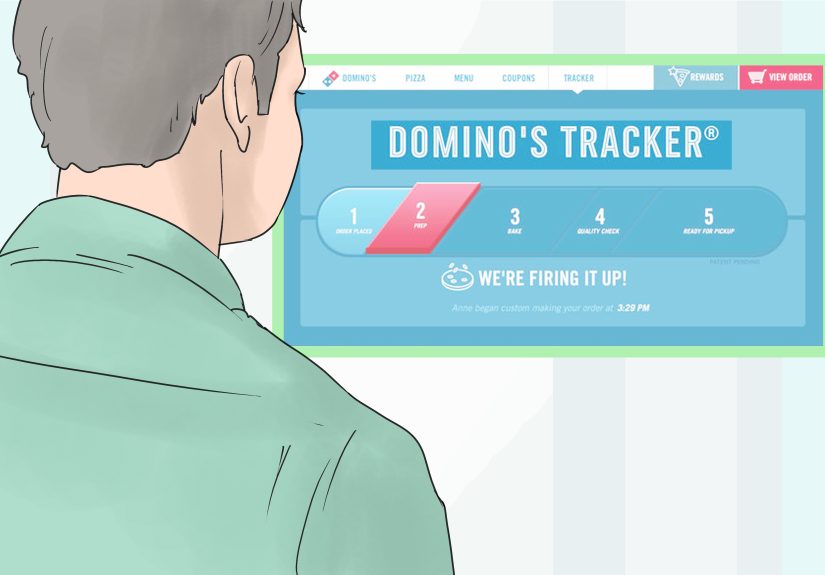
- Step 10: Track Your Order with Domino’s Tracker
- Common Mistakes to Avoid When Ordering Domino’s Online
- Tips for Getting the Best Domino’s Online Order
- Experience Notes: What Ordering Domino’s Online Is Really Like
- Conclusion
Ordering Domino’s pizza online is one of those modern comforts that feels almost suspiciously easy. A few taps, a little cheese-related decision-making, and suddenly dinner is on the way. No awkward phone call, no repeating your address three times, and no moment of panic when someone asks, “What toppings?” while your brain temporarily becomes a breadstick.
Whether you are ordering from the Domino’s website or the Domino’s Pizza USA app, the basic process is simple: choose delivery or carryout, enter your location, pick a store, build your order, apply a coupon if available, pay, and track your pizza. The trick is knowing how to move through the steps smoothly so you get the right food, the right deal, and the right delivery instructions without turning a simple pizza night into a full-time administrative project.
This guide walks you through how to order Domino’s pizza online in easy steps, with helpful examples, money-saving tips, and practical advice for avoiding common mistakes. Bring your appetite. Maybe also bring a napkin.
Why Order Domino’s Pizza Online?
Online ordering is popular because it puts you in control. Instead of explaining your order over the phone, you can see the menu, compare prices, customize each pizza, review the cart, and check the total before placing the order. That matters when one person wants extra cheese, another wants no onions, and someone else believes pineapple is either a blessing or a crime scene depending on the household.
Domino’s online ordering also gives you access to digital deals, rewards, saved addresses, previous orders, and the Domino’s Tracker. The app and website are designed for both delivery and carryout, so you can decide whether you want dinner brought to your door or you want to pick it up and avoid delivery fees.
Step 1: Go to the Domino’s Website or Open the App
Start by visiting the official Domino’s website or opening the Domino’s Pizza USA app on your phone. The app is available for iPhone and Android users and is built for ordering from participating Domino’s restaurants in the United States. If you order often, the app is usually the faster option because it can save your location, favorite orders, and rewards information.
If this is your first time, the website works perfectly fine. You do not need to be a technology wizard. If you can scroll, tap, and decide between pepperoni and sausage, you are already overqualified.
Website vs. App: Which Is Better?
The website is great when you are ordering from a laptop or desktop, especially for group orders where everyone is staring at the screen like it is a national pizza election. The app is better for repeat customers because it makes reordering, tracking, and saving deals more convenient.
Both options let you build pizzas, choose sides, use coupons, select delivery or carryout, and track your order. The best choice is simply the one that feels easiest in the moment.
Step 2: Choose Delivery or Carryout
Before you pick your food, Domino’s will ask whether you want delivery or carryout. This is more important than it sounds because it affects available coupons, store options, fees, timing, and sometimes even menu availability.
Choose Delivery If…
Delivery is the right choice when you want the pizza to come to you. Enter your full address, including apartment number, building name, gate code, hotel room, dorm details, or any special directions. The more specific you are, the less likely your driver is to wander around like a cheese-bearing detective.
Delivery orders may include a delivery charge, store minimum, taxes, and optional tip. These details can vary by location, so always review the checkout screen before placing your order.
Choose Carryout If…
Carryout is ideal when you want to save money, avoid delivery fees, or grab pizza on your way home. After entering your city, ZIP code, or using your current location, Domino’s will show nearby stores. Choose the store that is most convenient and check the estimated pickup time before confirming.
Carryout can be especially useful for lunch breaks, family movie nights, parties, and those moments when you are already out running errands and think, “I deserve carbs.” Correct. You do.
Step 3: Enter Your Address or Location
Next, enter your delivery address or search for a nearby carryout location. Domino’s uses this information to match you with a participating store. This step also helps show accurate menu items, store hours, local coupons, estimated times, and delivery availability.
For delivery, double-check every detail before moving forward. A missing apartment number can delay your order. A wrong ZIP code can send your pizza on a field trip. If you live in a large building, add helpful notes such as “use front entrance,” “call on arrival,” or “leave at lobby desk if permitted.”
For carryout, confirm the store address carefully. In cities with multiple Domino’s locations, it is surprisingly easy to select a store that is technically nearby but absolutely not the one you meant. Nothing builds character like driving to the wrong pizza shop, but character is overrated when dinner is cooling.
Step 4: Browse the Domino’s Menu
Once your store is selected, you can browse the menu. Domino’s typically offers pizzas, specialty pizzas, chicken, pasta, sandwiches, breads, dipping cups, desserts, drinks, and other limited-time items. Availability may vary by location, so treat the menu on your screen as the final authority.
Popular Menu Categories
The pizza section is the star, of course. You can usually choose from specialty pizzas or build your own. Specialty pizzas are useful when you want a pre-designed combination, such as a meat-heavy pizza, veggie pizza, or something with a bold sauce. Build-your-own is better when your topping preferences are very specific or when your household has strong opinions, which is most households.
Sides are where online ordering becomes dangerously persuasive. Bread twists, stuffed cheesy bread, wings, pasta, lava cakes, and dipping cups can turn a simple pizza order into a full meal. This is where discipline goes to take a little nap.
Step 5: Customize Your Pizza
This is the fun part. Choose your crust, size, sauce, cheese level, toppings, and special options. Domino’s online customization tools let you adjust ingredients in a visual way, making it easier to build exactly what you want.
Choose the Size
Common pizza sizes may include small, medium, large, and sometimes extra-large depending on the store and crust. For one hungry person, a small or medium may work. For two to three people, a large is usually safer. For a group, order multiple pizzas with different topping combinations rather than trying to make one pizza solve everyone’s emotional needs.
Pick the Crust
Crust options may vary, but you may see choices such as hand tossed, thin crust, handmade pan, gluten-free crust, or other promotional crusts. Thin crust is crispier, hand tossed is the classic middle ground, and pan crust tends to be thicker and heartier.
If someone has a food allergy or gluten sensitivity, read the restaurant’s allergen and nutrition information carefully before ordering. Cross-contact can be a concern in restaurant kitchens, so do not rely on menu names alone.
Select Sauce, Cheese, and Toppings
Choose your sauce and decide whether you want normal, light, extra, or no cheese where available. Then add toppings. Domino’s usually lets you place toppings across the whole pizza or only on half. Half-and-half customization is perfect when one person wants mushrooms and another person believes mushrooms are tiny umbrellas from another planet.
Before adding every topping available, remember that too many ingredients can make a pizza heavy or soggy. A good rule is to pick two to four toppings that work well together. For example, pepperoni, sausage, and banana peppers create a bold flavor. Spinach, mushrooms, onions, and tomatoes lean lighter. Extra cheese and bacon are for days when subtlety has left the building.
Step 6: Check Domino’s Coupons and Deals
Before you check out, visit the deals or coupons section. Domino’s often features online specials, carryout deals, mix-and-match offers, pizza discounts, combo deals, and limited-time promotions. Available offers can change by date, store, and ordering method, so always check before paying.
Some coupons apply only to delivery, while others apply only to carryout. Some require a minimum purchase. Others apply only to certain sizes, crusts, or toppings. Read the details so the coupon does not mysteriously disappear at checkout like a magician with marinara breath.
How to Apply a Domino’s Coupon Online
To use a coupon, open the coupon or deals section, choose the offer you want, and follow the prompts. Some deals require you to build the item from the coupon screen. Others can be applied to qualifying items already in your cart. If you have a promo code, look for a promo code box during checkout and enter it exactly as shown.
If a coupon does not work, check whether your selected store participates, whether the deal is expired, whether the order meets the minimum requirement, and whether the item qualifies. Coupon rules are not always romantic, but they are usually specific.
Step 7: Create or Sign In to a Domino’s Account
You can often continue as a guest, but signing in has advantages. A Domino’s account can save your address, favorite store, payment details, previous orders, and rewards information. If you plan to order again, creating an account can save time later.
Domino’s Rewards allows eligible customers to earn points on qualifying orders and redeem them for menu items. Rewards terms can change, and eligibility rules may vary, so check the rewards page in your account for current details. If you are already ordering anyway, collecting rewards is a nice bonus. It is like finding a small fry at the bottom of the bag, except organized.
Step 8: Review Your Cart Carefully
Before checkout, review the cart like you are proofreading an important email. Confirm the order type, store location, delivery address, pizza size, crust, sauce, toppings, side items, drinks, coupons, taxes, fees, and estimated time.
This step prevents classic online ordering mistakes, such as ordering carryout when you wanted delivery, choosing the wrong store, forgetting drinks, or accidentally selecting no cheese. No cheese is a valid choice for some people, but it should never happen by surprise.
Quick Cart Checklist
- Is the order set to delivery or carryout correctly?
- Is the address or pickup store correct?
- Are the pizza size, crust, sauce, and toppings right?
- Did the coupon apply successfully?
- Are taxes, delivery charge, tip, and total clear?
- Did you add drinks, napkins, plates, or dipping sauces if needed?
Step 9: Choose Payment and Place the Order
At checkout, Domino’s may offer several payment options depending on the store, location, and order type. These can include credit card, debit card, Domino’s gift card, digital payment options, or cash at participating stores. Available payment methods may vary, so rely on what the checkout page displays.
If you choose delivery, consider tipping online for convenience. If you choose contactless delivery where available, prepaying and adding delivery instructions can make the process smoother. For example, you might write, “Please leave order on table by front door and ring bell.” Clear instructions help everyone, especially when the driver is balancing hot pizza, drinks, and the hopes of your household.
When everything looks correct, place the order. You should receive a confirmation screen or message with order details. Save or screenshot it if you want quick reference.
Step 10: Track Your Order with Domino’s Tracker
After placing your order, Domino’s Tracker helps you follow the progress. It may show stages such as order received, prep, bake, quality check, and out for delivery or ready for pickup. Tracking does not make the pizza arrive instantly, but it does give you something to stare at while pretending you are not hungry.
For delivery, keep your phone nearby in case the driver calls or texts. For carryout, leave on time based on the estimated pickup window. Arriving too early may mean waiting; arriving too late may mean your pizza loses some of its fresh-from-the-oven magic.
Common Mistakes to Avoid When Ordering Domino’s Online
Choosing the Wrong Store
This is the big one for carryout. Always check the store address before confirming. In suburban areas or busy cities, two stores may appear close together, and the wrong one can turn dinner into a navigation challenge.
Forgetting to Apply the Coupon
Do not assume the best deal applies automatically. Check the deals page, select the coupon, and confirm that the discount appears in your cart before paying.
Overloading the Pizza
More toppings can be great, but too many can make the pizza cook unevenly or feel heavy. Choose toppings that match the sauce and crust. A balanced pizza is usually better than a toppings parade with cheese underneath.
Skipping Delivery Instructions
If your address is tricky, add instructions. Mention gate codes, apartment buildings, side entrances, or safe drop-off spots. A good delivery note can save time and prevent confusion.
Tips for Getting the Best Domino’s Online Order
First, compare carryout and delivery prices. Carryout can be cheaper because you may avoid delivery charges and certain fees. Second, use the deals page before building your cart. Starting from a coupon often makes the order easier and cheaper.
Third, save your favorite order if you use Domino’s often. A saved order can turn future pizza nights into a fast reorder instead of a full menu negotiation. Fourth, check the estimated time before you pay. During weekends, sports events, holidays, or bad weather, delivery may take longer.
Finally, order drinks and sides intentionally. A pizza by itself is great, but if you are feeding several people, sides can make the meal feel complete. Bread, wings, pasta, and desserts can be useful when guests have different appetites.
Experience Notes: What Ordering Domino’s Online Is Really Like
In real life, ordering Domino’s pizza online feels less like “placing a food order” and more like building a tiny edible project. The first time you do it, you may spend longer than expected comparing crusts, checking deals, and deciding whether you really need dessert. You do. Well, maybe. Okay, probably.
The smoothest experience usually starts with choosing the order type carefully. If you are at home, delivery feels effortless, but carryout can be surprisingly convenient if the store is nearby. Many people order carryout when they are already driving home from work, school, practice, or errands. The timing can work beautifully: order before leaving, arrive when the tracker says it is ready, and return home like a hero carrying warm boxes of happiness.
For delivery, the biggest lesson is to be specific. If your house is easy to find, you are lucky. If you live in an apartment complex, dorm, gated community, or building with multiple entrances, delivery notes matter. A short instruction like “Building B, second floor, door on left” can prevent a delay. If you want contactless delivery, say where the driver should leave the order. A small folding table or chair near the door can help keep the food off the ground.
Another real-world tip: build the order around the coupon, not the other way around. Many people fill a cart first, then hunt for a discount and discover their items do not qualify. It is easier to open the deals section first, choose an offer that matches your appetite, and customize from there. This is especially helpful for families or groups because mix-and-match deals can stretch the budget.
Customization is where online ordering shines. You can make one pizza half pepperoni and half veggie, add extra sauce, remove ingredients, or choose a different crust without having to explain it out loud. This is great for picky eaters, kids, roommates, and anyone who has ever said, “I’m easy,” then rejected six topping suggestions in a row.
The Domino’s Tracker is also part of the experience. It gives everyone something to check while waiting, and it helps you time your pickup or prepare for delivery. For carryout, do not leave the house the second the order is placed unless the store is far away. Watch the progress and aim to arrive close to the ready time. For delivery, keep your phone nearby, especially if your address is confusing or the driver may need help.
Finally, always review the order before tapping the final button. Online ordering is easy, but it is also easy to miss a detail. A quick review can catch the wrong crust, missing dipping sauce, incorrect store, or carryout-versus-delivery mix-up. The best Domino’s online order is not just fast. It is accurate, affordable, and timed well enough that the cheese is still doing that glorious stretchy thing when the box opens.
Conclusion
Ordering Domino’s pizza online is simple once you understand the flow. Visit the website or app, choose delivery or carryout, enter your location, select a store, browse the menu, customize your pizza, apply deals, review your cart, pay, and track your order. The whole process is designed to be convenient, but the best results come from slowing down just enough to check the important details.
Use coupons before checkout, add clear delivery instructions, confirm the store location, and keep an eye on the Domino’s Tracker. Whether you are planning a family dinner, a movie night, a study session, or a “no one is cooking tonight” celebration, online ordering makes it easy to get hot pizza with fewer mistakes and less effort.
Note: Domino’s menu items, coupons, prices, fees, rewards, delivery areas, and payment options can vary by location and time. Always review the live checkout page before placing your order.