Table of Contents >> Show >> Hide
- What Are Software Defined Retro ROMs?
- Why Retro ROMs Fail and Why Replacements Are Tricky
- How Software Defined ROMs Work
- Software Defined ROMs vs. EPROM Replacements
- Software Defined ROMs, FPGA Retro Systems, and Emulation
- Why Software Defined Retro ROMs Matter for Preservation
- Legal and Ethical Considerations
- Real-World Examples of Software Defined ROM Use
- Benefits of Software Defined Retro ROMs
- Potential Limitations and Challenges
- How Software Defined Retro ROMs Fit Into the Future of Retro Computing
- Best Practices for Using Software Defined Retro ROMs
- Experience Notes: Living With Software Defined Retro ROMs
- Conclusion
Retro computers have a funny way of making modern people feel both brilliant and completely humbled. One moment, you are admiring a beige machine from the 1980s like it is a museum artifact. The next, you are squinting at a dead ROM chip, wondering why your vintage treasure has the emotional stability of a toaster in a thunderstorm. That is where Software Defined Retro ROMs enter the story: not as magic, but as a clever modern answer to a very old problem.
In simple terms, a software defined retro ROM is a configurable ROM replacement that uses modern programmable hardware, often a microcontroller, to behave like one or more classic ROM chips. Instead of hunting for the exact antique chip, burning a replacement EPROM, setting jumpers like a tiny medieval puzzle, and hoping the machine forgives you, a software defined ROM can be configured in software to match the vintage system’s needs.
This idea matters because ROMs are not just boring storage chips. In old computers and consoles, ROMs often hold boot code, BASIC interpreters, character sets, firmware, disk-drive logic, and other essential software. When a ROM fails, the machine may become a beautiful plastic paperweight. When a software defined replacement works, that same machine may return to life with the cheerful glow of a monitor that has seen things.
What Are Software Defined Retro ROMs?
Software Defined Retro ROMs are modern hardware modules designed to emulate the behavior of old read-only memory chips through firmware and configuration rather than fixed silicon. A traditional ROM chip contains data that the host computer reads from specific addresses. A software defined ROM watches the same address and control lines, then places the correct byte on the data bus quickly enough that the vintage computer believes it is talking to the original chip.
The phrase “software defined” is important. It means the behavior of the replacement is determined largely by software settings and firmware. That can include ROM size, chip select behavior, pin mapping, multiple ROM images, and even dynamic image switching. In practical retro-computing language, it is the difference between “I need exactly this obscure 24-pin mask ROM from 1983” and “I can configure this board to act like the ROM I need.” The second sentence is much better for blood pressure.
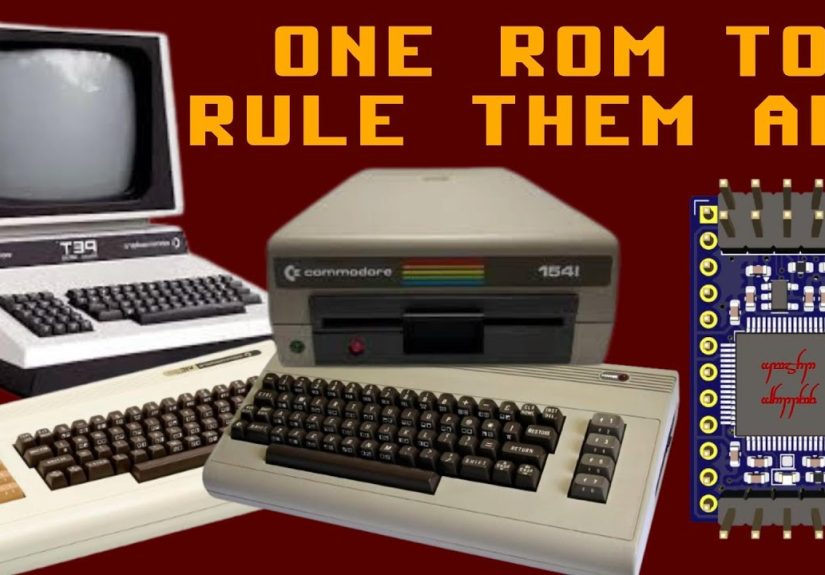
Projects such as One ROM, formerly known as Software Defined Retro ROM, show how far this idea can go. The project began around STM32F4 microcontrollers and later expanded to include newer hardware such as the Raspberry Pi RP2350. Its goal is to provide flexible drop-in ROM replacements for vintage systems, including machines that used 24-pin, 28-pin, 32-pin, and even some 40-pin ROM arrangements.
Why Retro ROMs Fail and Why Replacements Are Tricky
Old ROM chips fail for many reasons: age, heat, electrical stress, corrosion, bad sockets, questionable storage conditions, and the occasional mysterious gremlin that lives inside all vintage electronics. Even when the original ROM still works, owners may want a safe replacement to reduce wear on rare parts or to test alternate firmware without permanently modifying the system.
The problem is that ROM replacement is not always plug-and-play. Classic computers used many ROM types, pinouts, voltages, chip select arrangements, and access timing requirements. Some Commodore machines, for example, used different ROMs for BASIC, kernel functions, and character data. Disk drives could have their own ROMs. Arcade boards and home computers often used several chips with slightly different roles.
Traditional replacement approaches usually involve EPROMs, EEPROMs, adapters, or custom boards. These work, but they can be fiddly. You may need to erase chips under UV light, burn new images, configure jumpers, adapt pinouts, or build a new adapter for every oddball system. It is charming in the same way that hand-cranking a car is charming: historically interesting, but not exactly convenient.
How Software Defined ROMs Work
A software defined retro ROM sits in the original ROM socket or connects through an adapter. The host computer sends an address, activates control signals, and expects data to appear on the bus within a tight timing window. The replacement board reads those signals, looks up the requested byte from stored firmware or flash memory, and outputs the data as though it were an old ROM chip.
The technical challenge is speed. Vintage computers may seem slow compared with modern PCs, but ROM access timing can still be unforgiving. A microcontroller-based ROM replacement must respond within nanoseconds or very small fractions of a microsecond, depending on the host system. That is why these projects involve careful firmware, optimized signal handling, tight PCB layout, and sometimes hardware-specific tricks to reduce latency.
Think of it as a waiter in a very demanding restaurant. The computer asks, “What byte lives at address 0xE000?” and the ROM replacement must answer instantly. If it hesitates, the computer may crash, display garbage, or do the vintage-computing equivalent of staring into the middle distance.
Software Defined ROMs vs. EPROM Replacements
EPROMs and EEPROMs have been the traditional repair tools for decades. They remain useful, affordable, and widely understood. A technician can burn a ROM image to a compatible chip, place it in an adapter, and restore a machine. For many repairs, that is still a perfectly good solution.
Software defined ROMs, however, add flexibility. A single board may support multiple ROM sizes or pin behaviors. It may store several images and switch between them. It may replace more than one ROM socket in certain configurations. It may allow firmware updates without physically reburning chips. For repair benches, collectors, developers, and museums, that flexibility can save time and reduce the need to stock a drawer full of rare parts labeled with handwriting only a wizard could love.
Where EPROMs Still Shine
EPROMs are simple, stable, and historically familiar. Once programmed, they behave much like fixed memory. For a permanent repair in a single known machine, a burned EPROM can be excellent. It also has fewer moving parts from a firmware perspective.
Where Software Defined ROMs Win
Software defined ROMs are especially appealing when you need to test many images, support unusual chip select logic, repair several different systems, or preserve rare machines without modifying them heavily. The ability to configure behavior in software is the headline feature. It is like carrying a toolbox instead of one very specific screwdriver.
Software Defined ROMs, FPGA Retro Systems, and Emulation
Software defined retro ROMs belong to a larger movement in retro computing: using modern programmable technology to preserve, repair, and experience old systems. This includes software emulators such as MAME and RetroArch, FPGA platforms such as MiSTer FPGA, and hardware-preservation programs such as Analogue openFPGA.
Each approach solves a different problem. MAME focuses on documenting and emulating hardware to preserve software history. RetroArch provides a frontend and core-based ecosystem for running many emulators across platforms. MiSTer FPGA uses field-programmable gate arrays to recreate classic machines at the hardware-logic level. Analogue openFPGA gives developers a framework for building FPGA-based cores on compatible hardware.
A software defined ROM is narrower but beautifully practical. It does not replace the whole computer. It helps the original computer keep working. In other words, emulation says, “Let us recreate the machine.” A software defined ROM says, “Let us save this exact machine before its ROM chip retires to a farm upstate.”
Why Software Defined Retro ROMs Matter for Preservation
Classic game and computer preservation is not just nostalgia. It is cultural history. Old software shows how people learned programming, played games, wrote music, made art, managed businesses, and explored the early digital world. Unfortunately, many classic games and systems are no longer commercially available, and original hardware is aging every year.
The Video Game History Foundation has reported that a large majority of classic games released in the United States are not readily available through modern commercial channels. That does not automatically make copying them legal, but it does show why preservationists worry. If original media, chips, drives, and boards fail, pieces of digital history can disappear quietly.
Software defined ROMs can help by keeping original machines operational. Museums, archivists, repair shops, and hobbyists can use ROM replacements to revive systems without needing an endless supply of rare original chips. That is especially valuable for educational demonstrations, hardware research, and long-term conservation.
Legal and Ethical Considerations
Here is the part where the fun article puts on sensible shoes. ROM images can be copyrighted. Owning an old computer or cartridge does not automatically grant permission to download any ROM from the internet. Laws vary by country, and U.S. rules around copyright, fair use, circumvention, and preservation can be complicated.
For personal repairs, many hobbyists create ROM images from hardware they own or use replacement firmware that is freely licensed. Institutions such as libraries, archives, and museums may have specific preservation rights and limitations, including rules shaped by the DMCA exemption process. However, broad public distribution of copyrighted ROM files remains legally risky and often unlawful.
A responsible approach is simple: use ROM images you are legally allowed to use, respect active rights holders, support official re-releases when available, and explore public-domain, open-source, homebrew, or explicitly licensed software. Retro computing is more enjoyable when your conscience is not making the Windows error sound in the background.
Real-World Examples of Software Defined ROM Use
One practical example is replacing multiple ROMs in a Commodore 64 or VIC-20 setup. Machines like these may use separate ROMs for BASIC, kernel routines, and character sets. A flexible software defined ROM can potentially serve different images, support alternate firmware, or assist with diagnostics.
Another example is disk-drive repair. Vintage disk drives may contain controller ROMs that are essential for operation. If the ROM fails, the drive may stop responding correctly. A configurable replacement can help test whether the ROM is the issue and may restore the drive without requiring a rare original part.
Developers can also use software defined ROMs for experimentation. Instead of repeatedly burning EPROMs, they can test patched firmware, alternate character ROMs, diagnostic builds, or region variations more quickly. This is especially useful when studying how old systems boot, map memory, or communicate with peripherals.
Benefits of Software Defined Retro ROMs
1. Flexibility Across Machines
A well-designed software defined ROM can support several ROM sizes, pin counts, or control signal configurations. That makes it useful for repair benches where the next project might be a Commodore machine today, an Apple II-related repair tomorrow, and something wonderfully weird by the weekend.
2. Faster Testing
Testing firmware revisions with traditional EPROMs can be slow. Software-defined designs can reduce the cycle time between editing, loading, and testing. For developers and repair technicians, that turns “make coffee while the chip erases” into “try the next image now.” Coffee remains optional but recommended.
3. Reduced Dependence on Rare Chips
Original ROMs and compatible replacements can become scarce. A modern configurable board helps reduce pressure on old stock and may keep more machines alive.
4. Better Diagnostic Workflows
When troubleshooting a dead machine, being able to swap ROM images or test known-good firmware quickly is valuable. A software defined ROM can become a diagnostic tool, not just a final replacement.
5. Preservation Without Heavy Modification
Many collectors prefer reversible repairs. A drop-in ROM replacement can often preserve the original board layout and avoid permanent changes, which matters for historically significant machines.
Potential Limitations and Challenges
Software defined ROMs are exciting, but they are not magic confetti. Timing compatibility is the biggest challenge. Some systems require extremely fast access, and not every microcontroller or firmware approach will satisfy every bus. Voltage compatibility also matters because many old systems use 5V logic, while modern chips may operate at lower voltages.
Physical fit is another issue. Vintage ROM sockets may be surrounded by other chips, shielding, keyboards, or awkward case plastics. A replacement board has to fit mechanically, not just electrically. Signal integrity, power stability, and grounding are also important, especially when a board must respond quickly and reliably inside old hardware.
Finally, there is the learning curve. Users need to understand ROM images, pinouts, firmware configuration, and safe handling of vintage electronics. Plugging the wrong thing into the wrong socket can turn a repair into a tiny smoke ceremony. Nobody wants that.
How Software Defined Retro ROMs Fit Into the Future of Retro Computing
The future of retro computing is not just about playing old games on new screens. It is about keeping the original ecosystem understandable and repairable. Software defined ROMs are part of that future because they bridge eras. They combine modern microcontrollers, open hardware thinking, and firmware flexibility with machines built when RAM was expensive and manuals assumed you owned a soldering iron.
As more projects become open source, hobbyists can improve firmware, add machine profiles, create better configuration tools, and document compatibility. That documentation matters. Retro communities thrive when knowledge is shared clearly, not hidden in forum posts from 2009 titled “Help!!!” with three broken image links.
We will likely see more hybrid tools: ROM replacements that include USB configuration, SD card storage, diagnostic overlays, hot-swapping support, and maybe even logic-analyzer-style features. The best versions will stay respectful of the host machine. The goal is not to turn every vintage computer into a modern PC wearing old clothes. The goal is to help old hardware run faithfully, safely, and longer.
Best Practices for Using Software Defined Retro ROMs
Start by identifying the exact machine, board revision, ROM type, and original chip pinout. Do not assume two machines with the same badge use identical internals. Vintage manufacturers sometimes changed boards the way restaurants change soup specials.
Next, verify voltage requirements and chip select behavior. Make sure the replacement supports the target ROM type and access speed. Use known-good ROM images from legitimate sources, and keep backups of original dumps when you own the hardware and have the right to preserve them.
Before installation, inspect the socket. Clean corrosion carefully, check for bent pins, and confirm orientation. Pin 1 is not a decorative suggestion. After installation, test the machine with minimal peripherals first. If something behaves strangely, power down and recheck configuration rather than repeatedly restarting and hoping the electrons become friendlier.
Experience Notes: Living With Software Defined Retro ROMs
The experience of using software defined retro ROMs feels different from ordinary emulation. With an emulator, you are usually arranging files on a modern device and adjusting settings inside a friendly interface. With a software defined ROM, you are touching the real machine. You hear the old power switch, feel the keyboard, smell the faint warm-dust aroma of vintage electronics, and wait for the screen to show whether your repair has worked. It is part computing, part archaeology, and part suspense movie for people who own antistatic bags.
The biggest practical advantage is confidence during troubleshooting. When a vintage computer fails to boot, the ROM is only one possible culprit. The problem could be RAM, clock signals, power rails, logic chips, sockets, or cracked solder joints. A configurable ROM replacement lets you remove one uncertainty from the list. If the machine boots with a known-good ROM image, you have learned something valuable. If it does not, you can keep investigating without wondering whether your ancient ROM chip is secretly plotting against you.
Another pleasant surprise is how useful multiple ROM images can be. A collector might keep the original firmware, a diagnostic ROM, a patched ROM, and an alternate character set ready for testing. A developer might switch between builds while checking how a machine responds. A repair technician might carry one board to handle several common systems. This is where the “software defined” concept becomes more than a buzzword. It becomes convenience with a solder-mask finish.
There is also an emotional side. Many people restore old computers because those machines meant something to them. Maybe it was the first computer in the house. Maybe it was the machine at school. Maybe it was bought at a yard sale and immediately became a weekend obsession. Bringing one back to life with a modern ROM replacement does not erase its history. In many cases, it protects that history by allowing the machine to run again without sacrificing fragile original parts.
Of course, the process rewards patience. The best results come from reading documentation, checking compatibility lists, and moving slowly. Software defined ROMs are powerful, but they do not excuse careless installation. Vintage hardware deserves respect. It has survived decades of attics, basements, power bricks of uncertain origin, and at least one owner who probably said, “I think this cable fits.” A careful user treats the machine like a historical object, not a disposable gadget.
For beginners, the ideal first project is a well-documented machine with an active community. Commodore systems, Apple II-family machines, and other popular 8-bit platforms often have helpful repair guides, ROM images for diagnostics, and community knowledge. Starting there reduces frustration. After one successful repair, it becomes easier to understand the rhythm: identify the ROM, confirm the pinout, configure the replacement, install carefully, test, and document what worked.
For advanced users, the fun is in pushing the idea further. Hot-swapping character ROMs, testing patched firmware, supporting multiple sockets, or building custom diagnostic images can turn a ROM replacement into a development platform. That is where software defined retro ROMs become part of a larger creative toolkit. The same technology that saves old machines can also help people learn how those machines actually worked.
In daily use, the best software defined ROM is almost invisible. The machine boots, the keyboard responds, the drive behaves, and the user forgets there is a modern board quietly impersonating a chip from forty years ago. That invisibility is a compliment. Retro hardware restoration is not about showing off the replacement; it is about letting the original system take the spotlight again.
Conclusion
Software Defined Retro ROMs are one of the most practical ideas in modern retro computing. They combine the flexibility of software with the physical reality of vintage hardware repair. Instead of treating every failed ROM as a scavenger hunt for rare chips, they offer configurable, reusable, and increasingly capable replacements that can help preserve classic computers and consoles.
They are not a universal answer to every repair problem, and they do require care, documentation, and legal awareness around ROM images. But when used responsibly, they can keep old machines working, help developers test firmware, support museums and collectors, and make retro repair less intimidating. In a world where so much technology is sealed, disposable, and forgotten after two upgrade cycles, software defined ROMs feel refreshingly hopeful. They remind us that old machines still have stories to tellprovided someone gives them the right bytes at the right time.