Table of Contents >> Show >> Hide
- Why Facebook Should Be the Follow-Up, Not the Main Event
- 11 Steps to End a Relationship on Facebook the Right Way
- 1. Have the breakup conversation first
- 2. Decide what should stay private
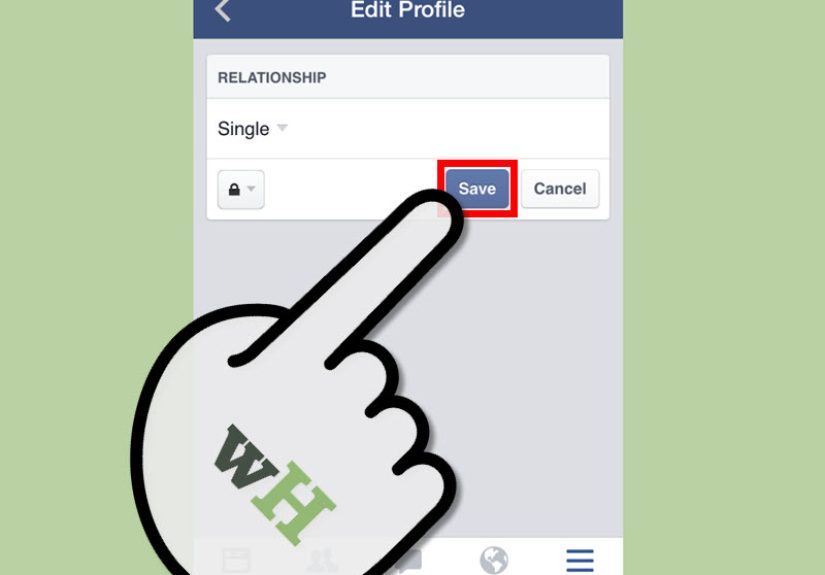
- 3. Change your relationship status on Facebook
- 4. Adjust who can see that status
- 5. Use “Take a Break” if seeing your ex everywhere is too much
- 6. Review old photos, tags, and shared posts
- 7. Archive or delete content without rushing into regret
- 8. Tighten your privacy settings
- 9. Decide whether to unfriend, unfollow, or block
- 10. Do not vaguebook your feelings
- 11. Build your post-breakup routine
- Common Mistakes to Avoid
- Experiences People Commonly Have After Ending a Relationship on Facebook
- Final Thoughts
- SEO Tags
Ending a relationship is already awkward enough without your phone acting like an overeager town crier. One minute you are trying to have an honest conversation like a mature adult, and the next minute Facebook is suggesting a memory from your “perfect weekend together” with enough confetti energy to make you want to launch your device into the sea. That is why learning how to end a relationship on Facebook matters. The goal is not to turn your breakup into a digital circus. The goal is to protect your privacy, keep things respectful, and help yourself move on without making the internet your breakup assistant.
If you are wondering how to change your relationship status on Facebook, what to do with shared photos, whether to unfriend your ex, or how to stop seeing old couple content in your feed, you are not alone. The smartest approach is simple: end the relationship in real life first, then handle Facebook in a calm, practical way. Think of Facebook as the paperwork after the emotional meeting, not the breakup itself. Below are 11 steps that help you do exactly that without oversharing, overscrolling, or accidentally starring in your own episode of Digital Drama: The Timeline Strikes Back.
Why Facebook Should Be the Follow-Up, Not the Main Event
Before getting into the steps, here is the big picture. A breakup is a personal conversation, not a status update. Changing your relationship status may be part of the process, but it should not be the way the other person finds out. That usually creates confusion, embarrassment, and unnecessary conflict. Facebook is useful for managing visibility, privacy, and boundaries after a relationship ends. It is not a substitute for honesty, closure, or good judgment.
That mindset makes everything easier. Instead of asking, “How do I publicly end this?” ask, “How do I quietly manage my digital life after this is already over?” That one shift will save you a lot of regret.
11 Steps to End a Relationship on Facebook the Right Way
1. Have the breakup conversation first
The first step has nothing to do with Facebook, and that is exactly the point. Speak to the person privately before touching your profile. In most situations, the kindest move is a direct conversation in person, by phone, or by video call if distance or comfort makes that more realistic. Be clear, respectful, and honest. Use calm language and avoid turning the discussion into a blame marathon.
Do not let your ex learn the relationship ended because your profile suddenly switched to “single.” That is not closure. That is surprise paperwork with emotional damage attached. If there are safety concerns, prioritize your wellbeing and choose a safer setting, including a semi-public place, a call, or digital distance if needed. But in general, breakup first, Facebook second.
2. Decide what should stay private
Once the relationship is over, pause before making anything public. Ask yourself what needs to be shared and what really does not. Not every breakup deserves a public bulletin. In fact, many do better without one. Some people prefer to remove the relationship status quietly. Others hide it instead of changing it immediately. Both can be smart choices if you want breathing room.
This is where maturity beats impulse. You do not need a dramatic post, a cryptic quote about betrayal, or a moody song lyric that practically has its own weather system. Privacy is not weakness. It is strategy. Give yourself enough space to think before you put anything on your profile that could invite comments, screenshots, or follow-up questions from people who suddenly become amateur relationship detectives.
3. Change your relationship status on Facebook
When you are ready, go to your Facebook profile and edit the relationship section. On desktop, Facebook’s Help Center says you can go to your profile, open About, then Family and Relationships, and add or edit your relationship status. On mobile, the wording may vary slightly, but the path is similar. You can change the status to Single, Divorced, or remove it entirely if you would rather leave that section blank.
This step sounds tiny, but emotionally it can feel enormous. That is normal. A status change is often less about “announcing” the breakup and more about aligning your public profile with reality. Do it when you are ready, not when your emotions are sprinting at full speed.
4. Adjust who can see that status
One of Facebook’s most useful tools is the audience selector for relationship status. In other words, you can control who sees it. If you do not want your aunt in Arizona, your old lab partner, and three people from middle school reacting within seven minutes, change the audience. You can make it visible to friends, only yourself, or a custom group, depending on what feels best.
This is especially helpful if you want to update your profile without turning your breakup into community theater. Maybe you want the record corrected but do not want a flood of comments. Fine. Quiet settings are your friend. There is no award for making a breakup more public than necessary.
5. Use “Take a Break” if seeing your ex everywhere is too much
Facebook has a feature designed for exactly this awkward season: Take a Break. Facebook says it may appear when you change your relationship status to single, divorced, or blank. The feature helps you see less of someone, limits what they see from you, and can also help you manage old posts involving both of you.
In plain English, it is a softer option than blocking. You can reduce how often their name, profile photo, or updates pop up in your feed without detonating the whole social connection instantly. If you are trying to avoid constant reminders but are not ready for a hard digital wall, this feature is a solid middle ground.
6. Review old photos, tags, and shared posts
After a breakup, your profile can become a museum of moments you are not exactly eager to revisit. Facebook’s Activity Log lets you review posts you are tagged in, manage that activity, and remove tags from specific items. That means you do not necessarily have to delete the internet; you can simply clean up your corner of it.
Start with the most visible content: profile photos, featured photos, anniversary posts, vacation albums, and any post where the two of you were tagged together. Ask yourself what still feels fine to leave up and what now feels like emotional confetti stuck in the carpet. There is no universal rule. Some people keep everything. Others untag, archive, or delete quickly. The right answer is the one that helps you breathe easier when you open the app.
7. Archive or delete content without rushing into regret
Facebook also lets you archive or delete posts. Archiving can be especially helpful because it removes content from public view without making it disappear forever. If you are emotional and not sure whether you want to erase an album, archive it first. Think of it as putting the memory in a box rather than setting the whole box on fire.
This is the smart move for shared memories that are still complicated. Maybe the trip was real, meaningful, and part of your life story, even if the relationship ended. Maybe you do not want to see those photos now, but you also do not want to make permanent decisions while upset. Archive gives you time, and time is a better editor than heartbreak.
8. Tighten your privacy settings
A breakup is a good time to review your overall privacy settings, not just your relationship status. Facebook’s Privacy Checkup helps you see who can view future posts and key profile information. Consumer Reports has also recommended reviewing your audience defaults so your content is not more public than you think.
This matters because breakups often make people suddenly aware of how visible their lives are online. Maybe you do not want public comments. Maybe you do not want every future post to become accidental evidence in the Court of Mutual Friends. Set your defaults intentionally. Fewer spectators usually means less stress.
9. Decide whether to unfriend, unfollow, or block
This part depends on the breakup and your emotional bandwidth. Unfollowing is the lightest option. It keeps the connection but removes their updates from your feed. Unfriending is more final. Blocking is the strongest boundary and limits interactions much more heavily. If seeing your ex’s posts makes you spiral, unfollowing or unfriending may be healthy. If the contact is upsetting, intrusive, or unsafe, blocking is appropriate.
You do not need to choose the “nicest” option if it comes at the expense of your peace. Boundaries are not rude just because they are visible. Sometimes the most respectful thing you can do for both people is create enough distance for the drama to stop feeding itself.
10. Do not vaguebook your feelings
There is a strong temptation after a breakup to post something dramatic but technically deniable, like “Funny how people show who they really are” or “Some endings are blessings.” Resist. Those posts invite speculation, screenshots, and comments from people who think they are helping but are actually adding fuel and popcorn.
If you need support, talk to a trusted friend or family member privately. Write in a journal. Take a walk. Scream into a pillow with excellent acoustics. Public posting often feels powerful for ten minutes and exhausting for ten days. Closure rarely comes from performing pain online.
11. Build your post-breakup routine
Once the Facebook cleanup is done, the real work begins: moving forward. That means sleeping enough, eating decently, leaning on people you trust, and giving yourself room to feel what you feel. It also helps to stop checking your ex’s profile. Repeatedly reopening the digital wound rarely brings clarity. It usually just keeps the emotional tab running in the background all day.
Healthy routines matter because breakups can scramble your focus, confidence, and schedule. Treat yourself with the same kindness you would offer a friend. The relationship ended. Your life did not. That is the headline worth remembering.
Common Mistakes to Avoid
Even when you know the right steps, breakups on Facebook can still go sideways. One common mistake is changing your status too fast, before the real conversation happens. Another is leaving everything public and then feeling ambushed by comments. A third is obsessively checking whether your ex has noticed the change, responded to it, or done their own digital cleanup. That turns your healing process into a scorecard.
Another mistake is confusing access with closure. Just because you can look at their page does not mean it helps. In many cases, constantly monitoring an ex only prolongs distress. Your job is not to manage their reaction. Your job is to manage your boundaries.
Experiences People Commonly Have After Ending a Relationship on Facebook
One of the strangest things about ending a relationship on Facebook is that the emotional experience rarely matches the technical one. Technically, it takes a few taps. Emotionally, it can feel like closing a chapter while the app keeps trying to reopen it. Many people describe staring at the relationship status field for much longer than expected. Not because they do not know which button to press, but because pressing it makes the breakup feel official in a new way. It is one thing to say, “We broke up.” It is another to see your profile reflect it.
Another common experience is the flood of tiny digital aftershocks. You may change the status and then notice old tagged photos, old comments, anniversary posts, event check-ins, and “memories” that suddenly feel less like nostalgia and more like emotional jump scares. This is why many people end up using Facebook cleanup tools in stages. First the status changes. Then the tags. Then the archived photos. Then the privacy settings. Rarely does someone sit down for five minutes and emerge fully unbothered and spiritually organized.
People also often underestimate how much their feed affects their mood. Seeing an ex pop up unexpectedly can trigger sadness, anger, curiosity, or that very specific modern emotion known as “I was doing fine until the algorithm got involved.” That is why tools like unfollowing, Take a Break, and audience controls matter so much. They are not petty. They are practical. They reduce surprise contact and give your brain fewer reasons to spiral at 11:43 p.m.
There is also the social side. Some people worry that changing their status will make others gossip. Sometimes it does spark questions, but usually not nearly as many as people fear. Most friends take their cue from your tone. If you keep things calm and private, others often do too. On the flip side, dramatic posts tend to attract dramatic responses. In other words, the internet often mirrors the energy you hand it, which is both useful and mildly terrifying.
Many people later say the best choice they made was keeping the breakup conversation private and the Facebook update simple. No emotional press release. No cryptic quotes. No digital revenge haircut reveal. Just a quiet update, a little profile cleanup, and stronger boundaries. That approach may not feel flashy, but it usually creates the least regret.
Perhaps the most encouraging experience people report is this: after the initial discomfort passes, the quieter profile often feels like a relief. The account stops carrying a version of life that is no longer true. The reminders become fewer. The urge to check tends to fade. The drama cools off. And eventually, Facebook goes back to being what it was always meant to be: a place where your cousin posts too many vacation photos and someone from high school suddenly wants to sell you candles.
Final Thoughts
If you want to know how to end a relationship on Facebook, the best answer is to think of it as a cleanup process, not a performance. End the relationship privately first. Then update your relationship status, control who sees it, use Facebook’s tools to limit contact and manage old content, and strengthen your privacy settings. Keep your dignity, keep your boundaries, and keep your ex from living rent-free in your feed.
Breakups are hard enough without turning them into a public event. Handle the digital side with care, and you give yourself a better chance at something underrated but wonderful: peace and quiet.