Table of Contents >> Show >> Hide
- What Does “Hide a Tinder Profile” Actually Mean?
- Step 1: Open Tinder and Go to Settings
- Step 2: Turn Off Discovery to Hide Your Profile from New People
- Step 3: Use Incognito Mode or “Only People I’ve Liked” for Stronger Privacy
- Step 4: Block Specific People or Delete Your Account for a Clean Break
- Hiding vs. Deleting Tinder: Which Option Should You Choose?
- Common Mistakes When Trying to Hide a Tinder Profile
- Privacy Tips Before You Hide Your Tinder Profile
- FAQ About Hiding a Tinder Profile
- Real-World Experience: What It Feels Like to Hide a Tinder Profile
- Conclusion
Sometimes you want Tinder to be there when you need itand politely disappear when you do not. Maybe you are taking a break from dating apps, focusing on someone you already matched with, cleaning up your digital footprint, avoiding coworkers, or simply tired of feeling like your face is being passed around the app like a very judgmental business card. Good news: you do not always have to delete your account to get more privacy.
This guide explains how to hide a Tinder profile in four practical steps, using settings that are actually available inside Tinder. The main method is turning off Discovery, which removes your profile from being shown to new people. For stronger privacy, you can also use Incognito Mode, block specific contacts, adjust visibility settings, or delete your account if you want a clean break.
Note: Tinder is designed for adults. This article is for general privacy education and is intended for users who are old enough to use the service in their region.
What Does “Hide a Tinder Profile” Actually Mean?
Before tapping buttons like a secret agent with a dating life, it helps to know what hiding your profile can and cannot do. On Tinder, hiding your profile usually means removing it from Discovery, the part of the app where other people see profile cards and decide whether to Like or Nope. When Discovery is off, your profile is not shown as a recommendation to new people.
However, “hidden” does not always mean “invisible to everyone forever.” People you already Liked before hiding your profile may still be able to see you and match with you. Your existing matches can still view your profile and chat with you. In other words, hiding your Tinder profile is like closing the front door, not demolishing the entire house.
If your goal is a temporary pause, turn off Discovery. If your goal is selective privacy while still swiping, consider Incognito Mode if it is available with your subscription. If your goal is to avoid specific people, use Block Contacts or Block Profile. If your goal is to remove your profile entirely, account deletion is the stronger option.
Step 1: Open Tinder and Go to Settings
The first step is simple: open the Tinder app or sign in through Tinder on the web. Tap the profile icon, then open Settings. This is where Tinder keeps most profile visibility controls, Discovery preferences, privacy tools, subscription features, and account options.
On mobile, the layout may change slightly depending on whether you use iPhone or Android, but the general path is usually the same: profile icon, settings gear, then scroll until you find the visibility or Discovery section. If you are using Tinder.com, look for your profile or account menu, then open settings from there.
Why Settings Matter
Tinder privacy is not controlled by one magical “make me disappear” button. Instead, it is split between several features. Discovery controls whether new people see you in their swipe stack. Block Contacts helps you avoid specific people. Paid privacy features may let you control who can see you more precisely. Account deletion removes your profile more completely.
That is why starting in Settings is important. It gives you the full control panel instead of forcing you to guess what “hiding” means. Think of it as the cockpit of your dating-app airplane, except with fewer flashing lights and hopefully no emotional turbulence.
Step 2: Turn Off Discovery to Hide Your Profile from New People
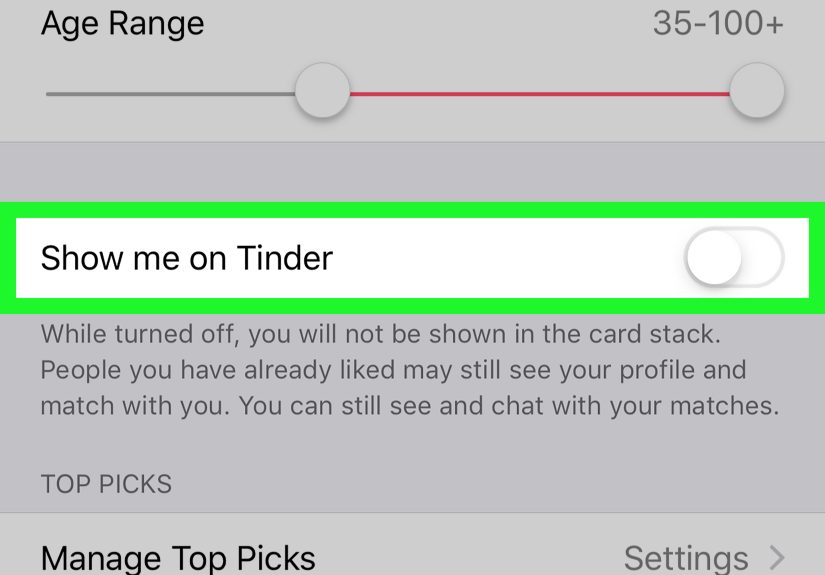
The easiest way to hide your Tinder profile without deleting your account is to turn off Discovery. In Settings, scroll to the Discovery section and look for a toggle such as Enable Discovery or Show me on Tinder. Turn that option off.
Once Discovery is disabled, your profile should stop appearing as a recommendation to new people. This is the best option if you want a dating-app break but do not want to lose your matches, chats, profile details, or account history.
What Happens When Discovery Is Off?
When Discovery is off, you generally cannot browse new recommendations or Like new people. That makes sense: if you are taking yourself out of the card stack, Tinder also pauses your ability to shop the card stack like it is a Saturday farmers market for romantic possibilities.
You can still usually view and chat with your existing matches. This makes Discovery-off mode useful when you are already talking to someone and want to stop attracting new matches. It is also helpful when you need a break from swiping but do not want to delete your profile entirely.
Important Limitation: Previous Likes May Still See You
Here is the part many users miss: turning off Discovery does not always prevent people you already Liked from seeing your profile. If you swiped right on someone before hiding your profile, they may still see you later and match with you. That means you could get a new match even after turning Discovery off.
This is not a bug; it is how the visibility logic works. Discovery-off mode is best understood as “stop showing me to new people going forward,” not “erase every trace of my past swipes from the universe.” Sadly, even Tinder has not invented time travel.
Step 3: Use Incognito Mode or “Only People I’ve Liked” for Stronger Privacy
If you want to keep using Tinder while staying more private, look for privacy controls such as Incognito Mode or Only People I’ve Liked. These features are typically tied to Tinder subscriptions and may vary by region, app version, or plan.
Incognito-style visibility is different from turning Discovery off. With Discovery off, you are mostly pausing new activity. With Incognito Mode, you can still Like and Nope profiles, but your profile is shown only to people you have already Liked. That gives you more control because you decide who has a chance to see you.
When Incognito Mode Makes Sense
Incognito Mode is useful if you are worried about being seen by coworkers, classmates, neighbors, clients, distant cousins, or that one barista who already knows too much because you order the same drink every day. It is also useful for people who want to date more privately while still actively using the app.
For example, imagine you are traveling for work and want to browse Tinder in a new city without appearing to everyone nearby. Incognito Mode can reduce random exposure because only people you Like should see your profile. It is not the same as deleting your account, but it is more selective than regular Discovery.
Hide Age, Distance, Top Picks, and Swipe Surge Visibility
Some Tinder privacy settings may also let subscribers hide their age, hide their distance, or reduce visibility in special areas such as Top Picks or Swipe Surge. These settings do not fully hide your profile, but they can limit how much personal context other users see.
For privacy-conscious users, these smaller controls matter. Distance can reveal more than people realize, especially in small towns, campuses, office districts, or apartment-heavy neighborhoods. Age may also be something users prefer not to display immediately. Just remember: hiding age or distance is not the same as hiding your entire profile.
Step 4: Block Specific People or Delete Your Account for a Clean Break
Turning off Discovery is great for a general pause, but it does not target specific people. If your goal is to avoid being seen by certain individuals, use Tinder’s blocking tools.
Use Block Contacts
Block Contacts lets you select people from your phone contacts so Tinder can try to prevent you from seeing each other on the app. This can be helpful if you want to avoid an ex, a coworker, a family friend, or anyone else whose appearance in your swipe stack would make your soul briefly leave your body.
You can usually find Block Contacts inside Settings. Tinder may ask for permission to access your contacts, or you may be able to manually enter contact information. After selecting the contacts you want to block, Tinder will do its best to keep those profiles from crossing paths with yours.
Use Block Profile
If you come across a profile you do not want to interact with, Tinder may also offer a Block Profile option. This is useful when you see someone inside the app and want to prevent future visibility between you and that person.
Block Profile is more immediate than Block Contacts because it applies to someone you have already encountered in the app. Block Contacts is more preventive because it can help reduce the chance of seeing selected people in the first place.
Delete Your Account If You Want Your Profile Removed
If you want to remove your Tinder profile instead of hiding it, account deletion is the more complete option. Deleting your account generally removes your profile from visibility and deletes account data according to Tinder’s policies. This is different from deleting the app from your phone. Deleting the app only removes the app from your device; it does not necessarily delete your Tinder account.
To delete your account, go to Tinder Settings and look for Delete Account. Follow the confirmation steps carefully. Tinder may ask whether you want to pause or hide your profile instead. Choose deletion only if you are comfortable losing matches, messages, and profile history.
Hiding vs. Deleting Tinder: Which Option Should You Choose?
Choose Hide Discovery if you want a break but may come back soon. This keeps your account available while stopping your profile from appearing to new people. It is the best low-drama option.
Choose Incognito Mode if you want to keep swiping but control who sees you. This is better for active users who want more privacy, though it may require a paid subscription.
Choose Block Contacts or Block Profile if your privacy concern involves specific people. This is ideal when you do not mind being visible generally, but you want to avoid certain awkward encounters.
Choose Delete Account if you are done with Tinder and want your profile removed rather than paused. This is the strongest option, but also the least reversible.
Common Mistakes When Trying to Hide a Tinder Profile
Mistake 1: Deleting the App Instead of Hiding the Profile
Many people think deleting the Tinder app from their phone hides or deletes their profile. It usually does not. Your account may still exist, and your profile may still be visible depending on your settings. Always change visibility settings or delete the account from inside Tinder before removing the app.
Mistake 2: Forgetting About Previous Likes
If you Liked someone before turning off Discovery, that person may still see your profile later. This surprises users who expect complete invisibility. If you need stronger control, consider Incognito Mode before swiping or use blocking tools for specific people.
Mistake 3: Assuming Blocking Is Perfect
Blocking tools are useful, but they depend on available information. If someone uses different contact information from what you blocked, the system may not always identify them. Blocking reduces risk; it does not turn Tinder into a witness protection program.
Mistake 4: Ignoring Other Profile Clues
Even if you hide your distance or age, your photos, job title, school, bio, Spotify, Instagram, interests, and prompts can reveal a lot. If privacy matters, review the entire profilenot just the visibility toggle.
Privacy Tips Before You Hide Your Tinder Profile
Before hiding your profile, take two minutes to review what you have shared. Remove overly specific details such as your workplace, school schedule, apartment complex, exact neighborhood, or daily routine. Keep photos polished but not overly revealing of private locations. A great profile photo says, “I am approachable.” It does not need to say, “Here is the front door of my building and the name of my gym.”
If you use connected social accounts, consider whether you want Tinder users to see them. Linked platforms can make a profile feel more authentic, but they can also expose more information than intended. Privacy is not paranoia; it is simply good digital housekeeping.
Also review your matches before going hidden. If there are conversations you want to continue, you can keep chatting after turning off Discovery. If there are conversations you no longer want, unmatch or block as needed. Hiding your profile is a good moment to tidy up your dating app life, like spring cleaning, but with fewer dust bunnies and more unread “hey” messages.
FAQ About Hiding a Tinder Profile
Can I hide my Tinder profile without deleting my account?
Yes. Turn off Discovery or “Show me on Tinder” in Settings. This hides your profile from being shown to new people while allowing you to keep existing matches and chats.
Will my matches know I turned off Discovery?
No obvious notification is usually sent to matches when you turn off Discovery. They can still see your profile and chat with you unless you unmatch, block them, or delete your account.
Can I still message people after hiding my Tinder profile?
Yes, you can generally continue messaging existing matches after turning off Discovery. You just may not be able to swipe on new profiles while Discovery is disabled.
Can someone still match with me after I hide my profile?
Yes, it is possible if you already Liked that person before turning off Discovery. They may still see your profile and Like you back.
Is Incognito Mode better than turning off Discovery?
It depends on your goal. Discovery-off mode is better for taking a break. Incognito Mode is better for active swiping with more control over who sees you.
Real-World Experience: What It Feels Like to Hide a Tinder Profile
In real life, hiding a Tinder profile is less dramatic than people expect. There is no thunderclap, no digital curtain falling from the sky, and no tiny Tinder employee whispering, “You are safe now.” It is usually just a toggle. But the emotional effect can be surprisingly noticeable.
For many users, the best part of turning off Discovery is the quiet. Dating apps can become noisy even when your phone is silent. There is the mental habit of checking matches, wondering who saw you, comparing profiles, rewriting your bio for the ninth time, and debating whether a selfie with a dog counts as personality. Hiding your profile gives your brain a break from that loop.
One common experience is using Discovery-off mode after starting a promising conversation. Suppose you match with someone, the chat is going well, and you want to focus instead of continuing to swipe. Turning off Discovery can help you stop collecting new conversations like browser tabs you will never read. You keep your existing match, but you reduce new distractions.
Another common situation is privacy anxiety. Maybe you are new to online dating and feel uncomfortable being visible to everyone nearby. Maybe you live in a small town where “nearby singles” includes your dentist, your cousin’s roommate, and the person who always takes the good parking spot. In that case, hiding your profile or using Incognito Mode can make the app feel less exposed.
Some users hide their profiles after dating-app burnout. Swiping can start as entertainment and slowly turn into homework. When every profile feels like another micro-decision, taking your profile out of Discovery can help reset your energy. You are not quitting forever; you are just telling the algorithm to stop tapping you on the shoulder.
There is also a practical lesson: hiding your Tinder profile works best when you know what kind of privacy you want. If you want a pause, turn off Discovery. If you want selective visibility, use Incognito Mode. If you want to avoid specific people, block them. If you want to leave completely, delete the account. The mistake is treating all of these as the same thing.
The smartest approach is to check your profile before hiding it. Remove details that feel too personal, update photos if needed, and clean up old conversations. Then choose the privacy setting that matches your goal. Hiding a Tinder profile is not just about disappearing; it is about taking control of when, where, and how you show up.
Conclusion
Hiding your Tinder profile is simple once you understand the difference between pausing visibility, limiting who sees you, blocking specific people, and deleting your account. For most users, turning off Discovery is the fastest way to hide a Tinder profile without losing matches or chats. For stronger privacy while still swiping, Incognito Mode may be a better fit. For awkward real-world overlap, Block Contacts and Block Profile are your best friends. And if you are finished with Tinder altogether, deleting your account is the cleanest exit.
The key is to choose the right level of privacy. You do not need to delete everything just because you want a break, and you do not need to stay fully visible just because you want to keep chatting. Tinder gives you several ways to manage visibilityuse them thoughtfully, review your profile details, and keep your dating life as public or private as you want it to be.